
 >
How To >
Music Tips >
>
How To >
Music Tips >
Spotify Premium unlocks the platform's full suite of features, encompassing ad-free, seamless playback, high-quality audio enjoyment, offline downloading capabilities, and unlimited song skipping, among others. Meanwhile, Spotify ++, a modified version of Spotify, grants users access to these Premium features at no cost, thereby bypassing the recurring monthly subscription fee for Spotify Premium. However, many users are unsure about acquiring Spotify++. This article provides a comprehensive review on Spotify++. Most importantly, this article also provides effective alternatives for when Spotify++ is not working.

Spotify++ is a modified version of the Spotify app. Unlike xManager, it comes as a "ready-made" modded Spotify app, usually in the form of an APK (for Android) or IPA (for iOS) file. This kind of Spotify app offers Premium features, such as ad-free listening, unlimited skips, and more at no cost.
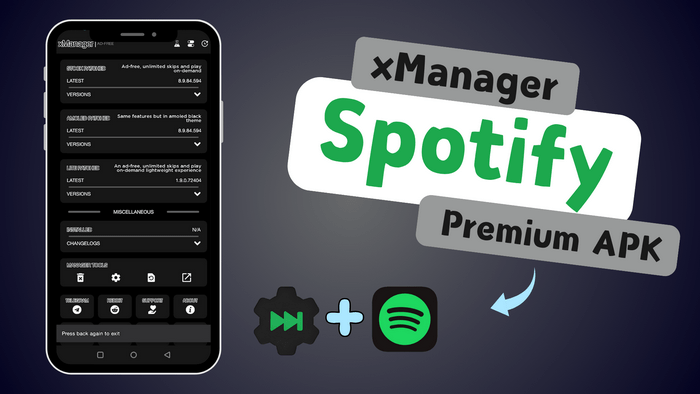
Another question people are concerned about is whether Spotify++ is still available in 2026. It's really hard to say. According to our latest investigation in 2026, online user feedback varies. In short, only some versions of the Spotify++ app are still accessible at present, and their reliability depends entirely on luck. Though it enables unlocking Spotify premium features for free, installing a cracked version of the Spotify app carries certain risks, including the account being banned. We should proceed with caution.
Currently, it's difficult to find directly downloadable Spotify++ IPA files online. Sometimes users need to find accessible resources on GitHub and use certain techniques to build an IPA installation package themselves. This can be quite complex for those without any technical skills. Additionally, some users have reported that Spotify++ stops working on newer iOS versions like iOS 26. This is because Spotify++ is a hacked version of Spotify, and it relies on modifying the IPA, using non-standard signing, and using older APIs. iOS 26 can detect these irregularities and prevent the Spotify++ app from running.
Even if the app installs, features like offline playback, premium unlocks, or login may fail. If you want to use Spotify premium features such as offline playback and unlimited skipping more stably, it is recommended to find other simple and easy-to-use alternatives to Spotify++.

TuneCable Spotify Downloader is the ultimate alternative for Spotify ++, letting you download songs, playlists, and podcasts in high-quality MP3, FLAC, and other formats — all while preserving full metadata, album art, and lyrics. Available for Windows, macOS and Android devices!
Based on our testing, we don't recommend users use Spotify++. However, to satisfy curiosity, we'll briefly explain how it works below.
Warning: Installing a cracked version of the Spotify app carries certain risks, including the account being banned. Please proceed with caution. For a safer and hassle-free method to download Spotify tracks, albums, playlists, audiobooks, and more without a Premium subscription, refer to Part 4 of this article.
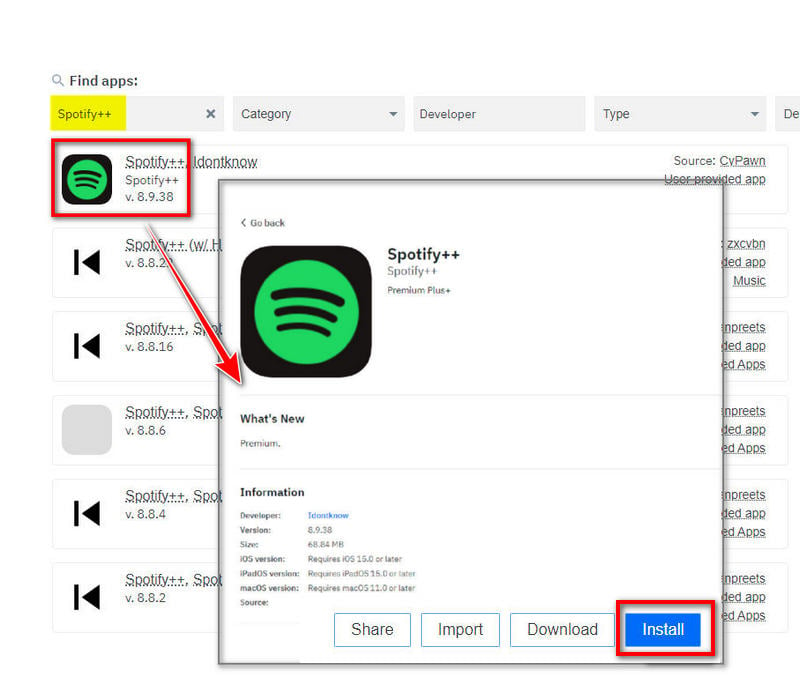
On iOS devices, Spotify++ is not directly available for download from the App Store. However, some older versions of the Spotify++ app can be found on third-party app stores such as AppDB, TweakBox, AppValley, and TopStore. Here, we'll use AppDB as an example.
AppDB, functioning as an application marketplace (or store/platform), is tailored specifically for Apple devices. It empowers users to explore and uncover applications that transcend Apple's closed ecosystem, including Spotify++ thereby enabling true freedom of experience on their devices.
Step 1: Open the AppDB website. Go to the upper right, and click "Link your device" to establish a connection.
Step 2: Find the available source and select a proper Spotify++.
Step 3: Click "Install". Then Go to "Settings", then "General", and "Device Management" to trust the AppDB app.
Step 4: Follow the on-screen instructions to install and launch it to enjoy Spotify Premium features.
Spotify++ is also available for Android, offering an alternative to its iOS counterpart. Unlike iOS, installing such apps on Android is generally more straightforward and doesn't necessitate the use of third-party app stores. However, it still entails risks, requiring you to permit installations from unknown sources. Once installed, Spotify++ unlocks all features without the need for a Spotify Premium subscription. A simple online search using relevant keywords yields numerous options for Spotify++ on Android, and the process to get it on Android devices follows a similar pattern.
Step 1: Navigate to "Settings > Security" to enable "Unknown Sources" on the phone, ensuring third-party app installations from websites aren't blocked.
Step 2: Use the browser to search for the Spotify++ APK file. Find an accessible source and download the file.
Step 3: Tap the downloaded APK to initiate installation. Once done, enjoy accessing Spotify Premium features while playing your music.
 Related article: xManager Spotify Review: Is It Safe?
Why opt for Spotify++? Whether it's for ad-free music listening, access to full categories, unlimited skips, or unlocking other premium features, Spotify++ seems like an attractive option. However, as we previously mentioned, although the Spotify++ app remains functional on certain iOS and Android devices, it has begun to encounter issues—stemming from operating system updates, API changes, and other factors. And these apps inherently carry risks, frequently crash, and may intermittently disable those very Premium benefits. To some extent, it is not a particularly user-friendly solution. Hence, more and more users have started to seek out better, simpler, and more accessible alternatives. Here, we present a more dependable alternative for extracting Spotify songs and your meticulously curated Spotify playlists. Below, we briefly compare Spotify++ to a more secure alternative - TuneCable Spotify Downloader.
TuneCable Spotify Downloader  Spotify++
TuneCable Spotify Downloader
 Download Spotify songs, albums, playlists, podcasts, radio & audiobooks in bulk.
Available for both the Spotify Free & Premium accounts.
Convert Spotify songs to undecrypted MP3, AAC, WAV, FLAC, AIFF, and ALAC.
Enable you to transfer Spotify songs to Android devices, iOS devices, or other portable devices without limitations.
Fully back up all Spotify tracks and playlists on a local disk and can be kept forever.
The downloaded Spotify songs can be imported to any media player or other apps, like DJ software, OBS, Apple TV, etc
Embedded tools: Export to iTunes, AA/AAX Converter, Format Converter, Burn CD, Tag Editor.
There will NEVER be any ads pop-up.
Safe to install and stable performance.
Download Spotify songs, albums, playlists, podcasts, radio & audiobooks in bulk.
Available for both the Spotify Free & Premium accounts.
Convert Spotify songs to undecrypted MP3, AAC, WAV, FLAC, AIFF, and ALAC.
Enable you to transfer Spotify songs to Android devices, iOS devices, or other portable devices without limitations.
Fully back up all Spotify tracks and playlists on a local disk and can be kept forever.
The downloaded Spotify songs can be imported to any media player or other apps, like DJ software, OBS, Apple TV, etc
Embedded tools: Export to iTunes, AA/AAX Converter, Format Converter, Burn CD, Tag Editor.
There will NEVER be any ads pop-up.
Safe to install and stable performance.
Spotify++
Unlock most of Spotify Premium features for free, such as no ads, unlimited skips, high-quality audio streaming, etc.
Don't need to get it installed on computers.
 Can not unlock the download feature.
Need to authorize unknown-source installation. Potential security risks and ads.
No official support or updates.
Only compatible with Android and iOS.
You are not supported to play the downloaded Spotify songs via other apps or transfer them to other devices.
Can not unlock the download feature.
Need to authorize unknown-source installation. Potential security risks and ads.
No official support or updates.
Only compatible with Android and iOS.
You are not supported to play the downloaded Spotify songs via other apps or transfer them to other devices.
TuneCable Spotify Downloader allows you to download music directly from the Spotify web player. While enjoying fast conversion speeds, the original quality of your music can be preserved. Follow the steps below to get started.
Step 1 Launch TuneCable and Log In
Run TuneCable Spotify Downloader on your Android device. From the top menu bar, click on "Login Spotify" to sign in to your account.
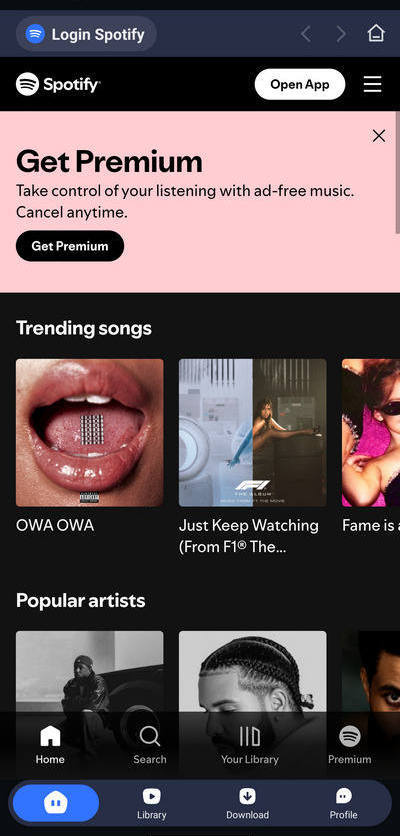
Step 2 Select Spotify Music Tracks to Download and Configure Your Download Preferences
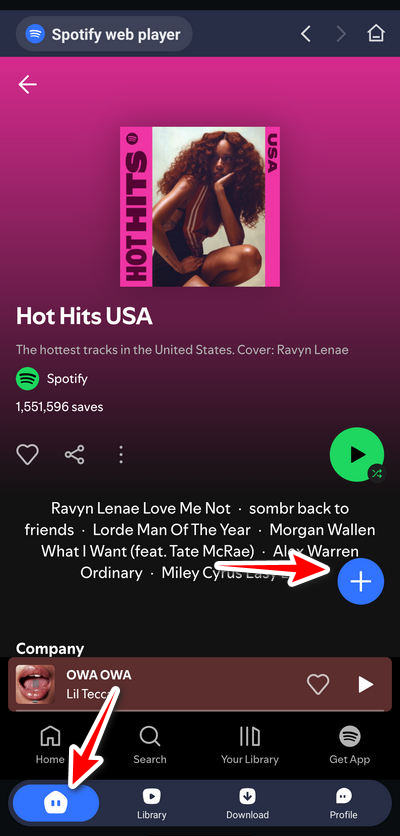
Open any Spotify playlist or album and click the blue "+" button. TuneCable will analyze the tracks and present you with a list to choose from.
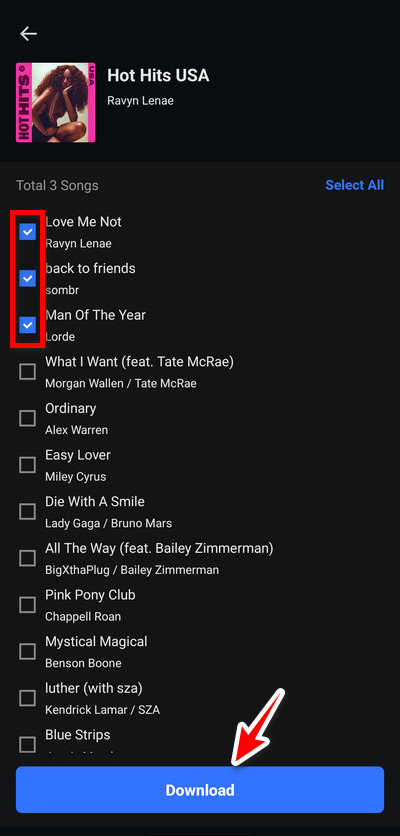
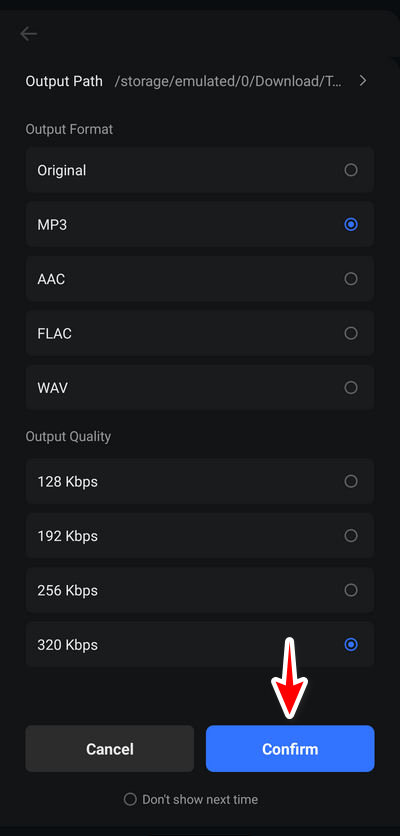
Select the songs you wish to download and click the "Download" button. A window will appear and you can choose the output format and quality, then click "←" to begin the download.
Step 3 Access Your Downloaded Songs
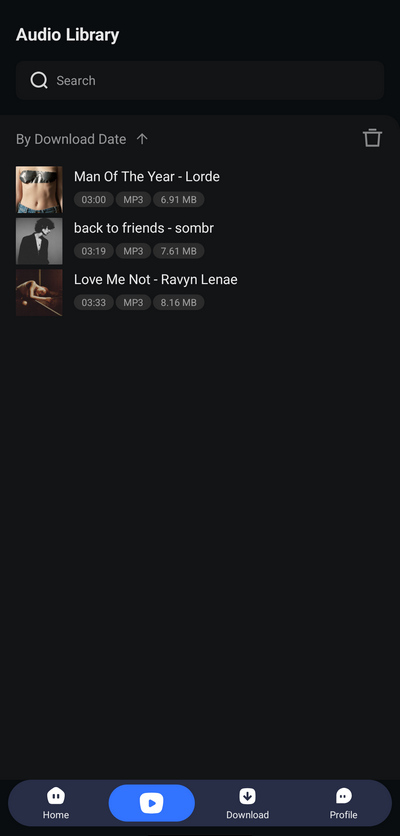
Once the download is complete, go to the "Library" tab in the bottom menu. Here, you can view your download history. Simply click on a song title to play it directly.
Some users value Spotify in conjunction with other software suites (often supported by Spotify Premium). Beyond offline listening to Spotify music, some users may need to export playlists to other apps or devices, share them as files with friends, incorporate tracks into video edits, use them in DJ software for remixing, burn music to CDs, or store playlists on USB drives or SD cards. For these scenarios, a tool like TuneCable Spotify Downloader for Windows/Mac can serve as an alternative to Spotify++ to help accomplish such tasks.
Step 1 Launch the App on Your Computer
Get TuneCable Spotify Downloader installed on your Windows PC or Mac. Select a music source on the primary interface: Spotify app or Spotify Web Player. Downloading songs directly from the Spotify app ensures the highest-quality audio, whereas using the Spotify Web Player for up to 40x conversion speed.
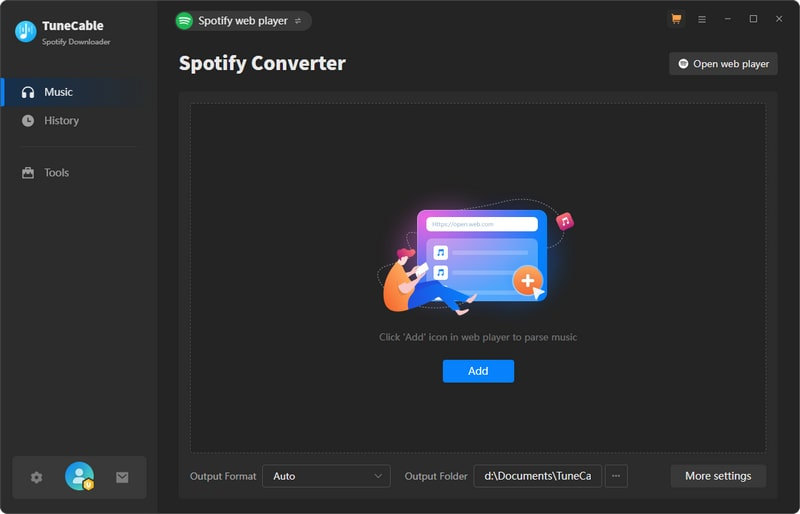
Step 2 Browse for Desired Spotify Items
Select your desired song, album, or playlist within the Spotify app or web player and open its detailed view. Then, click on the "Click to add" bubble that appears in the bottom right corner of the page.
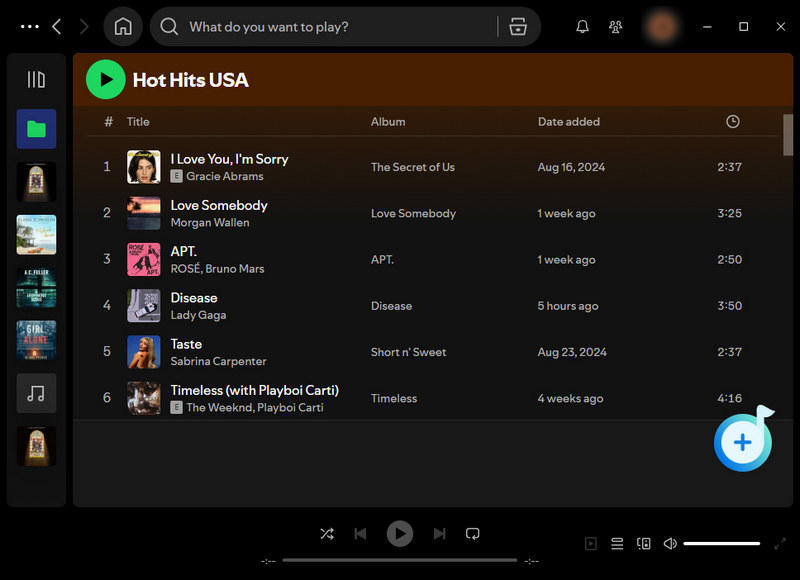
Step 3 Add Spotify Songs/Albums/Playlists to Task List
Select the desired items from your music list. Use the "Filter Converted" option above the list to hide already converted tracks, enhancing clarity. Once satisfied with your choices, click the "Add" button to prepare the selected tracks for processing.
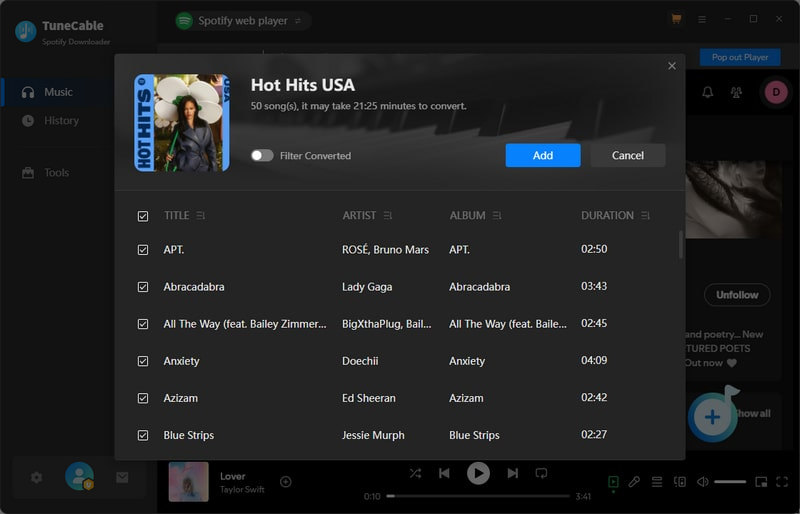
Step 4 Make Changes to Output Settings
Head to "Settings" to make proper changes. If you are new to music extracting and want to download Spotify songs in original quality and format, select "Recommended" in the "Output Format".
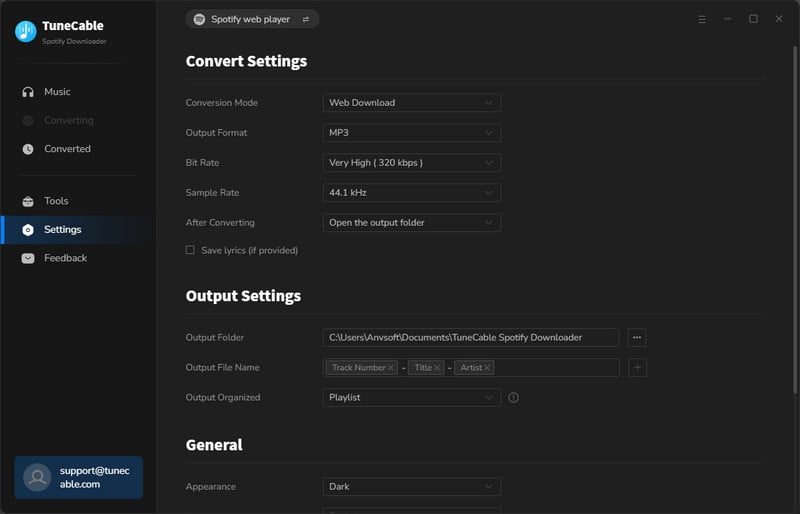
Step 5 Start Downloading Spotify Songs as Local Files
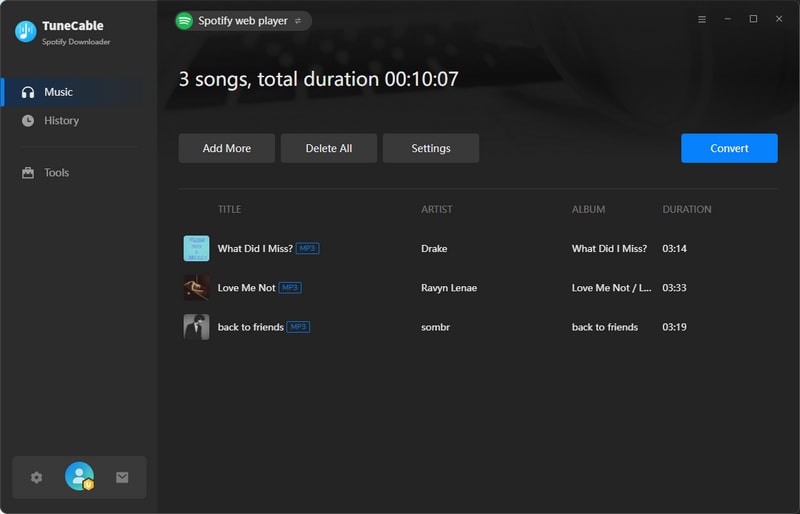
To queue more songs or playlists, click on the "Add More" button. Otherwise, jump to the "Convert" button for an instant conversion. The downloaded Spotify songs and playlists will be organized in the way you previously selected.
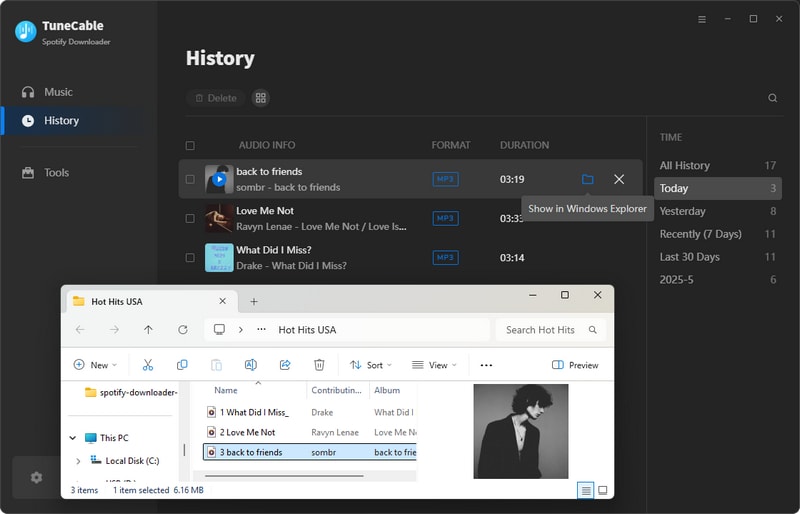
Here, we concisely outline the steps to play your converted Spotify songs on mobile devices.
 iPhone/iPad/iPod Touch:
Step 1: Connect your iOS device to your computer and sync the Spotify songs to the connected iOS device.
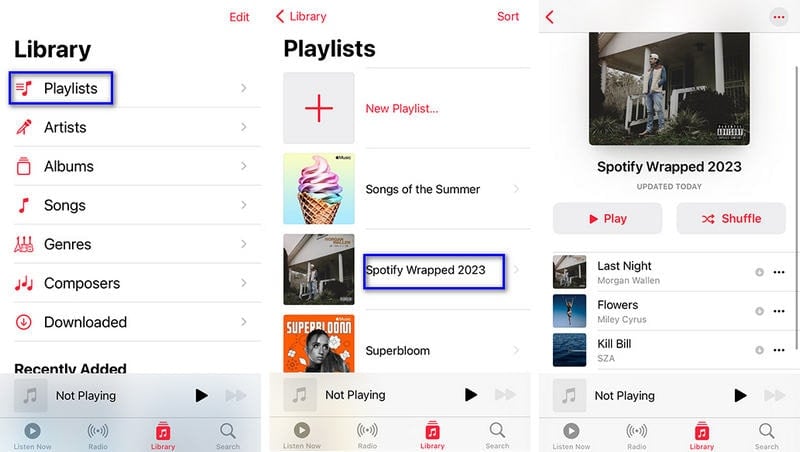
Step 2: Afterwards, unlock your iPhone, and open the "Music" app.
Step 3: Go to "Library". Enter any section, Playlists, Albums, or Songs to play the newly uploaded Spotify songs, albums, or playlists.
 Android:
Step 1: Plug your Android device into your computer with a USB cable.
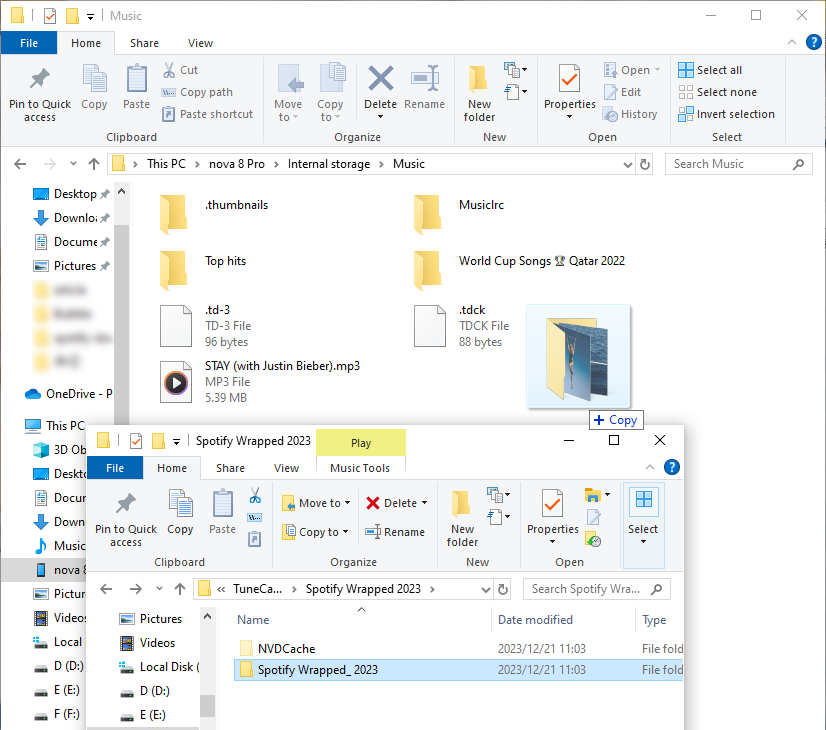
Step 2: Access "This PC" and enter the device's internal storage.
Step 3: Locate the "Music" folder and transfer the Spotify songs there.
Step 4: Once disconnected safely, enjoy your freshly imported Spotify songs on any music app installed on your Android.
1. Is Safe to Use Spotify++?
Using modified apps like Spotify++ can pose risks. No matter if you are running Spotify++ iOS version or Android version, exercise caution when using such apps.
2. Need Spotify Premium to Use Spotify++?
No. You can access Spotify Premium via Spotify++ without a subscription.
3. Is Spotify++ Updated Regularly?
No. Unlike the official Spotify app, Spotify++ IPA does not facilitate traditional app updates. To access the latest features, you must obtain and reinstall the most recent version from a trusted source each time an update is available.
4. What Can I Get with Spotify++?
Spotify++ enables you to unlock most of Spotify Premium features, including ad-free experience, Spotify connect, high-quality audio streaming, crossfade, enhanced customization options, sleep mode, curated playlists like daily mixes, made for you, premium queue, equalizer, radio, find wrapped, car mode, private session, auto adjust quality, etc.
5. Can I Download Songs with Spotify++?
No. Spotify++ is a modified version of Spotify Premium. It can not get your user token authenticated. Therefore, offline playback is not activated on Spotify++. You can only download songs for permanent offline playback via TuneCable Spotify Downloader.
This article explains what is Spotify++, how it works, and introduces some safer alternatives. Though somehow the Spotify++ app is convenient. However, if your primary desire is to download Spotify music locally, and even convert it into various formats to facilitate transfer to different devices or import into a multitude of other software, you will inevitably need to rely on the assistance of professional tools - TuneCable Spotify Downloader, a safer and user-friendly option to enjoy Spotify music without limitations. Start your free trial now!
 What's next? Download TuneCable Spotify Downloader now!

Ava Morrison | Senior Writer
TuneCable Spotify Downloader


