
 >
How To >
Spotify Music Tips >
>
How To >
Spotify Music Tips >
If you've been on social media lately, chances are you've seen friends sharing stylish festival posters filled with their favorite artists. That's Instafest Spotify in action, a popular web app that turns your listening history into a custom Spotify music festival lineup poster. It's a fun way to showcase your music taste, whether you're highlighting your top artists from the past month or creating a themed poster from one of your favorite playlists. But once you have that eye-catching lineup, you might find yourself wanting actually to keep the songs from those artists. What if you could build a permanent offline collection based on your Spotify Instafest results? Read on to know how.

Instafest is a free third-party web app that generates a custom music festival poster based on your Spotify listening history. Created by USC student Anshay Saboo in 2022, the tool connects to your Spotify account through the official API. It analyzes your most-played artists to create a three-day lineup, complete with stage designations and a festival name. The result is a stylish, shareable graphic that lets you showcase your music taste in the same format as posters for events like Coachella or Lollapalooza. With Instafest Spotify, you can choose from multiple visual themes, adjust the time period for your listening data, and even hide your username if you prefer to keep things low-key. It has become a popular alternative to Spotify Wrapped, offering a year-round way to celebrate your favorite artists.

Want to listen to the top songs from Spotify Instafest lineup offline? TuneCable Spotify Downloader lets you download your Instafest lineup to MP3, FLAC, and more, so you keep the music forever. Click the download button on the right to try it for free or jump to Part 5 to learn how to turn your poster into a music library you truly own.
Making your own Spotify Instafest music festival lineup takes only a few minutes. The process works the same whether you are using a computer or a smartphone, and you do not need a Premium subscription to get started. Follow these steps to generate your first poster.
Step 1 Open your browser and go to the official Instafest site.
Step 2 Click the green "Sign in with Spotify" button. You will be redirected to Spotify's login page. Enter your credentials and permit Instafest to view your listening history.
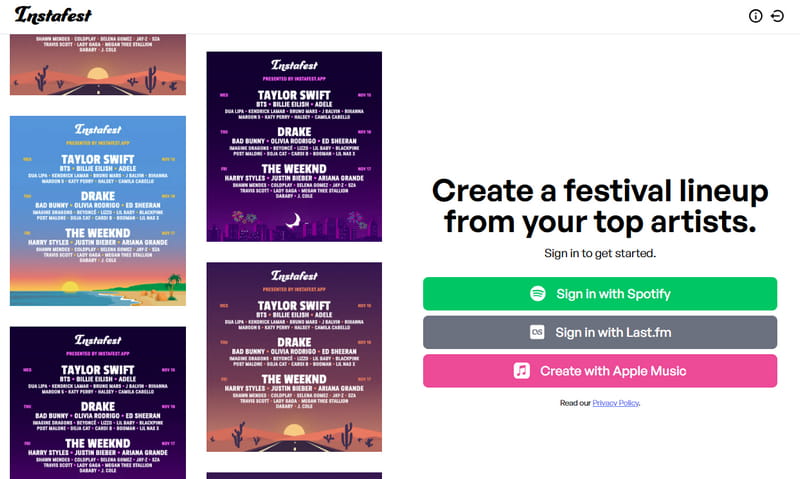
Step 3 Once you authorize access, Instafest instantly creates a Spotify music festival poster based on your listening habits.
Step 4 On the right, or scroll down to the customization section, you can adjust the time range for the artists displayed, choosing between the "Last 4 weeks", "Last 6 months", or "Last year" listening history. You can also select a background theme, rename your festival, and decide whether to show your base score or hide your username.
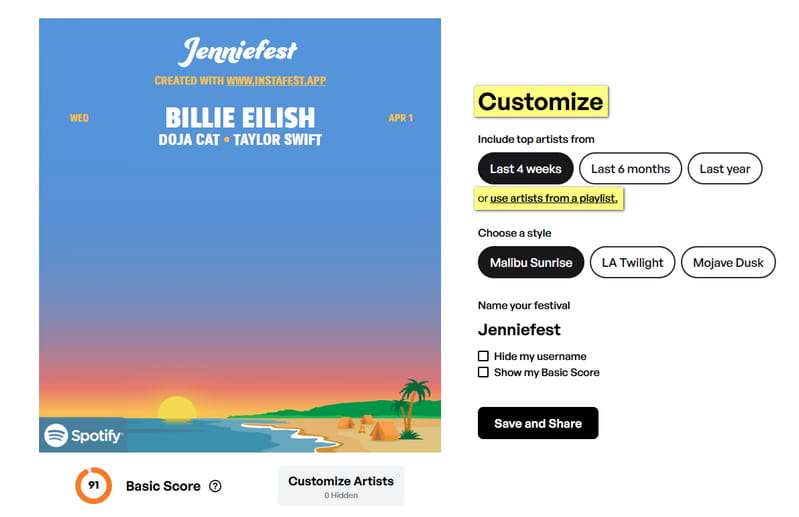
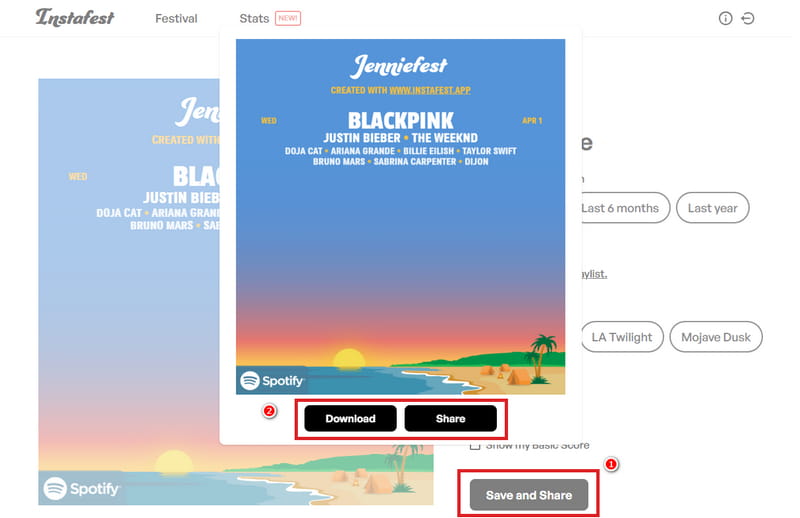
Step 5 When you are satisfied with how your lineup looks, click "Save and Share". You can download the poster as an image to your device or share it directly to social media platforms like Instagram, Twitter, or Facebook.
Beyond using your general listening history, Instafest also lets you generate a festival poster based on a specific playlist. This feature is perfect for creating themed lineups, such as a poster for a road trip mix, a workout playlist, or a collection of songs you want to highlight for a special occasion. Here is how to do it.
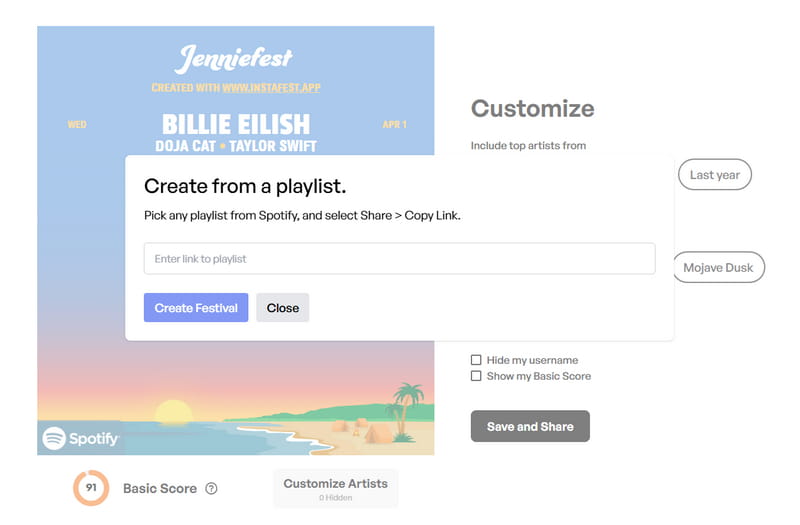
Step 1 Connect to your Spotify account as guided in Part 2. After you grant access to your Spotify account, Instafest will generate a preliminary poster. In the customization section, click "use artists from a playlist" located beneath the time range setting.
Step 2 Open Spotify and navigate to the playlist you want to use. Click the three dots next to the playlist name, select "Share", and then choose "Copy link to playlist".
Step 3 Return to Instafest and paste the copied link into the provided field. Click the "Create Festival" button, and the tool will analyze the artists within that playlist to generate a new lineup poster.
After Instafest generates your initial lineup, you have several options to refine which artists appear on the poster. This level of control helps you create a final result that truly reflects the music you want to showcase.
Step 1 On the right side of the poster or scroll down to find a set of controls labeled "Customize" that let you modify different aspects of your festival.
Step 2 Under "Include top artists from", you can select from three options: "Last 4 weeks", "Last 6 months", or "Last year". This determines which listening period Instafest uses to pull your top artists. If you have limited listening data, choosing "Last year" typically produces a fuller three-day lineup.
Step 3 Click the "Custom Artists" button. A list of artists from your selected time period will appear. You can uncheck any artists you do not want to include, and Instafest will regenerate the lineup to fill the gaps with the next most-played artists from your history. This is useful if you want to hide artists you feel do not fit the festival vibe.
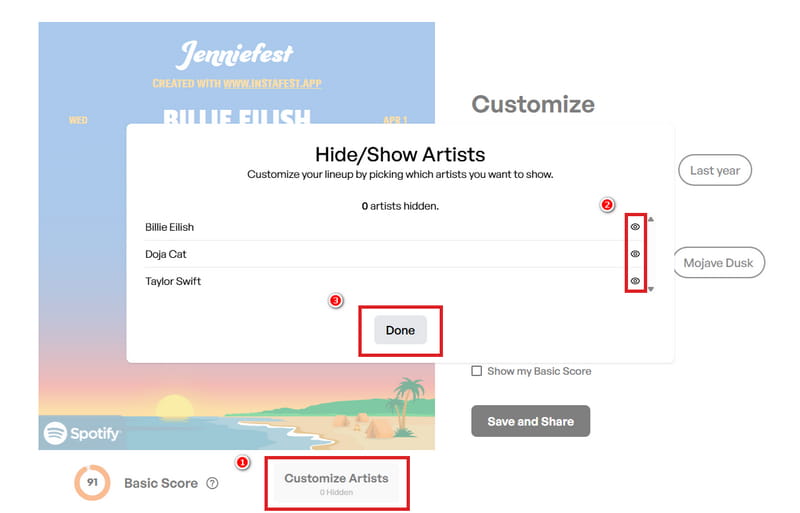
Step 4 Beyond artist selection, you can change the poster's background style. The available themes include "Malibu Sunrise", "LA Twilight", and "Mojave Dusk". Each offers a different color palette and mood, so you can match the design to your personal aesthetic.
Step 5 Once you have made all your adjustments, click "Save and Share" to finalize your poster. Your customized Instafest Spotify poster will reflect the artists you selected along with your preferred visual settings. If you ever want to try a different combination, you can return to the site and repeat the process at any time.
 Tip: How to Remove Instafest's Access to Your Spotify Account
If you ever decide to stop using Instafest, revoking its access to your Spotify account is quick and easy. Here is a detailed walkthrough:
Step 1. Open the Spotify desktop app or go to open.spotify.com in your browser. Click your profile icon at the top right and select "Account" from the dropdown menu. This will take you to your Spotify account overview page.
Step 2. On the account page, scroll down until you see the "Security and privacy" section. Click on “Manage apps” to view all third-party applications connected to your Spotify account.
Step 3. Locate "Instafest" in the list of apps. Next to it, click the "Remove Access" button.
Once removed, you can always reconnect Instafest later by signing in again through the Instafest website.
Now that you have a customized Instafest poster showcasing your top artists, you might be wondering how to actually listen to those songs without being tied to a Spotify Premium subscription. After all, the poster captures your music taste, but the tracks themselves remain locked behind streaming restrictions. The natural next step is to build a permanent collection of those songs so you can enjoy them offline on any device.
TuneCable Spotify Downloader is a dedicated desktop software that downloads Spotify songs, playlists, albums, podcasts, and audiobooks in lossless audio quality. Unlike online Spotify song downloaders that rely on unstable servers, TuneCable operates locally on your device, eliminating common issues like intrusive ads, potential malware, and unexpected downtime. It supports multiple output formats, including MP3, AAC, WAV, FLAC, AIFF, and ALAC, giving you full control over how you save your music. With batch downloading at up to 40x speed and full preservation of ID3 tags and even lyrics, it offers a reliable way to turn your Spotify Instafest music festival lineup into a permanent offline collection. Whether you need a Spotify music downloader for everyday use or a Spotify to MP3 converter to build a personal library, TuneCable handles the job without the limitations of a free Spotify account.
TuneCable Spotify Downloader
Once you have created your Instafest Spotify poster, you can turn those featured artists into a permanent music collection. The most straightforward approach is to build a Spotify playlist with the top songs from your lineup and let TuneCable handle the rest.
Step 1 Launch TuneCable and sign in to Spotify
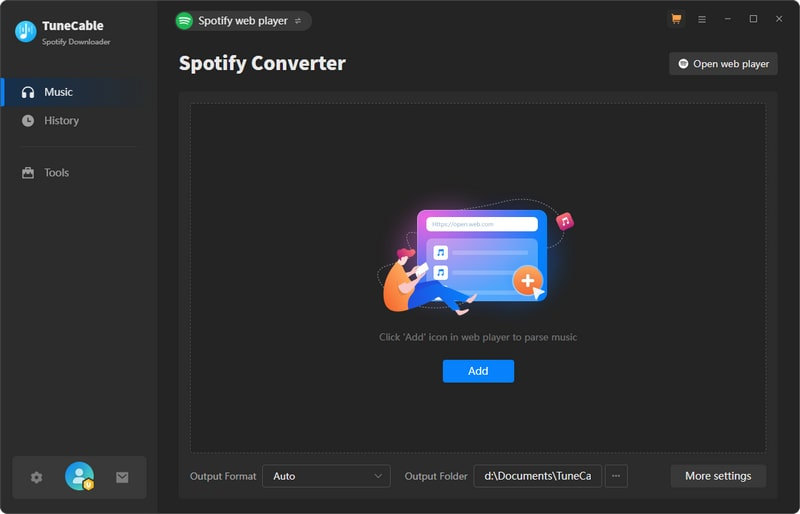
Open TuneCable Spotify Downloader. The program lets you choose between the "Spotify App" and the "Spotify web player" as your download source. Sign in to your Spotify account when prompted. A free account is sufficient for downloading.
Step 2 Create a Spotify playlist of Instafest artists
Look at your Spotify Instafest music festival lineup poster and note the artists you want to keep. Open Spotify and create a new playlist with a name that matches your festival theme, such as "My Instafest Lineup". Add the top three to five songs from each artist on your list. If you prefer, you can also use one of your existing playlists or even a Spotify music festival playlist you have already curated.
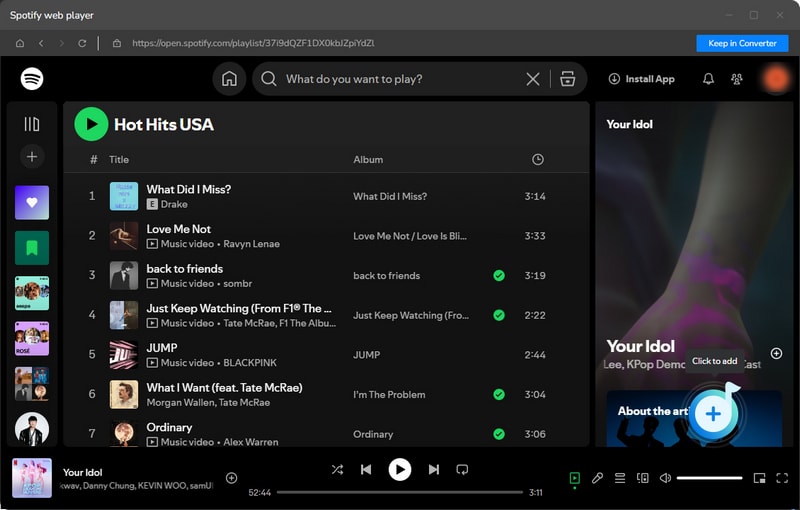
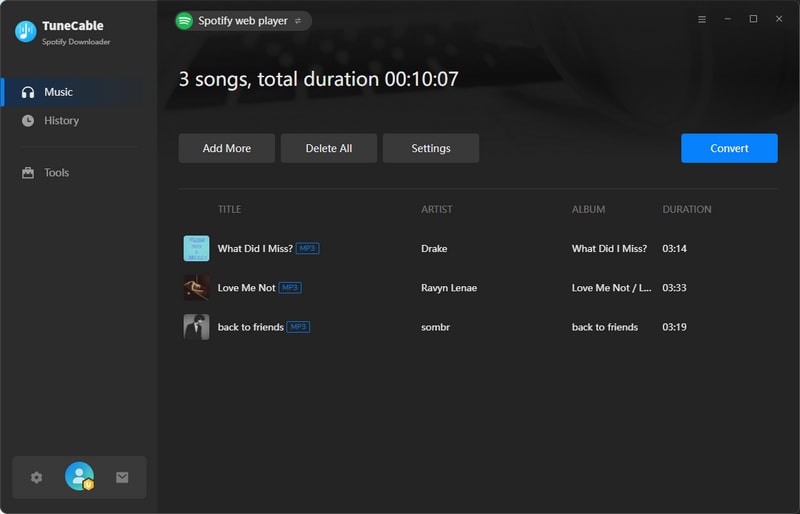
Open your Instafest Spotify playlist. Click the "+" button in the bottom right corner. When the playlist is parsed and listed in a window, select all and click the "Add" button to add them to the download queue. Or you can deselect the songs you don't want.
Step 3 Adjust output settings before converting
Click the "Settings" button to choose your preferred output settings. You can set the output format, bit rate, sample rate, and output folder, etc. TuneCable lets you organize converted files by artist, album, or playlist, which is helpful when you are building a library around your Spotify festival lineup.
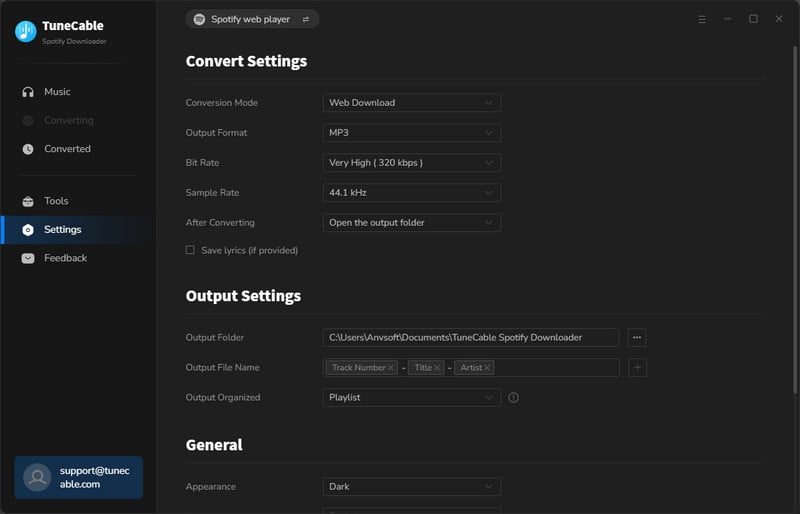
Step 4 Start the conversion and download Instafest Spotify
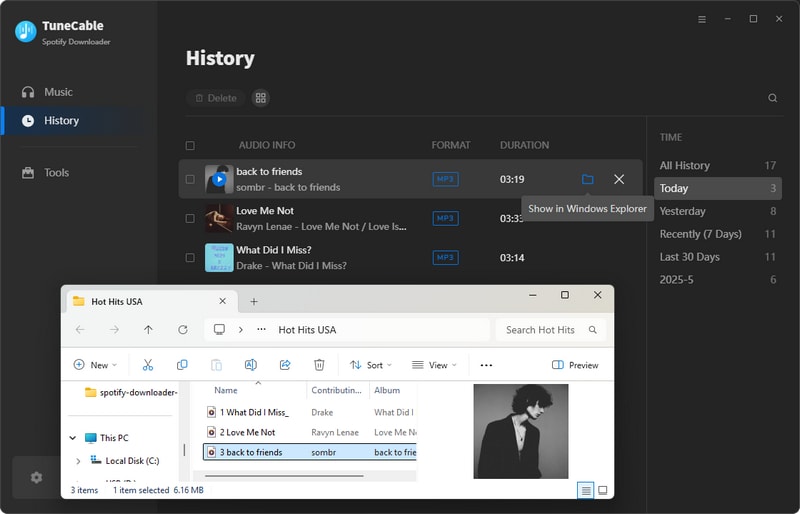
Click the "Convert" button to begin downloading. Once the conversion finishes, go to the "History" tab to find all your downloaded songs. From there, you can move them to your phone, upload them to cloud storage, or enjoy offline playback anywhere.
With TuneCable, your Spotify Instafest lineup stops being just a poster and becomes a music collection you truly own. Whether you use it as a Spotify music downloader for everyday listening or as a Spotify to MP3 converter to build a permanent archive, the process puts you in full control of your favorite tracks.

Want to save the songs from your Apple Music Instafest lineup, too? Instafest now supports Apple Music! And TuneCable BeatOne lets you download music from Apple Music, Spotify, Amazon Music, Tidal, and over a dozen other streaming services. Try it to keep your festival lineup forever!
Yes, Instafest is safe. It connects to Spotify through the official API and only requests access to your listening history. It cannot view your password, make changes to your account, or post anything on your behalf.
This often happens if you are a new Spotify user or if you selected a short time range like "Last 4 weeks." Switching to "Last year" in the customization settings typically resolves the issue and produces a complete lineup.
If your listening time is simply too short to generate sufficient music data, you can instead create a playlist of your favorite songs and then use the method described in Part 3 to generate your Instafest Spotify music festival lineup.
The base score is a number Instafest calculates based on the popularity of the artists in your lineup. It reflects how mainstream or niche your music taste is. Lower scores indicate a more eclectic selection, while higher scores mean your top artists are widely popular. You can choose to hide this score if you prefer not to display it.
Spotify Wrapped is an annual feature created by Spotify that gives you a detailed summary of your listening habits over the past year. Instafest, on the other hand, is a third-party tool available year-round. It focuses specifically on presenting your top artists in a festival poster format, and you can generate a new lineup anytime you like.
While Instafest lets you create a beautiful poster, the music itself remains tied to Spotify. If you want to build a permanent offline collection of the songs from your lineup, you can use a Spotify music downloader like TuneCable to download and save them locally. This way, you keep the music forever with no subscription required.
Instafest Spotify turns your listening history into a personalized festival poster that captures your music taste in a fun, shareable way. This guide has walked you through the process of creating your lineup, customizing it to your liking, and even generating posters from specific playlists. To truly own the music from your Instafest lineup and enjoy it offline on any device, TuneCable Spotify Downloader gives you the freedom to download those songs and keep them forever. Try TuneCable to turn your festival lineup into a permanent music collection.
 What's next? Download TuneCable Spotify Downloader now!

Ava Morrison | Senior Writer
TuneCable Spotify Downloader


