
 >
How To >
Spotify Music Tips >
>
How To >
Spotify Music Tips >
Spotify has been able to maintain its unassailable position in the streaming music landscape for so many years. It provides both Free and Premium options. While the Free plan allows you to stream music online, downloading Spotify playlists for offline playback requires a Premium subscription. Additionally, even with a Premium plan, you don't have complete control over your downloads. The priorities are merely limited to playing music of higher quality without ads and downloading music offline. As you seek a Spotify Music Downloader, it's evident that you're not content with these limitations and desire to circumvent them. In the following post, we'll highlight the top 4 Spotify Playlist Downloaders that cater to various user needs, facilitating more flexible uses of Spotify playlists on any device and are compatible with a range of programs.
A regular renewal to Spotify Music doesn't mean the downloaded Spotify files are at your disposal. You are restrained from the following conditions:
1. Downloaded Spotify songs can only be played through the Spotify app.
2. Offline playback ceases when the Spotify subscription is not renewed.
3. An online connection is required at least once every 30 days. If this does not occur, downloaded songs become unplayable.
4. The download limit is 10,000 songs across up to five devices.
5. Transfers of downloaded Spotify playlists to other apps or devices are not permitted.
Spotify's limitations make Spotify download playlist solutions essential. All kinds of Spotify Playlist Downloaders aim to convert music from Spotify to unencrypted formats and also download Spotify playlist to computer as local files. Usually, A Spotify playlist downloader enables users to:
💾 1. Back up Spotify playlists to a local computer or USB drive for permanent offline playback.
📲 2. Import Spotify playlists to any device or for remixing on DJ apps.
📤 3. Mix the Spotify playlist with any other apps.
🧑 4. Share your Spotify playlist as a file instead of a link.
📂 5. Retain access to downloaded Spotify playlists after canceling your subscription.
There are numerous music downloaders available online, but most of the Spotify Playlist downloaders have similar interfaces and functions. After testing a range of Spotify Playlist Downloaders, we have compiled a list of 4 unique types of Spotify Playlist downloaders.
TuneCable Spotify Downloader delivers entire playlists in original quality with perfect metadata preservation. It enables users to download songs, albums, playlists, audiobooks, and other audio files from Spotify to the local Windows PC, Mac, or Android. And it can conveniently download Spotify playlists in bulk in FLAC format with Lossless quality. Also, it supports exporting music in popular output formats, including MP3, AAC, FLAC, WAV, AIFF, and ALAC, making it suitable for various devices and apps with different uses. The downloaded Spotify playlists can be transferred to an Android phone, iPhone, USB flash drive, SD card, MP3 player, game device, wearable gadgets, DJ Software, Premiere Pro, etc. Additionally, it offers sorting options, allowing users to archive your downloaded Spotify songs by album, artist, playlist, or any preferred method. This flexibility ensures that when exporting multiple playlists in bulk, TuneCable will categorize them according to their preferences.
| Account Required | Spotify Free and Spotify Premium accounts are supported. |
| Operating System | Windows PC, Mac, or Android. |
| Music Sources | Recording from the Spotify app or Spotify web player. |
| Download Speed | up to 40× conversion speed. |
| Output Settings |
|
| ID3 Tags | Title, Album, Artist, Artwork, Track Number, Disc Number, Year, Genre, etc. |
| Handy Tools | Format Converter, Burn CD, Tag Editor, AA/AAX Converter, Export to iTunes. |
We take the desktop version of TuneCable Spotify Downloader as an example. Here is how it works:
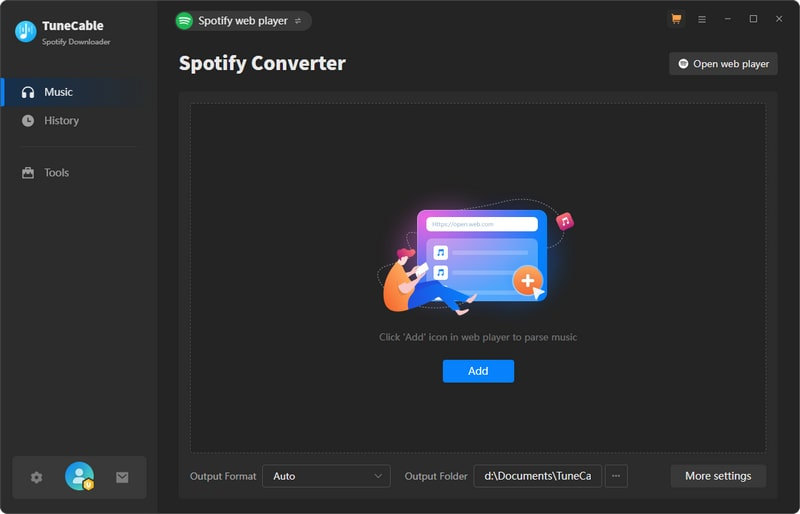
Step 1: Launch TuneCable Spotify Downloader and decide the music source, the Spotify app or Spotify web player. Then, log in to a Spotify account.
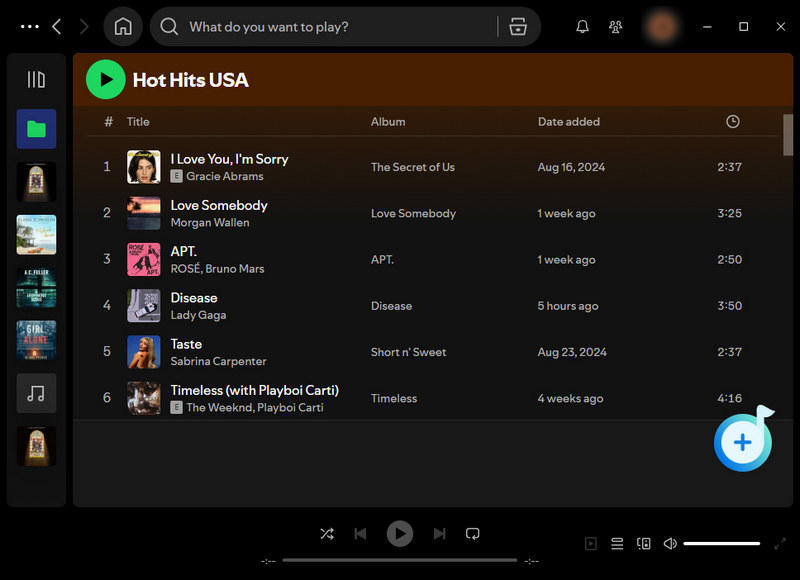
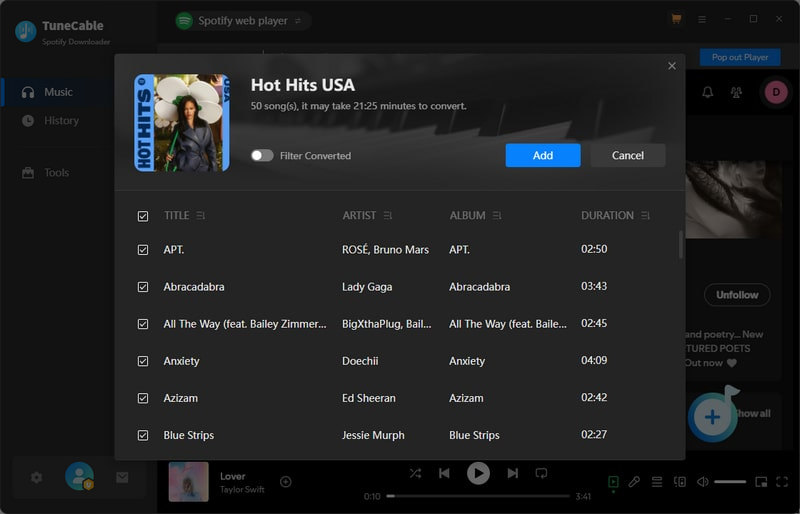
Step 2: Open a playlist in the Spotify web player or app, and tap on the "Click to add" pop-up bubble in the lower right. Select the needed tracks. Then, click on "Add" to make a download list.
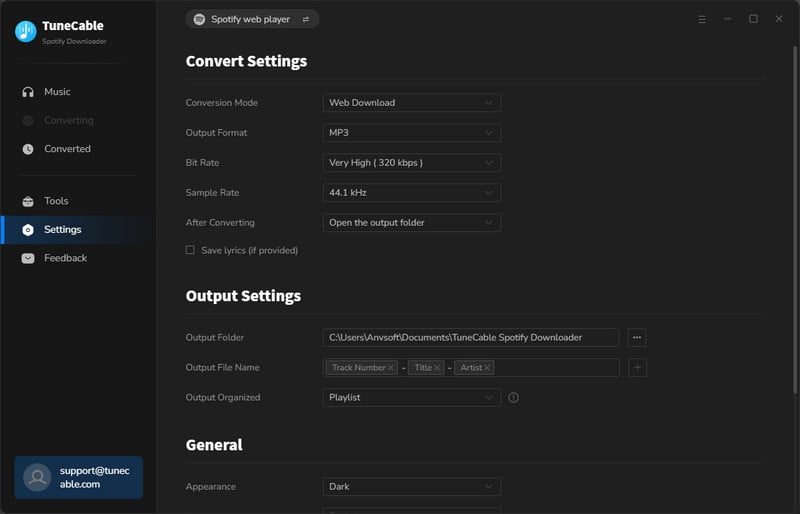
Step 3: Change the output format, bit rate, sample rate, output file name, output organized manner, and other parameters under the "Settings" section.
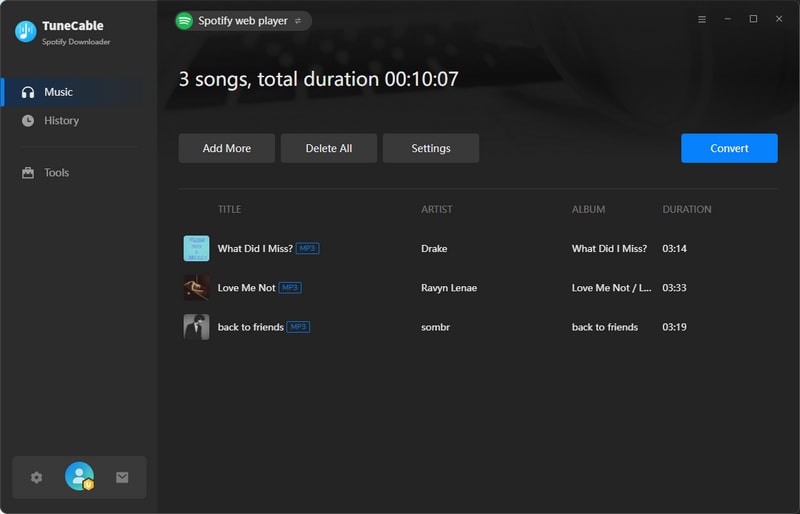
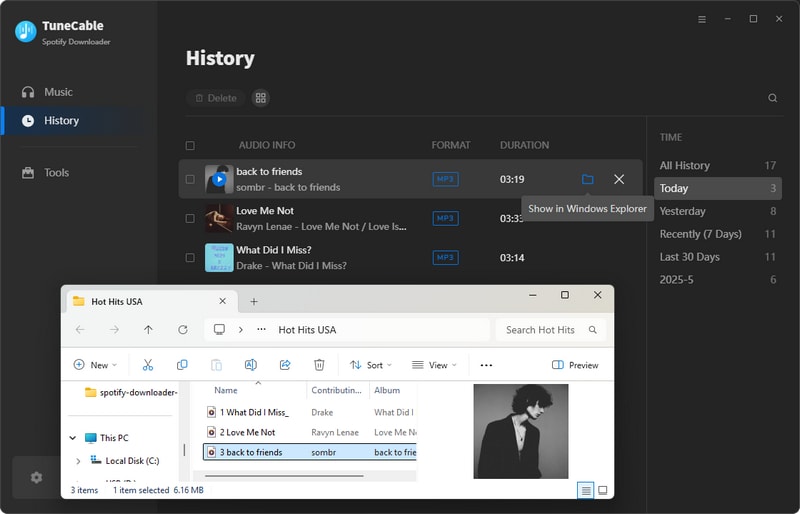
Step 4: To trigger the conversion, click on the "Convert" button. The downloaded Spotify playlists will be well-categorized on the local PC.
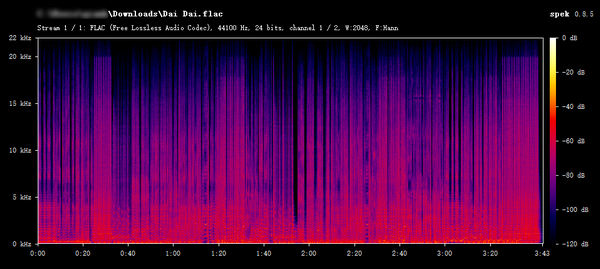
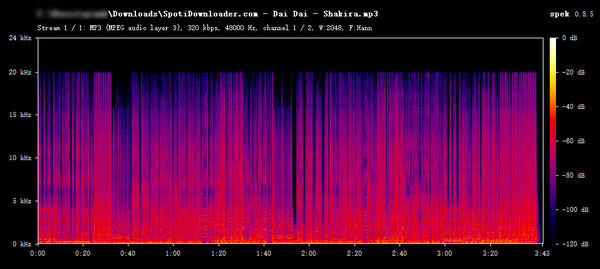
The spectrogram shows that the frequency response extends to 20kHz above with visible energy, indicating well-preserved high frequencies. This is typically a feature of high-bitrate or lossless source files. The overall sound quality is very good, belonging to the Spotify lossless level.
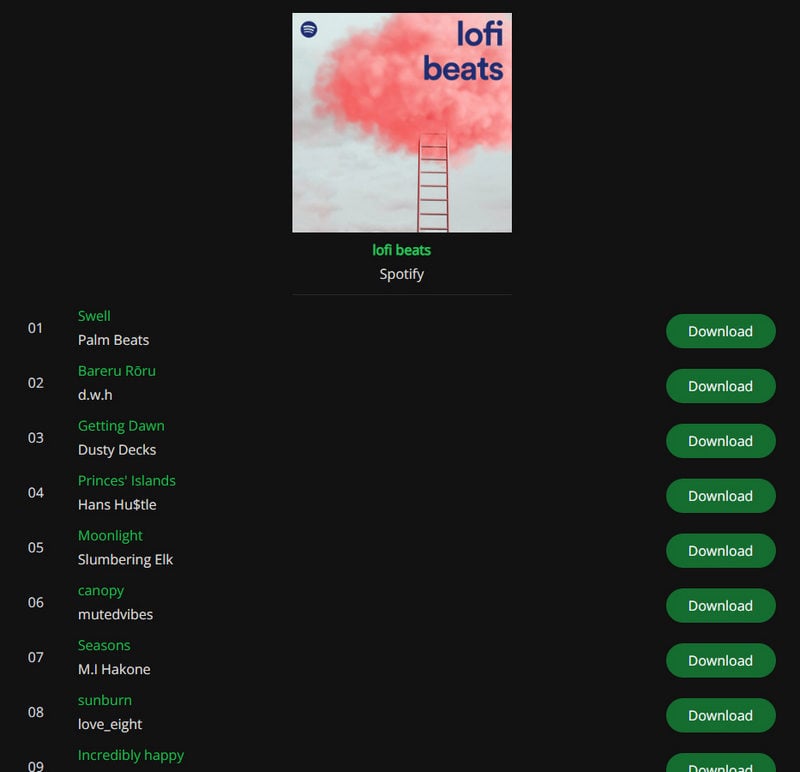
In addition to the three Spotify conversion programs mentioned earlier, there exist numerous websites like SpotiDownloader.com in the market. When you open this website, you only need to put the link of the song, album, or Playlist from Spotify into the search box and click Download. However, downloading an entire album or playlist requires manually selecting each song individually, and with every click, an advertisement pops up.
As SpotiDownloader generates revenue through advertisements, they cannot be avoided. Its advantage lies in its convenience and speed, as it only requires a link and does not require the installation of additional programs or even logging into your Spotify account to help you download songs. It takes one click to download Spotify playlist to MP3 format without any loss in audio quality.
While SpotiDownloader is indeed a user-friendly and free download tool compatible with mobile web browsers, it's important to note that due to frequent pop-up advertisements on their web pages, overall security cannot be guaranteed. Therefore, exercising caution and implementing additional protective measures is highly recommended when using such tools to download Spotify playlist to computers.
| Account Required | Spotify Free and Spotify Premium plans are feasible. Don't need to log in to Spotify to conduct a conversion. |
| Operating System | Windows PC, Mac, Android, iOS. Only need to open the website via a browser. |
| Music Sources | Parse the URL link from Spotify and convert the Spotify track directly. |
| Download Speed | Up to 5× conversion speed. |
| Output Settings | No output options can be tailored. Download song from Spotify to MP3 in the original quality (up to 320kbps). |
| ID3 Tags | Title, Album, Artist, Artwork, Year. |
Step 1: Launch the Spotify app on your device.
Step 2: Locate the song or album you wish to download.
Step 3: Click the "three-dot" button, which appears as a small ellipsis.
Step 4: Select "Share" and then "Copy Link".
Step 5: Paste the copied link into the provided field and click "Submit".
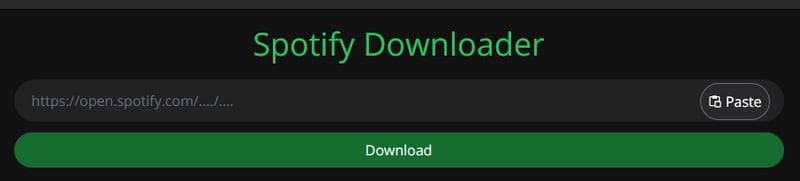
Step 6: Wait for processing to complete, then click the "Download" button to start the download process.
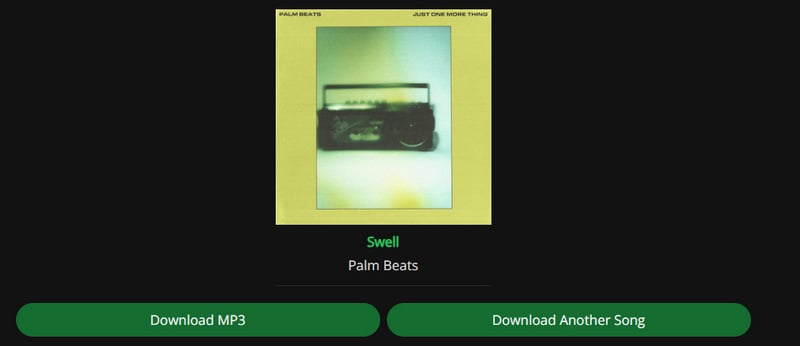
Step 7: At last, tap on "Download MP3" to save the downloaded track to your computer.
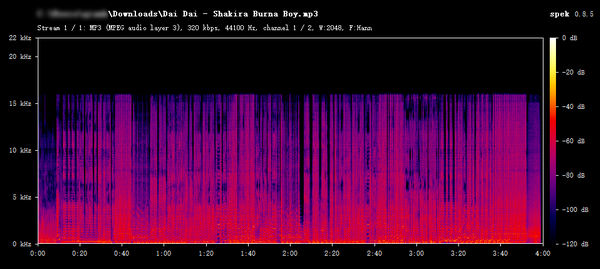
The spectrogram shows almost no signals in the 18kHz-20kHz region, indicating a high-frequency cutoff. This does not match the characteristics of "high-bitrate (320kbps) or lossless" audio. It is more likely from a 128kbps MP3 or similar low-bitrate source.
Spotisongdownloader is a free service that lets you download Spotify songs, albums, and playlists as local MP3 files. In our tests, we found that this web-based tool allows users to choose audio quality options ranging from 64 to 320 kbps. However, while the output file details may indicate a bitrate of 320 kbps, the actual spectral quality is significantly lower than advertised. That said, as a free online tool, it features a clean, ad-free interface with no pop-ups—which helps make up for some of its shortcomings.
| Account Required | Spotify Free and Spotify Premium plans are feasible. Don't need to log in to Spotify to conduct a conversion. |
| Operating System | Windows PC, Mac, Android, iOS. |
| Download Speed | Up to 5× conversion speed. |
| Output Settings | 64-320 kbps quality in MP3 format. |
| ID3 Tags | Album, Year, Artist. |
Step 1: Copy and paste the Spotify link into this website and click "Download".
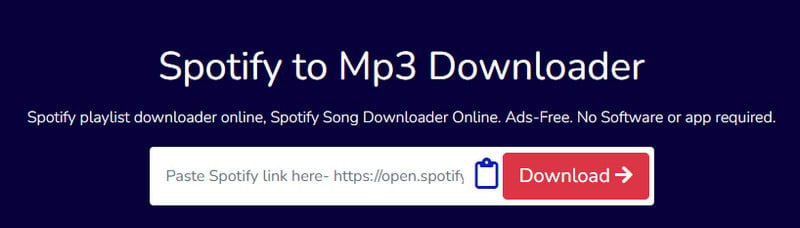
Step 2: Click the "Generate Download Link" button and choose an audio quality.
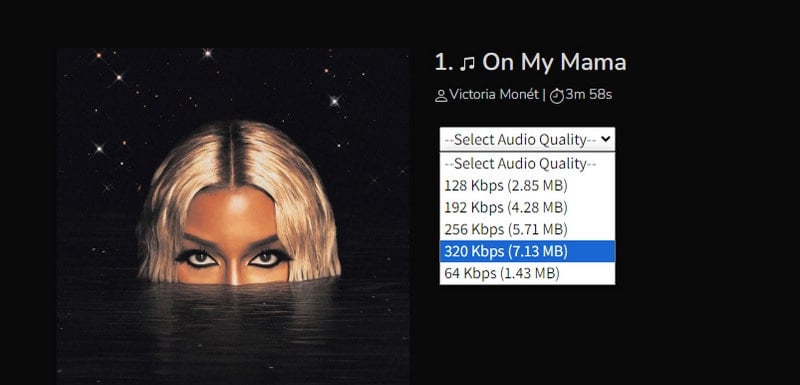
Step 3: After finished loading, it will begin saving the song locally.
There is no signal above 16kHz. It indicates a total loss of high-frequency detail, resulting in poor audio quality. This is almost certainly a 64kbps or 96kbps MP3 files.
Generally speaking, whether on mobile devices or personal computers, we can find recording software. If you only need to download a small number of music tracks, then using a recorder seems economical and efficient. Audacity is also a recording software. However, it is superior to ordinary recording software because of its built-in editing functions and selectable output formats. Most importantly, it is completely free, just visit its official website to download and use it for free, without worrying about annoying pop-up ads. Because this software is developed and maintained by a group of volunteers. Therefore, if you are not in a hurry and your Spotify playlist does not contain too many tracks, you can try manually recording and exporting them to your local device.
Audacity not only includes basic recording and editing audio but also supports advanced functions such as spectrum analysis, frequency tuning, and mixer, which can meet users' diverse needs for audio processing and adjustment. In addition, users can further expand Audacity's functionality by installing third-party plug-ins.
| Account Required | A Spotify Premium account is needed to record ad-free songs. |
| Operating System | Windows PC, Mac, GNU/Linux. |
| Functions | Recording and playback; Basic audio editing such as cut, copy, and paste; Multi-track mixing; Digital effects and plug-ins; Waveform editing; Noise Cancellation; Multi-channel mode; Custom effects; High sampling rate (up to 384kHz/24bit); Sound quality switching (16-bit/24-bit/32-bit); Batch import, export and edit sound files; Edit metadata |
| Download Speed | 1x record speed. Not allowed to adjust conversion speed. |
| Output Settings |
|
| ID3 Tags | Title, Album, Artist, Artwork, Track Number, Genre, etc. Need to manually edit. |
Step 1: Start playing the song in the Spotify app and click on the "red button" on Audacity to start recording simultaneously.
Step 2: When the song ends, click on the "stop icon" to finish recording.
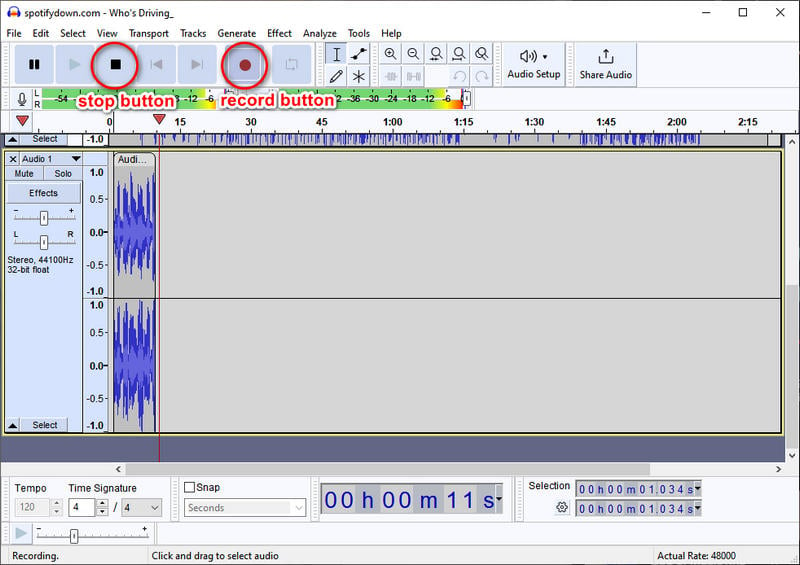
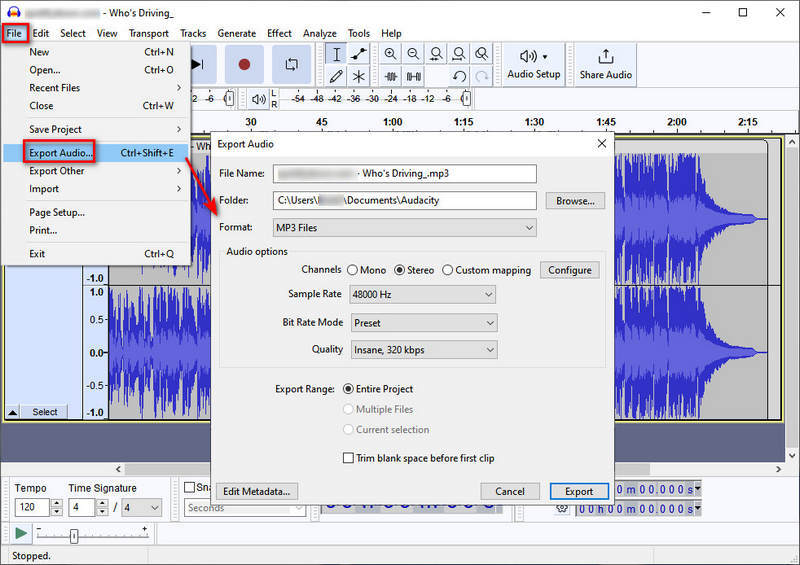
Step 3: Go to "Files > Export Audio". In the pop-up window, set up the output parameters, like output format, folder, bit rate, sample rate, channel, etc.
Step 4: You are allowed to edit the tags (Artist Name, Track Title, Album Title, Track Number, Year, Genre, Comments, and COMM) by clicking on the "Edit Metadata" button.
Step 5: When it's done, simply hit "Export" to this track to your local space.
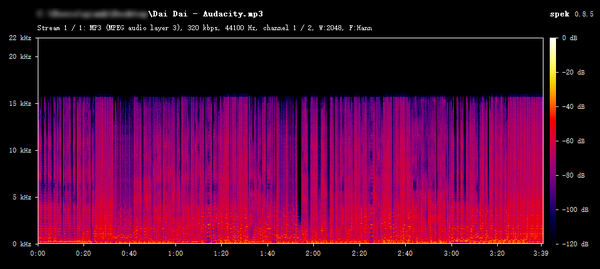
The spectrogram shows a clear cutoff at about 16kHz, with almost no signal above this point. This indicates a significant loss of high-frequency detail and poor audio quality. It is likely a low-bitrate MP3 (e.g., 64kbps–128kbps).
| TuneCable Spotify Downloader | SpotiDownloader.com | Spotisongdownloader.com | Audacity | |
|---|---|---|---|---|
| Best For | Batch & Lossless Export | Everyday Light Use (Web-based) | Basic Users (Web-based) | Beginners (Manual Recording) |
| Platform Support | Windows, Mac, Android | Web browser (Any OS) | Web browser (Any OS) | Windows, Mac, GNU/Linux |
| Output Formats | MP3, AAC, FLAC, WAV, AIFF, ALAC | MP3 only | MP3 only | WAV, MP3, FLAC, OGG, Opus, AC3, AMR, MP2, & more |
| Output Quality | Real 320kbps (MP3); 24-bit/44.1kHz Lossless (FLAC) | Up to 320kbps (*claimed) | 64–320kbps (*claimed) | Depend on the recording source |
| Download Speed | up to 40× | Up to 5× | Up to 5× | 1× (Real-time recording) |
| ID3 Tags & Metadata | Preserves fully (Title, Album, Artist, Year, Track Number, etc.) | Partial (Title, Album, Artist, Artwork, Year) | Partial (Album, Year, Artist) | None |
| Batch Download | ✔ | ❌ | ❌ | ❌ |
| Key Disadvantages | Paid software | Frequent pop-up ads, security concerns, no batch download | False quality claims (320kbps output is much lower), no batch download | Real-time recording (slow), manual tagging |
Yes. But only some of the Spotify playlist downloaders (like TuneCabe Spotify Downloader) enable keeping the original playlist order. To maintain playlist sequence in downloads, you should navigate to TuneCabe Spotify Downloader and go to the lower left "Settings" section. Under "Output File Name", choose "Playlist Index" and "Title".
Yes. However, online tools usually don't support this feature. Desktop Spotify playlist downloaders like TuneCable Spotify Downloader allow users to add an entire playlist to the download list with a single click. To select multiple playlists, simply click "Add More" and repeat the steps.
Typically, a series of research is required to locate an appropriate Spotify Playlist Downloader. Numerous Spotify limitation breakers claim to be helpful. But which one can be your perfect match? In this post, we have elaborately selected 4 different kinds of Spotify Playlist Downloaders that cater to diverse requirements. We believe that you have known how to download Spotify playlist to MP3 or other formats after reading. Through our tests, the crown goes to TuneCable Spotify Downloader as it takes only a few simple steps to download Spotify playlists to computers as local files and archive them according to your preferences. With its assistance, you do not need to subscribe to Spotify before unlocking offline playback. If you are looking for a highly efficient Spotify Playlist Downloader, why not give it a free try right now?
 What's next? Download TuneCable Spotify Downloader now!

Ava Morrison | Senior Writer
TuneCable Spotify Downloader


