
 >
How To >
Music Tips >
>
How To >
Music Tips >
Instagram is home to endless trending music and viral sounds. However, the app doesn't offer a built-in way to save these tracks. Because of this, many users look for a reliable Instagram audio downloader to extract and save their favorite clips. Whether you want to download Instagram Reels audio for offline listening or use a specific sound for content creation, having the right tool is essential.
While there are many ways to convert Instagram to MP3, finding a safe and high-quality option isn't always easy. Some free online Instagram downloader tools provide poor sound quality or are filled with annoying ads. To help you, we tested dozens of platforms to find the fastest and most reliable Instagram downloader solutions. In this guide, we compare quick web-based options and professional desktop tools to help you find the best way to save Instagram audio.
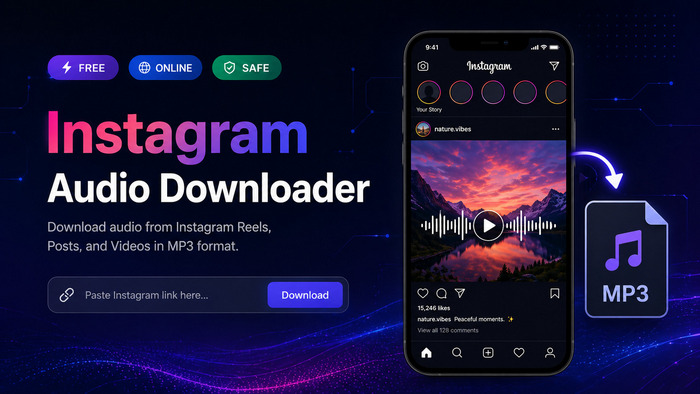
While Instagram is a great place to discover new sounds, it doesn't make it easy to actually own them. Here are the top reasons why a dedicated Instagram audio downloader is a must-have tool for 2026.
You might notice that when you use Instagram's built-in download button on a Reel, the video often saves without the music. This usually happens because of licensing restrictions. A third-party tool bypasses this, allowing you to download Instagram Reels audio that the app would otherwise block.
Instagram "Saved" sounds only work when you are inside the app and connected to the internet. When converting these tracks to MP3 via Instagram audio downloader, you can:
If you are a content curator, downloading sounds one by one is a waste of time. Professional software allows you to download entire playlists or multiple audio tracks at once. This "batch" feature is something you won't find in the official app
TuneCable BeatOne is a powerful, all-in-one Instagram audio downloader and converter designed for high-quality results. While many tools struggle with restricted content, BeatOne makes it easy to download Instagram Reels audio and music from popular platforms like Spotify, Apple Music, SoundCloud, and more. It features a built-in browser and recorder, allowing you to convert Instagram to MP3 or other high-fidelity formats such as FLAC, WAV, and AAC with just a few clicks.

TuneCable BeatOne
Step 1 Launch TuneCable Instagram Audio Downloader on your computer. On the home screen, scroll down and click "Add Other Source." Type in "www.instagram.com" and save it. Two windows will open: one for your recording settings and a built-in Instagram browser. Log in to your Instagram account to access your favorite Reels and videos.
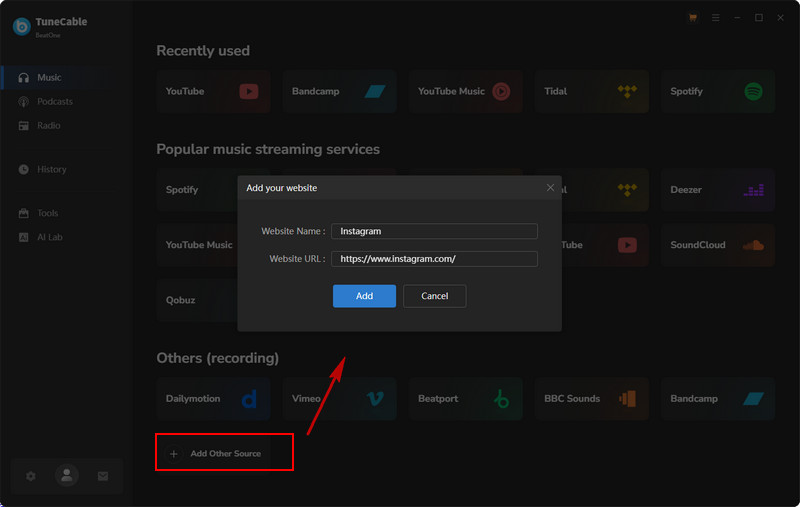
Step 2 In the recording window, pick your preferred output format and quality.
Once you are happy with the settings, click the "Click to Record" button to put the recorder on standby.
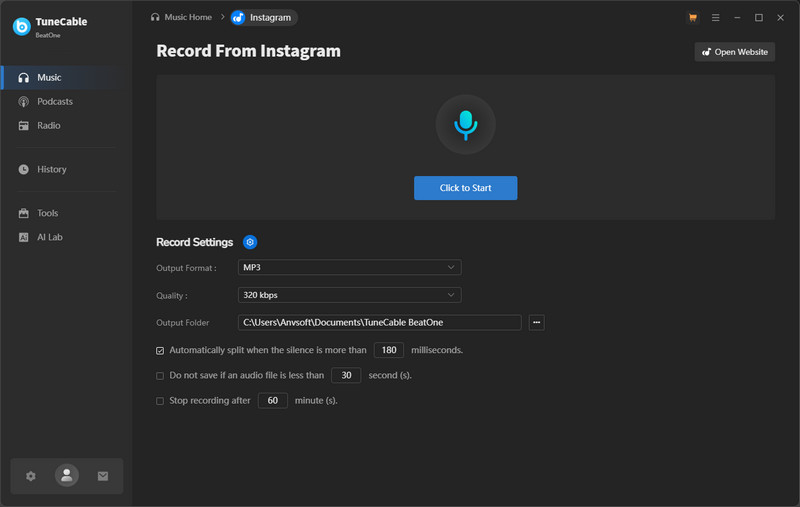
Step 3Switch to the Instagram browser window and play any video. TuneCable BeatOne will detect the sound and start recording automatically. If you want to work quietly, simply click the "Mute" icon on the recording interface to silence the playback while the software works.
💡 Tips: Need to download from other platforms? TuneCable BeatOne supports 10x fast speed for Spotify, Apple Music, Tidal, and more. Learn More >>
Step 4 You can play multiple Reels in a row, and TuneCable will save each track as an individual high-quality file. When you are finished, click "Stop Recording." To find your saved music, hover over any track in the history list and click the Folder icon to open the file location on your computer instantly.
If you are looking for a powerful Instagram audio downloader that handles more than just social media, TunePat VideoGo All-In-One is an excellent choice. This versatile tool is designed to download content from various streaming sites and social platforms. It allows you to download Instagram Reels audio directly by extracting the sound from the video link, saving you the hassle of manual recording.
Step 1 Install and launch TunePat VideoGo All-In-One on your PC or Mac. On the main interface, click "More Sites" in the top-right corner to see the full list of 1,000+ supported platforms. From here, select Instagram to open the built-in downloader.
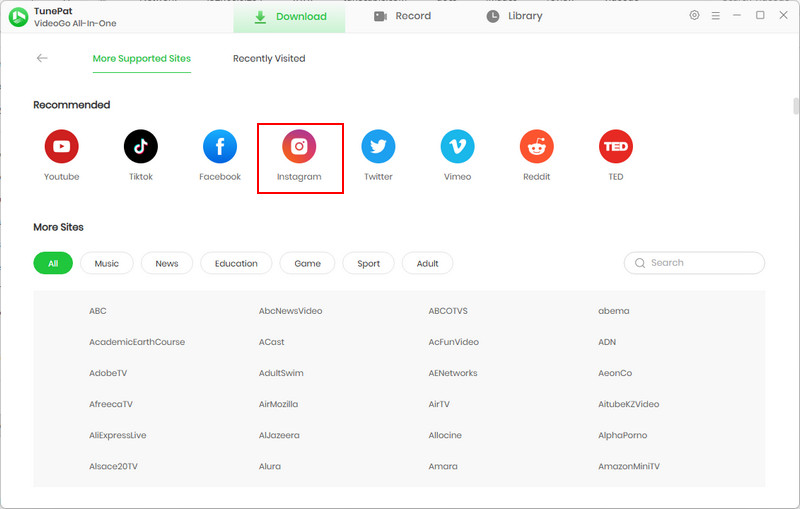
Step 2 Use the built-in browser to open the Instagram Reel you want to save. A green Download button will appear on the right side—click it to analyze the video. Alternatively, you can simply copy the Instagram URL and paste it directly into the TunePat search bar.
Step 3 TunePat will display the video details and various quality options. This allows you to choose the best resolution or bitrate for your file before saving.
Step 4 To save only the sound, look for the "Download as:" section at the bottom of the window. Select "Audio" from the dropdown menu, then click the Download button to save your high-quality Instagram audio file instantly.
While professional desktop software offers the best stability and quality, sometimes you just need a quick, one-off download without installing any programs. If you're looking for a fast and free online Instagram downloader, 2026 has brought some fantastic web-based tools to the table. Below, we have curated the top 10 best free online Instagram audio downloaders that are currently trending for their speed, ease of use, and reliability.
⚠️ Note: These online services allow you to convert Instagram to MP3 directly in your mobile or desktop browser. They are perfect for grabbing a viral sound on the go or saving a quick Reel audio for a social media post. However, keep in mind that free online tools often come with ads and may not always support the highest 320kbps audio quality.
🔗: https://reelsave.app/audio
ReelSave is a highly efficient web tool tailored for the modern social media landscape, specializing in high-definition content extraction. It allows users to seamlessly download audio from Instagram Reels, IGTV, and standard videos. Its responsive interface is optimized for both mobile and desktop, providing a quick way to convert Instagram links into high-quality MP3 files without any mandatory software installation.

🔗: https://fastdl.app/en2
FastDL is a comprehensive tool for downloading all types of Instagram media. It offers a specialized "Audio" tab that ensures you are getting a dedicated MP3 file rather than a video file with the sound inside.

🔗: https://speakapp.com/t/tools/instagram-audio-download
SpeakApp offers a highly polished and modern online utility as part of its broader social ecosystem, focusing on high-speed Instagram audio extraction. Unlike many generic downloaders, SpeakApp provides a cleaner, more professional-looking interface that avoids the cluttered feel of typical free tools. It is engineered specifically to identify and isolate audio streams from Reels and IGTV, providing users with a reliable way to save background music and trending voiceovers with minimal effort.

🔗: https://saveclip.app/en
SaveClip is one of the most popular web-based Instagram downloaders. It allows users to quickly extract audio from Reels, IGTV, and videos. It’s highly favored for its simplicity—just paste the link and hit download. It doesn't require any software installation, making it perfect for quick tasks.

🔗: https://audiodropper.com/
AudioDropper is a streamlined, web-based tool specifically designed for extracting audio from Instagram Reels and videos. It stands out for its minimalist design and speed, allowing users to convert Instagram links to MP3 files without any account registration or software installation. It is a go-to solution for casual users who need a quick, no-fuss way to save viral sounds.

🔗: https://reelsvideo.io/download-instagram-mp3
ReelsVideo is a dedicated Instagram-to-MP3 converter designed for users who need a quick and straightforward way to grab audio from Reels. The platform provides a dual-option interface, allowing users to choose between downloading the full video or just the audio track. It is particularly known for its simple "paste and convert" workflow, making it accessible even for those with no technical background who want to save viral sounds for offline listening.

🔗: https://snapinsta.to/en2
SnapInsta is optimized for high-speed downloads. It excels at parsing Instagram URLs to find the highest quality audio stream available. It is a great choice if you want to convert Instagram to MP3 without a long wait.

🔗: https://sssinstagram.com/en1
DSSSInstagram is a fast, lightweight web app. It is specifically designed for users who need to grab Instagram Reels audio for editing in apps like CapCut.

🔗: https://snapsave.app/
SnapSave is a heavyweight in the video downloading space. While it's known for 4K video, its audio extraction tool is highly efficient, providing a stable way to grab viral sounds for your own content.

🔗: https://downloadgram.org/
DownloadGram is the minimalist’s choice. It features a simple, bare-bones search bar with no extra fluff. It’s the fastest way to get a file if you don't care about extra features or settings.

If you are an audiophile or a professional creator, sound quality is non-negotiable.
The "free" price tag of online sites often comes at a hidden cost.
Conclusion: choose online free tools if you only need a single audio track for personal use, you are on a mobile device, and you don't mind lower audio quality or a few advertisements; and choose desktop professional converters if you are a professional web content creator, you need high-quality 320kbps or lossless audio, you want to download files in bulk, or you require extra tools like an AI audio splitter to remove vocals from background music.
 What's next? Download TuneCable BeatOne now!

Ava Morrison | Senior Writer
TuneCable BeatOne - All-in-one Music Solution

