
 >
How To >
Music Tips >
>
How To >
Music Tips >
Founded by DJs, Beatport began as a platform for purchasing digital electronic music and has since evolved into a space where artists and producers can release and promote their work. It also provides a subscription-based streaming service, which allows electronic music enthusiasts to enjoy music to their heart's content while enabling DJs to integrate Beatport's vast music library with DJ software such as rekordbox, Serato, and more. Although it offers many valuable benefits, including support for offline playback, many users are seeking a reliable Beatport downloader to save money or for other reasons. In this article, we will explore several useful Beatport downloaders, including both free and pro tools. Whatever your reasons may be, if you want to learn how to use a Beatport downloader to download music in WAV, AIFF, or other standard formats, then read on!
A Beatport downloader is a tool designed to download tracks from Beatport directly to a local device. These tools generally fall into two categories: web-based tools and standalone software. Typically, these tools support downloading Beatport music to MP3 format, while some also support outputting lossless audio formats like WAV, AIFF, and FLAC. Furthermore, certain tools enable preserving the song metadata, including cover art, album details, and titles, after downloading. With key information saved, these downloaded audio files are ideal for DJs, as tracks can be easily managed and identified directly in the DJ software panel after import.
Beatport originally served as a music purchasing platform, enabling users to buy and download audio files in MP3, WAV, AIFF, and FLAC formats for offline playback or other purposes. What are the differences between these output formats? Please refer to the table below.
| Audio Quality | Audio Performance | Compression Method | File Size | Metadata Support | Compatibility | Target Users | |
|---|---|---|---|---|---|---|---|
| WAV | Lossless | ⭐⭐⭐⭐⭐ | Uncompressed | Very Large (~30–50 MB) | Limited | Windows / DJ Equipment | DJs / Producers |
| AIFF | Lossless | ⭐⭐⭐⭐⭐ | Uncompressed | Very Large (~30–50 MB) | Excellent | Apple / DJ Equipment | DJs / Mac Users |
| FLAC | Lossless | ⭐⭐⭐⭐⭐ | Lossless Compression | Large (~15–30 MB) | Excellent | Newer DJ Equipment (Incompatible with certain DJ software) | Semi-Professional DJ / Music Enthusiast |
| MP3 | Lossy | ⭐⭐⭐ | Lossy Compression | Relatively Small (~7–10 MB) | Excellent | Cross-Platform | General Users |
Among these various output formats, many DJs prefer WAV and AIFF over FLAC or MP3 downloads from Beatport. Why is that?
As we mentioned earlier, Beatport is not merely a digital music marketplace but also an electronic music streaming platform, offering multiple streaming plans that include a download feature for offline listening. So, what's the difference between downloading Beatport music by buying it outright, using a Beatport downloader, and downloading with a Beatport streaming plan? Please see the table below.
| Download from Beatport Store | Download from Beatport Downloader | Download with Beatport Streaming Plan | |
|---|---|---|---|
| Supported Output Format | MP3, FLAC, WAV, AIFF | MP3, FLAC, WAV, AIFF, and more | Music downloaded with Beatport subscription is saved in a proprietary format, which is not compatible with other apps or devices. |
| Supported Output Quality | 320 kbps (MP3) or up to 1411 kbps (CD quality) | 128 kbps or higher | 128 kbps |
| Download Speed | Regular | Regular | Regular |
| Batch Download | ✅ Select "Download All" to save all tracks to local storage. | ✅ Continuously download all songs in the playlist. | ❌ |
| Keep Metadata | ✅ | ✅ | ❌ |
| Import to DJ apps | ✅ | ✅ | ✅ (Requires an Advanced or Professional subscription) |
| Other Requirements | Users must purchase tracks individually to download them locally, typically starting at around $1.50 per song. | A Beatport subscription (the most basic tier) is required to download full tracks. | An active Beatport subscription is required. |
Can't wait to try out a Beatport downloader? Skip straight to Part 4 to see which Beatport downloader is the best fit for you!
All things considered, a Beatport downloader stands out as a more flexible and cost-effective option. On the one hand, it allows users to download tracks in formats such as MP3, FLAC, WAV, AIFF, and more, without having to pay for each track. On the other hand, while keeping an active Beatport subscription and enjoying unlimited access to the entire Beatport music library, users can download full tracks directly to their local storage by utilizing a Beatport downloader in conjunction with their subscription. And the best part? This works with even the most basic Essential plan. Consequently, there is no need to maintain a continuous subscription. Instead, users can download their favorite tracks within a short timeframe to curate their own core offline music library for DJ performance or other purposes. These are the key reasons why people choose to use Beatport downloaders.
TuneCable BeatOne is a comprehensive music downloader that supports downloading music from platforms such as Beatport, Bandcamp, Spotify, Tidal, and Apple Music. This professional desktop Beatport downloader is compatible with both Windows and Mac systems, and the supported output formats include MP3, AAC, WAV, FLAC, AIFF, and ALAC. Additionally, it features continuous recording capabilities, allowing users to record and download all tracks within a Beatport playlist at once. TuneCable's interface is clean and intuitive. It is straightforward to operate and highly user-friendly. With TuneCable, downloaded Beatport tracks can be permanently saved locally. Additional features of TuneCable BeatOne are listed below:
TuneCable BeatOne
Step 1 Launch TuneCable BeatOne and select "Beatport". Log in to your Beatport account in the pop-up window. Please note that to record full Beatport tracks, you will need to subscribe to one of their streaming plans. However, don't worry—the most basic tier, the Essential Plan, is sufficient.
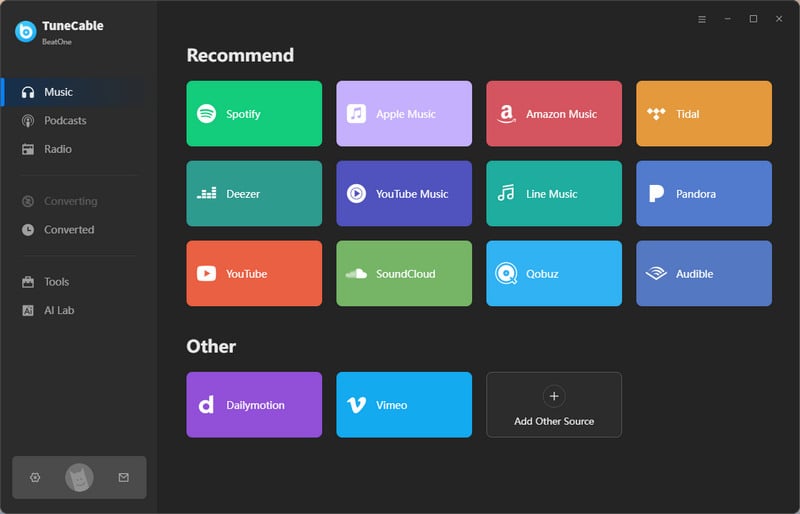
Step 2 Return to the TuneCable panel. Customize the "Settings" options according to your needs.
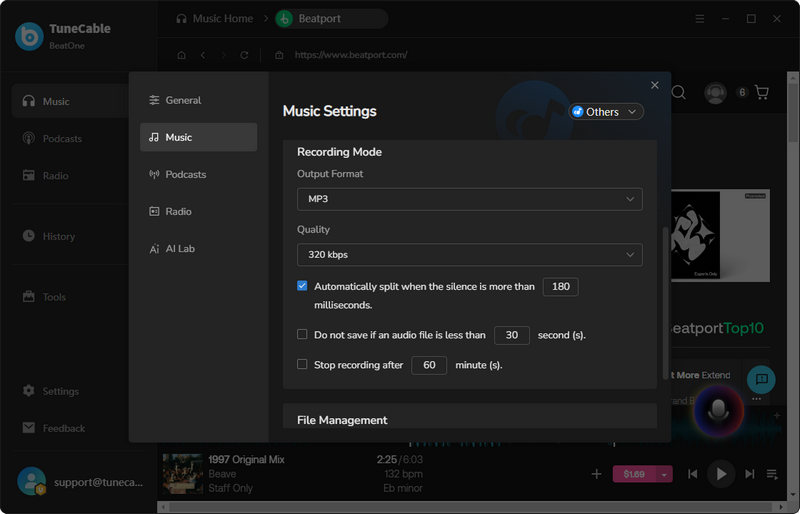
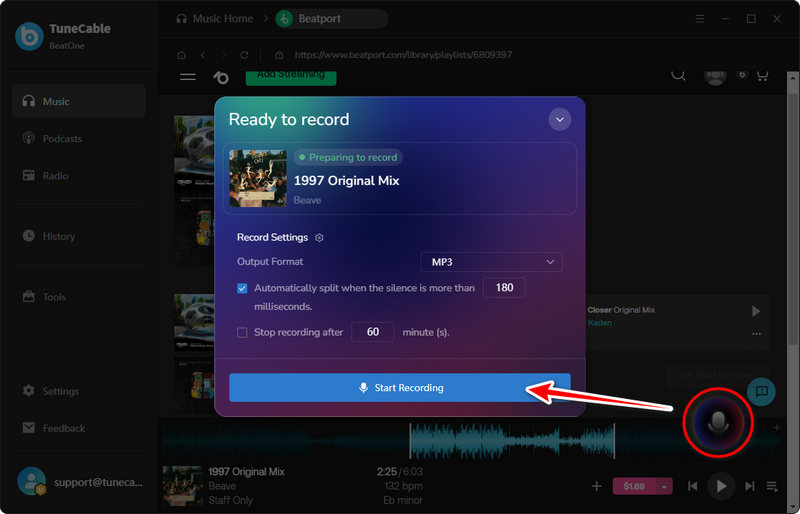
Step 3 Click "Click Start to record …" and choose "Start Recording" from the pop-up. Then, navigate to the embedded Beatport web player to play the music. TuneCable will then automatically detect the track and begin downloading it locally.
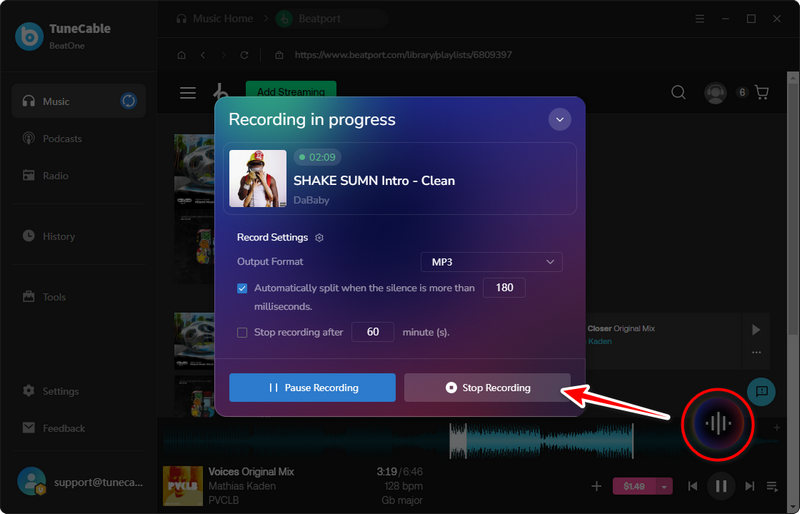
When you want to stop recording music, click the "Recording" button on the right and select "Stop Recording" from the pop-up window.
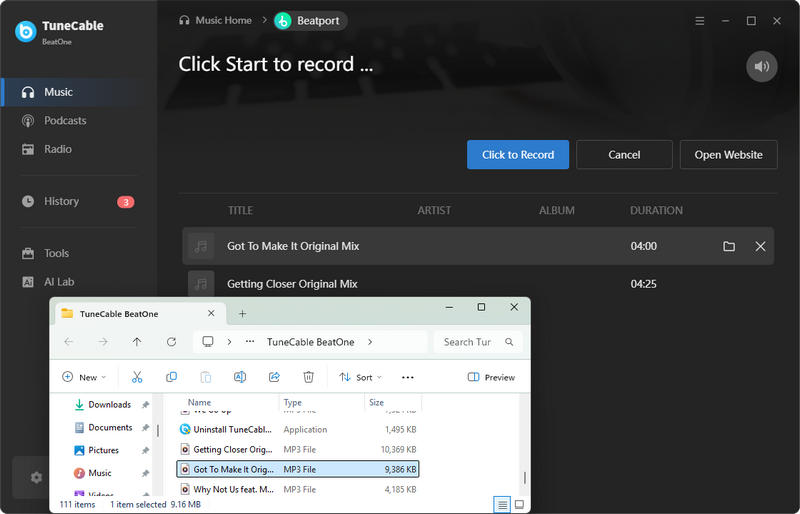
Step 4 Once the download is complete, you can view the downloaded Beatport tracks in "History". For easier song management, you can edit the ID3 tags of downloaded tracks. In the "History" module, simply select the files you wish to edit and choose "Tag Editor" to make your modifications.
TubeNinja is a web-based free Beatport music downloader. It is originally designed for downloading videos and music. According to its website, supported platforms include Beatport, Bandcamp, YouTube, Facebook, and more. By parsing the URL, TubeNinja retrieves the video or audio content contained within the link. It only supports outputting MP4 video files or MP3 audio files.

TubeRipper is an online media content extractor designed for downloading video or audio content from websites. This free, web-based Beatport music downloader allows users to download Beatport tracks as MP3 audio files directly to the output folder of their browsers. It is accessible from any device with a browser.

| Supported Output Format | Batch Download | Edit ID3 Tags | Stability | Success rate | Ads / Risk | Overall Rating | Best For | |
|---|---|---|---|---|---|---|---|---|
| TuneCable BeatOne | MP3, FLAC, WAV, AIFF, AAC, ALAC | ✅ | ✅ | High | High | ❌ | ⭐⭐⭐⭐⭐ | Professional or semi-professional DJs looking to build an extensive music library, or electronic music collectors. |
| TubeNinja | MP3 | ❌ | ❌ | Low | Low | ✅ | ⭐⭐ | Casual users who simply download one or two Beatport tracks every now and then. |
| TubeRipper | MP3 | ❌ | ❌ | Low | Low | ✅ | ⭐⭐ | Casual users who simply download one or two Beatport tracks every now and then. |
Yes. The Beatport store offers a WAV option for purchasers. Once the purchase is complete, you can download the WAV files of the tracks directly to your local device. Alternatively, to save money, you can pair a Beatport downloader (such as TuneCable BeatOne) with your Beatport subscription to get your favorite tracks downloaded in formats like WAV, AIFF, FLAC, MP3, AAC, or ALAC.

If there is sufficient memory, WAV, AIFF, or FLAC formats are the most suitable choices for DJs. Lossless audio preserves more complete audio information and sonic dynamics, and it delivers harder-hitting drops and more pronounced musical dynamics during the DJ performance.
Yes. However, typically only specialized Beatport downloaders are capable of downloading entire playlists at a time. TuneCable BeatOne is the exact one. Simply click "Click to start" and play the Beatport tracks. TuneCable will then begin downloading every track within the playlist. Its advanced technology enables it to accurately identify each individual track within the playlist and save them as separate files.
In this article, we analyzed the key features of Beatport downloaders and introduced the audio output formats best suited for DJs. Additionally, we recommended TuneCable BeatOne, a professional Beatport music downloader, along with 2 free online Beatport music downloaders that require no installation. You are free to choose the option that best suits your specific needs. We offer different recommendations for different types of users. For remix amateur or casual listeners of electronic music, we suggest using free online tools, as they are budget-friendly, simple, and convenient. However, for professional or semi-professional DJs who need to build a massive, core offline music library, we highly recommend using a professional tool that supports batch downloading and offers greater cost-efficiency. Just click below to try it out.
 What's next? Download TuneCable BeatOne now!

Ava Morrison | Senior Writer
TuneCable BeatOne - All-in-one Music Solution

