
TuneCable BeatOne
 >
How To >
Music Tips >
>
How To >
Music Tips >
In the modern era of digital music, people are increasingly accustomed to accessing music through various music streaming platforms. Among these, YouTube Music stands out as one of the most popular, offering users a rich and diverse music content experience. Nevertheless, there are times when we wish to save our favorite songs in the local MP3 format for offline enjoyment anytime, anywhere. This article is tailored to introduce you to several effective and convenient methods to download YouTube Music playlists to MP3 local files, empowering you to effortlessly achieve local storage and offline playback of your tunes.
Looking for a quick answer? Compare your options below, and jump to the section that fits your needs.
| TuneCable BeatOne | Free Online YouTube to MP3 Converter | |
|---|---|---|
| Ad-Free | ✔ | ❌ |
| Batch Download | ✔ | Varies |
| Audio Quality | Original (320kbps) | Typically 128kbps |
| ID3 Tags & Album Art | ✔ | Basic |
| Conversion Speed | ⚡ 10X | Unstable |
| Output Format | MP3, AAC, WAV, FLAC, AIFF, ALAC | MP3 |
| File Organization | ✔ | ❌ |
| Supported Platforms | YouTube Music, YouTube, Spotify, Apple Music, TIDAL, Deezer, Amazon Music, etc. | YouTube, YouTube Music |
⚠️ Security Note: During our testing, we noticed that some of the following free online downloaders may contain aggressive pop-up ads. To protect your privacy, please ensure your device has active antivirus software enabled before visiting them. For a 100% safe downloading experience, we highly recommend using the method introduced in Part 2.
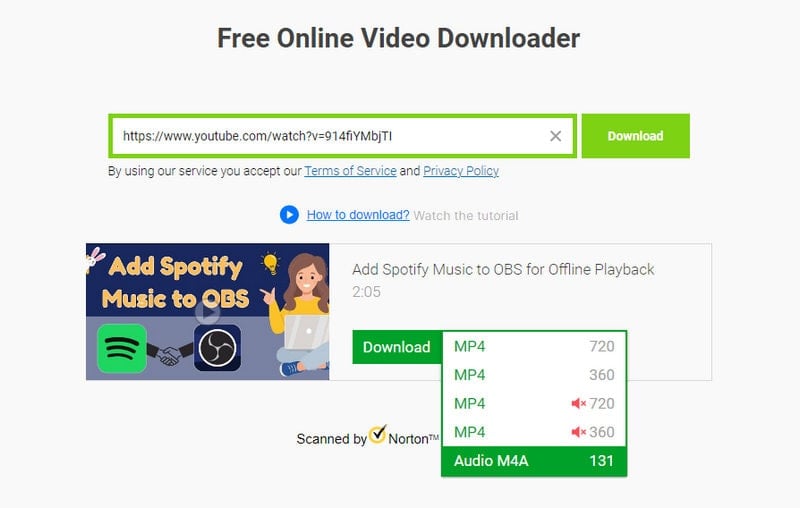
1. SaveFrom extracts videos and background music from YouTube, Facebook, Instagram, Twitter, Dailymotion, Vimeo, and more. However, many users report "Failed to find links" errors. Batch download is not available, and HD downloads may occasionally lack audio.
 How to Use
Step 1: Visit its website and enter a link to a YouTube video.
Step 2: Click "Download" and select "Audio M4A" in the "Download" setting.
Step 3: You will be directed to a new page. Click the "..." icon and choose "Download".
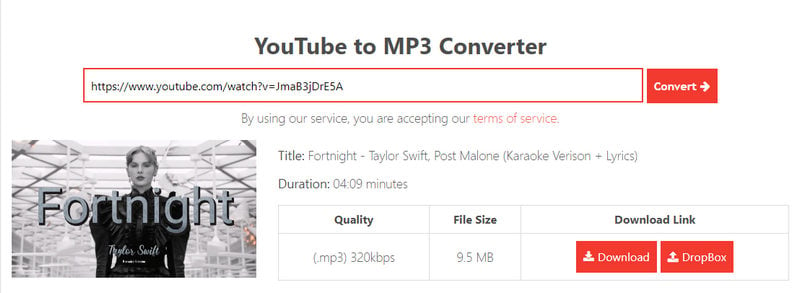
2. OnlyMp3 supports unlimited conversions and allows saving directly to Dropbox. During the test, we encountered occasional slowdowns and redirects to unrelated sites like TikMate during testing.
How to Use
Step 1: Copy a link to YouTube Video and paste it into the parse box. Hit the "Convert" button.
Step 2: Wait for a while. It automatically loads the details of the quality and size. Click "Download" to convert the background music to MP3 format.
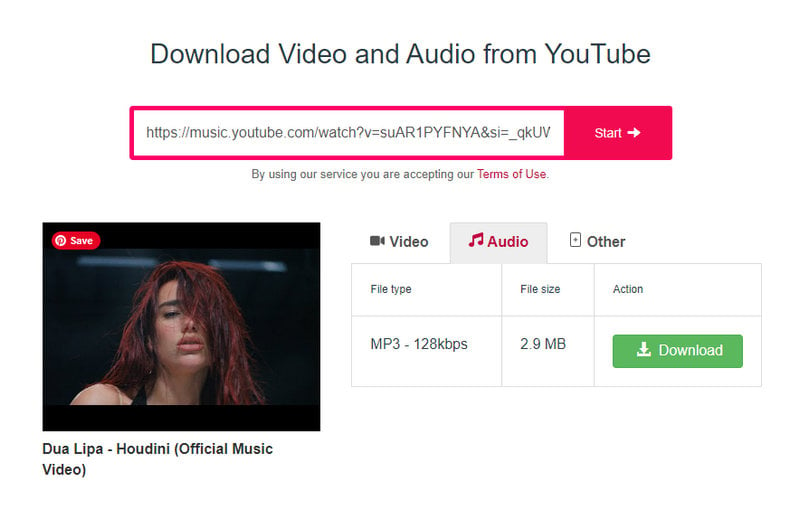
3. Y2mate extracts both audio and video from YouTube, supporting video downloads up to 1440p. However, it triggers aggressive pop-up ads and spammy browser notifications. On Trustpilot, y2mate.ch holds a 3.3/5 "Average" rating.
How to Use
Step 1: Paste a YouTube video or Music link into the parser, then hit "Start".
Step 2: Go to the "Audio" tab, and click "Download" for MP3. For WEBM, proceed to "+Other" and select "webm".
4. YTMP3Music is dedicated to extracting audio from YouTube. It converts any YouTube video or YouTube Music link into an MP3 file for offline enjoyment.
Note: YTMP3Music is currently unavailable. Please use the other tools mentioned in this article to continue your downloads.
 https://ytmp3music.org/v1/
How to Use
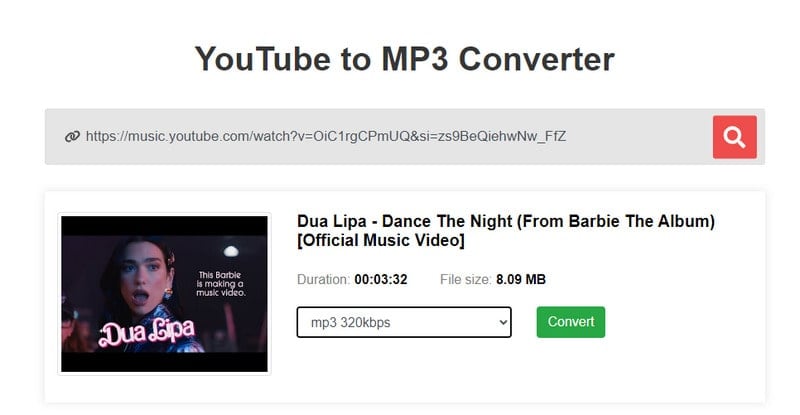
Step 1: Enter the link to the YouTube Music track you wish to download into the designated search box.
Step 2: Once the link is processed, select the desired quality for the MP3 file from the available options (64kbps, 128kbps, 192kbps, 256kbps, and 320kbps). After choosing the preferred quality, click on the "Convert" button to initiate the conversion process. This background music will be converted to MP3 format.
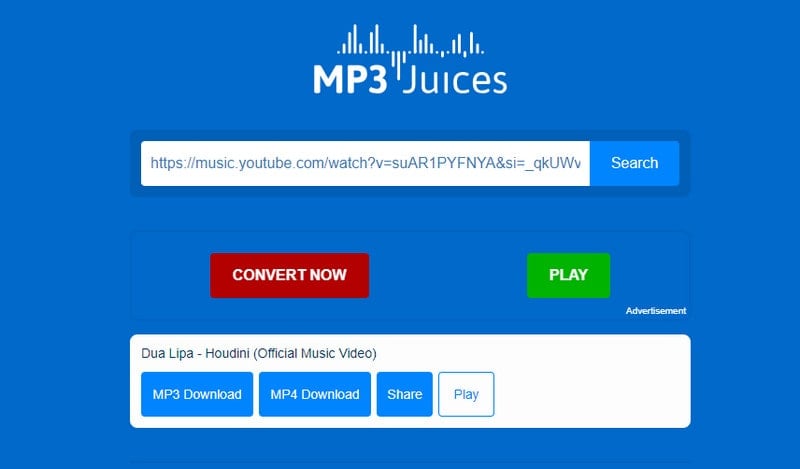
5. MP3-Juices is known for its user-friendly design and simple navigation. To download audio or video, just open its homepage and input a YouTube or SoundCloud link. The straightforward process makes it easy to get content without hassle.
How to Use
Step 1: Enter a link to a YouTube video or music track. Then click "Search".
Step 2: Select "MP3 Download" and briefly wait for the "Download" button to appear. Click the "Download" button to download this YouTube track to MP3.
6. GreenConvert helps YouTube users download videos as MP4 and audio as MP3 on both desktop and mobile. It does not redirect to unfamiliar pages or show intrusive ads. However, it works slowly, and downloaded files often strip song and author information from the file name.
https://greenconvert.ai/web/tool/video
How to Use
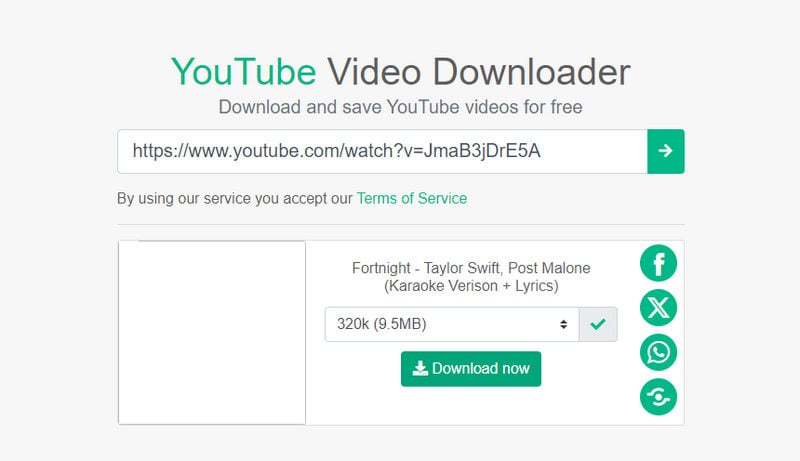
Step 1: Insert a link to a YouTube video and select the output quality of the audio file, from 64kbps to 320kbps. Be prepared for lengthy load times.
Step 2: Afterwards, click "Download Now". It will execute the download task automatically. Wait patiently, the background music will be saved to your local disk.
 User Experience - Online YouTube Music Downloaders:
Pros
 Extract music from YouTube Music videos for free.
Some sites support downloading music from various sources.
Easily access it via a browser website.
You can download YouTube videos as well.
Extract music from YouTube Music videos for free.
Some sites support downloading music from various sources.
Easily access it via a browser website.
You can download YouTube videos as well.
Cons
 Dangerous redirections to unknown pages.
There is no playlist parsing. You must download songs one by one.
You are not allowed to download YouTube Music tracks, albums, and playlists directly.
Severe quality loss, mostly capped at 128kbps or lower.
No multiple options for output formats.
Total loss of ID3 tags, album art, and lyrics.
Unstable download speeds with frequent conversion failures.
Be careful with frequent ads and donation prompts.
Dangerous redirections to unknown pages.
There is no playlist parsing. You must download songs one by one.
You are not allowed to download YouTube Music tracks, albums, and playlists directly.
Severe quality loss, mostly capped at 128kbps or lower.
No multiple options for output formats.
Total loss of ID3 tags, album art, and lyrics.
Unstable download speeds with frequent conversion failures.
Be careful with frequent ads and donation prompts.
If you wish to sidestep all the drawbacks of online YouTube Music downloaders, it's worth delving into the following section. It introduces a truly efficacious tool designed to assist you in batch downloading entire YouTube Music playlists as local MP3 files with full ID3 tags and pristine quality preserved.
TuneCable BeatOne stands as a comprehensive, cutting-edge solution for extracting streaming music, accommodating downloads from a multitude of platforms. It seamlessly facilitates downloading songs from leading services such as Spotify, Apple Music, Amazon Music, Tidal, YouTube Music, Deezer, Pandora, Line Music, and others, serving as a one-stop solution for all your music extraction needs, safe and clean.
If you're seeking a specialized tool to download YouTube Music playlists directly as MP3 files, TuneCable BeatOne is what you need. It goes beyond merely extracting background music from standard YouTube videos. With its assistance, you can download playlists you've created on YouTube Music, as well as freely access and download any song, album, or playlist available on the YouTube Music service. By investing just a few minutes to glance through the simple usage instructions, you'll quickly understand why it perfectly aligns with your requirements.
 Batch Download: TuneCable BeatOne empowers you to batch process your music needs, allowing you to effortlessly add numerous tracks, albums, and playlists to a task list and convert them all to MP3 or other prevalent formats with a single click.
 Lossless Audio Quality: You can customize your audio experience by selecting sample rates up to 192kHz and bit rates up to 320kbps, ensuring your downloaded YouTube Music playlists are captured in pristine, high-fidelity quality.
 Permanent Playback: The YouTube Music playlists, once downloaded, reside securely on your computer, ensuring constant accessibility and eliminating the risk of losing them. Furthermore, the conversion process meticulously retains comprehensive metadata, encompassing details such as song title, artist, album, playlist, genre, track number, year, as well as lyrics and cover artwork, ensuring a complete and rich media experience post-conversion.
 Ad-Free Download: Whether you're a YouTube Free user or a YouTube Premium subscriber, you can enjoy ad-free downloads of YouTube Music playlists to MP3 format straight to your computer.
 Unlimited Uses: Once your YouTube Music playlists are transformed into MP3 files, they become effortlessly portable. Transfer them to mobile devices, USB flash drives, SD cards, gaming consoles, or any other gadget for offline listening. Moreover, you can seamlessly integrate these YouTube Music playlists into diverse apps, create audio CDs, share them with friends, or explore further uses, expanding your musical horizons without boundaries.

TuneCable BeatOne
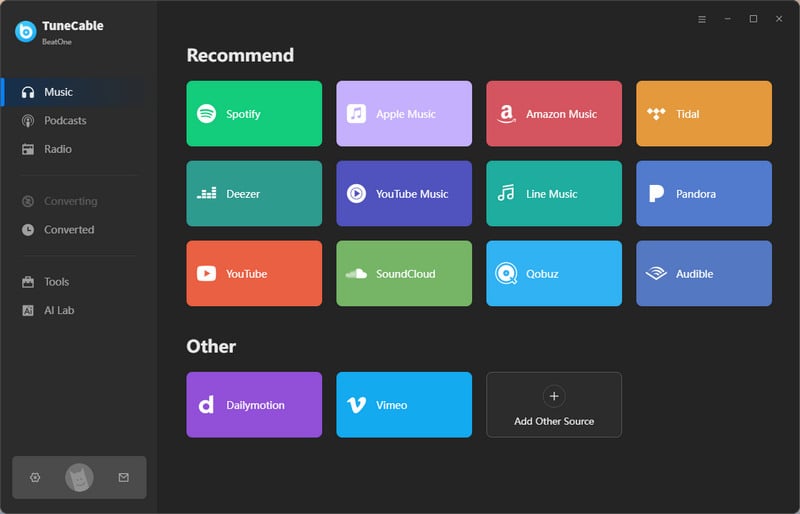
Step 1: After the installation of TuneCable BeatOne, double-click on the app icon to launch it. Tap on "YouTube Music" to extract music playlists from YouTube Music. Soon after, the embedded YouTube Music web player appears.
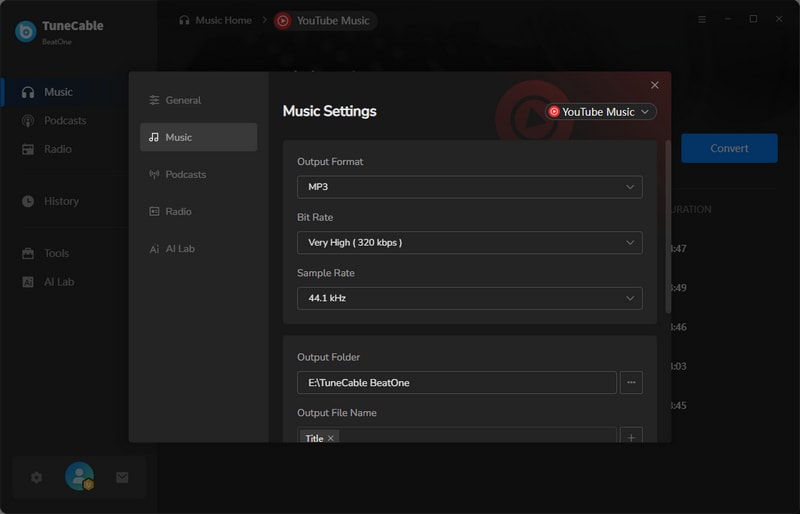
Step 2: Head to the "Settings" section to modify output preferences. Select the preferred output format, bitrate, sample rate, output folder, output file name, output organized way, and other parameters. To download YouTube Music playlists to MP3, switch to "MP3" in the "Output Format" setting.
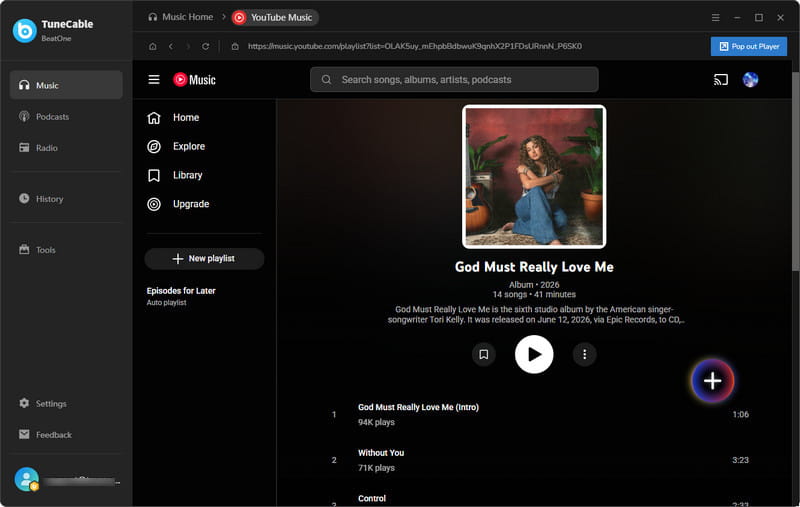
Step 3: In the pop-up YouTube Music web player, quickly browse through and pause when you spot a playlist you're interested in. Click on its title to open it. Then click the "Click to add" button located at the bottom right. With this click, TuneCable will generate a list of available songs for further selection.
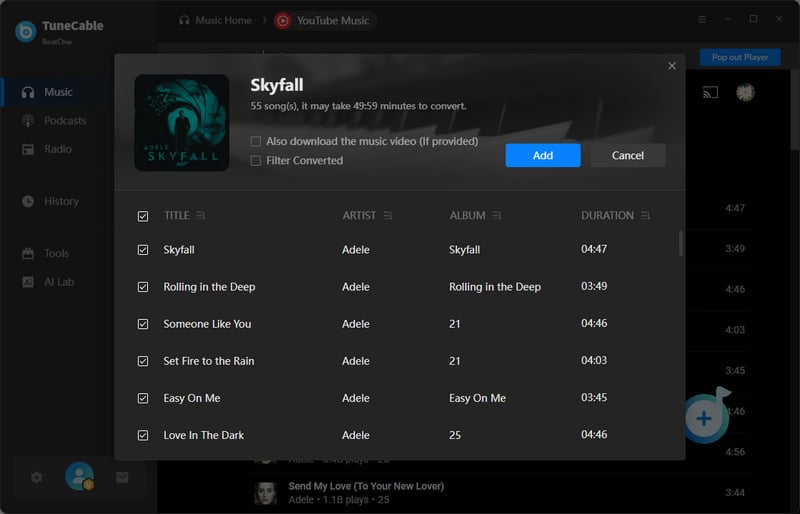
Step 4: Get the tracks you need selected, then tap on the "Add" button to queue them for download. If you have downloaded several YouTube Music playlists before, toggle on the "Filter Converted" option to swiftly hide converted songs.
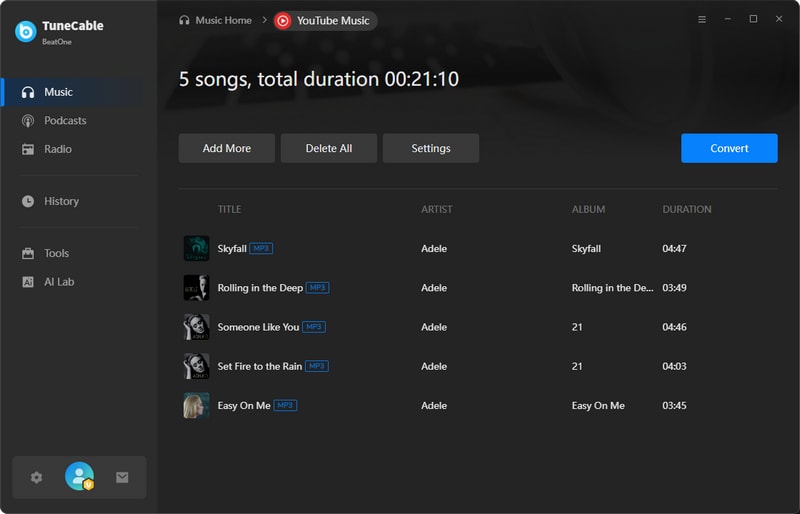
Step 5: When you are prone to include more YouTube Music playlists, click on "Add More". To perform an instant conversion, click the Convert button. After conversion, the YouTube Music mp3 playlist will be stored in the output path you specified.

| TuneCable BeatOne | SaveFrom | OnlyMp3 | Y2mate | YTMP3Music | MP3-Juices | GreenConvert | |
|---|---|---|---|---|---|---|---|
| Ad-Free | ✔ | ❌ | ❌ | ❌ | ❌ | ❌ | ✔ |
| Playlist Batch Download | ✔ | ❌ | ❌ | ❌ | ❌ | ❌ | ❌ |
| Audio Quality | Original (320kbps) | 128kbps | 114kbps | 320kbps | 320kbps (Unavailable) | 192kbps | 320kbps |
| ID3 Tags & Album Art | ✔ | ❌ | ✔ | ✔ | N/A | ❌ | ❌ |
| Output Format | MP3, AAC, WAV, FLAC, AIFF, ALAC, MP4 for MVs | AAC | MP3 | MP3 | MP3 | MP3 | MP3, MP4 |
| File Organization | ✔ | ❌ | ❌ | ❌ | ❌ | ❌ | ❌ |
| Supported Platforms | YouTube Music, YouTube, Spotify, Apple Music, TIDAL, Deezer, Amazon Music, etc. | YouTube, YouTube Music, Facebook, Instagram, Twitter | YouTube, YouTube Music | YouTube, YouTube Music | YouTube, YouTube Music | YouTube, YouTube Music, SoundCloud | YouTube, YouTube Music |
After completing the steps provided in Part 2, your desired YouTube Music playlists will have been converted to MP3 format, which helps you to have full control over the YouTube Music playlists. Let's see what we can do with these MP3s.
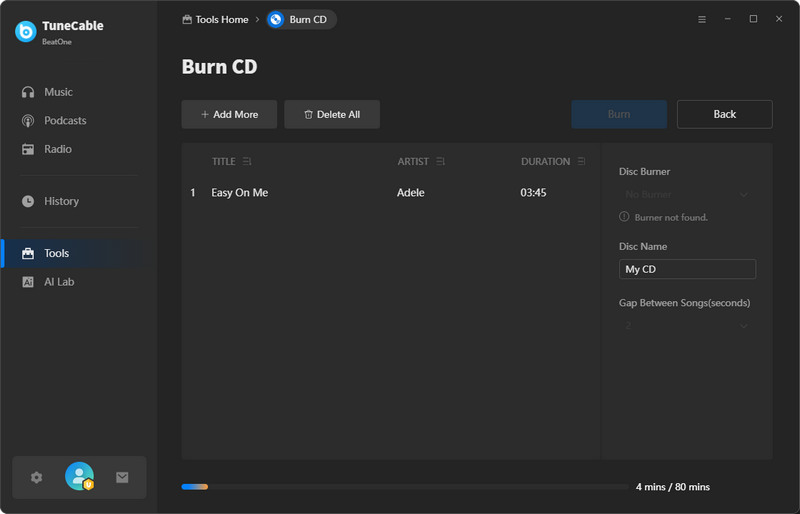
TuneCable BeatOne provides a built-in tool to burn music to a CD. Follow the steps below to burn the downloaded YouTube Music Playlists to a CD.
Step 1: Open TuneCable BeatOne. Go to "Tools >Burn CD".
Step 2: Click "+Add" to import YouTube Music tracks from a local computer.
Step 3: Click "Burn" after inserting a blank CD and successfully establishing a connection.
 Follow similar steps here to learn more methods for burning YouTube Music playlists to CDs.
Step 1: Launch the iTunes app. Go to "File >Add File/Folder to Library".
Step 2: Select desired YouTube Music files and add them to iTunes.
Step 1: Open Windows Media Player. Head to the "Playlist" or "Music" section.
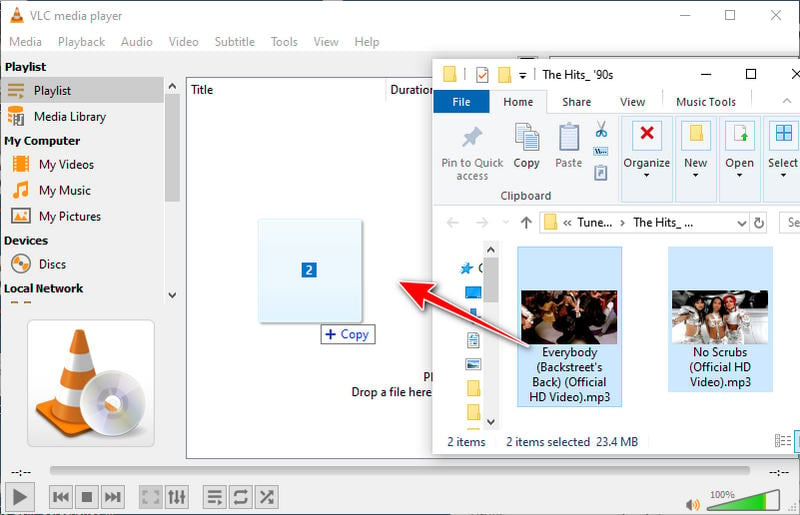
Step 2: Drag and drop the YouTube Music tracks to Windows Media Player.
Step 1: Start VLC Media Player. Go to "View >Playlist".
Step 2: Drag and drop the YouTube Music tracks to VLC Media Player.
Follow similar steps here to add the converted YouTube Music playlists to common media players.
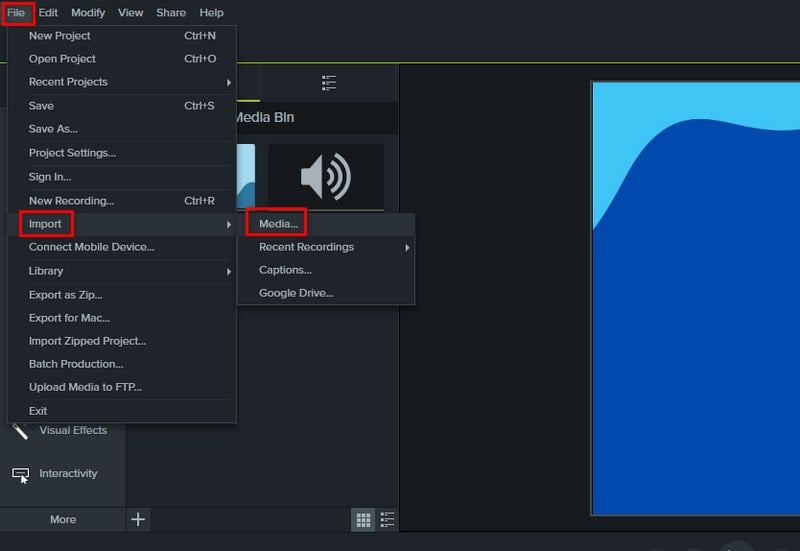
Camtasia stands out as a popular video editing software. Here's a quick guide on incorporating your YouTube Music files into Camtasia for seamless editing.
Step 1: Launch the Camtasia app. Go to "File > Import > Media....".
Step 2: In the pop-up Windows Explorer, select your desired YouTube Music files and add them to Camtasia.
Follow similar steps here to import the converted YouTube Music playlists to more video editors.
Add YouTube Music Playlists to Serato DJ: To import your downloaded YouTube Music playlists, simply open the designated folder, select the desired tracks, and drag them into Serato DJ for effortless editing and mixing.
Add YouTube Music Playlists to Rekordbox DJ: Access the folder containing your downloaded YouTube Music playlists, then drag and drop them into Rekordbox DJ for mixing and playlist integration.
Add YouTube Music Playlists to Virtual DJ: In Virtual DJ's left-hand menu, select "Local Music". Proceed to "Desktop > This PC" and locate the folder housing your converted YouTube Music playlists. Once the folder is accessed, the songs will seamlessly load into the software.
Follow similar steps here to add the converted YouTube Music playlists to Traktor DJ.
With your YouTube Music playlists now saved as local MP3 files, you have the freedom to effortlessly transfer them onto any Android or iOS device.
Follow similar steps here to import the converted YouTube Music playlists to an Android device.
Follow similar steps here to import the converted YouTube Music playlists to an iOS device.
Online converters typically strip away some ID3 metadata. Dedicated tools like TuneCable are needed to preserve track information, album art, and lyrics. Moreover, it also offers a free Tag Editor for users to use.
While online tools are often capped at 128kbps, professional applications can retain original quality up to 320kbps MP3 or even lossless formats like FLAC.
No. MP3 files converted via tools like TuneCable BeatOne are permanent local files. They do not expire or require an active subscription. In fact, TuneCable enables you to download music from YouTube with a 320kbps audio quality without requiring a YouTube Premium account.
Yes. Once downloaded, MP3s are DRM‑free and can be copied to any smartphone via USB, cloud storage, or file transfer apps.
YouTube Music provides higher‑quality audio streams compared to standard YouTube videos (typically 126‑152kbps).
Whether you aim to permanently preserve cherished musical pieces or aspire to indulge in music without internet connectivity, TuneCable BeatOne provides unparalleled convenience. With straightforward and user-friendly steps, you can swiftly convert your favorite YouTube Music playlists into MP3 format and store them on a myriad of devices. Henceforth, let's follow the practical YouTube Music downloading tricks offered by TuneCable BeatOne, enhancing your musical journey with added pleasure and ease.
 What's next? Download TuneCable BeatOne now!

Ava Morrison | Senior Writer
TuneCable BeatOne

