
 >
How To >
Music Tips >
CnvMP3 is a free online converter that converts YouTube videos into MP3 or MP4 files. But is CnvMP3 safe, and does its advertised 320 kbps MP3 option deliver the expected audio quality? We tested CnvMP3's website redirects, security, actual audio quality, download length limits, playlist support, and metadata retention. Our results reveal several limitations worth knowing before using this online converter.
CnvMP3 is a free web-based tool that allows you to download videos from platforms like YouTube, TikTok, Reddit, Instagram, Facebook, and X, converting them into MP3 or MP4 formats. No software installation or user registration is required. The website maintains a clean, ad-free interface supported by donations through Ko-fi. Users can join the discussion on the official Reddit community, r/cnvmp3.
| Features | Details |
|---|---|
| Supported Formats | MP3, MP4 |
| Audio Bitrate Options | 96, 128, 256, 320 kbps |
| Video Resolution Options | 144p, 360p, 480p, 720p, 1080p |
| Supported Platforms | YouTube, TikTok, Reddit, Instagram Reels, Facebook, Twitch, X |
| Playlist Support | ❌ |
| Login Requirement | ❌ |
| Length Limits | MP3: no longer than 90 minutes; MP4: no longer than 60 minutes |
Note: Although CnvMP3 advertises MP4 downloads of up to 180 minutes, our testing found shorter limits: up to 90 minutes for MP3 and up to 60 minutes for MP4. See our detailed length test for the results.
When using online tools, the primary concerns are the potential for computer viruses and other security risks. In light of this, we have conducted a security test on CnvMP3.
On the day of testing, when we entered "cnvmp3.com", we were redirected straight to the site cnvmp3.com/v55. During this process, we saw no ads or pop-ups (aside from a prompt for Ko-fi donations), nor did we see any prompts to install any software.
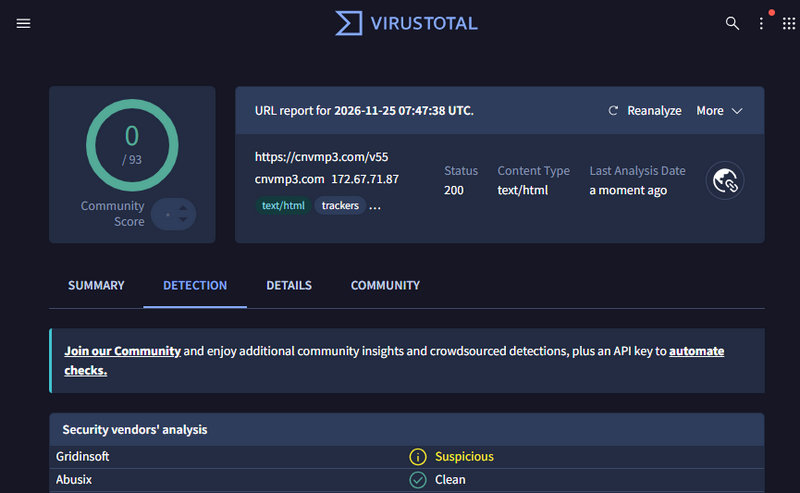
We submitted https://cnvmp3.com/v55 to VirusTotal for analysis. At the time of testing, 0 out of 93 security engines flagged the URL as malicious. However, Gridinsoft separately classified it as suspicious. This result does not prove that the website is completely safe, nor does it rule out potential risks from downloaded files or future changes to the website.
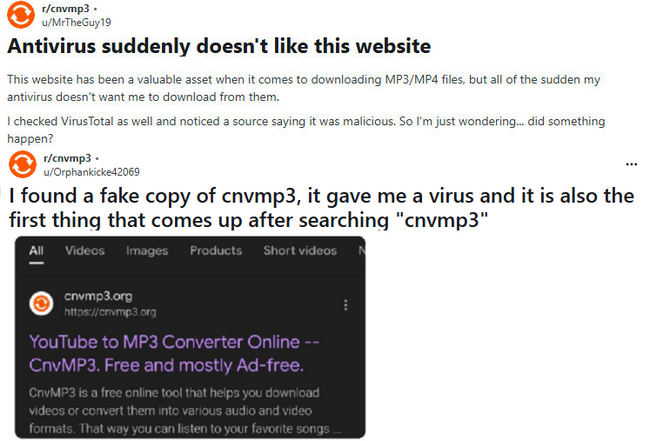
Some users have reported on the official CnvMP3 Reddit community that they have encountered websites appearing to be CnvMP3. In some cases, when visiting these sites, virus detection tools have flagged them as containing viruses.
Free online YouTube-to-MP3 converter sites may pose security risks. To reduce potential risks, verify the website domain before using it. You can also scan URLs and the downloaded files with tools like VirusTotal for potential threats. Avoid clicking unfamiliar links or pop-ups to reduce the risk of malware infections.
Disclaimer: This review is intended for informational and educational purposes. Only download content that you own, have permission to download, or that is legally available for downloading. Always respect applicable copyright laws and platform terms of service.
Some users have reported that when searching for the keyword CnvMP3 on Google, the homepage of the search results shows "cnvmp3.com/v55" or "cnvmp3.com/v54" instead of "cnvmp3.com", and they are unsure if they have opened a genuine CnvMP3 website. In addition, there are many similar domains. We conducted the following tests on this:
| URL | Final Destination | Verified in Our Test |
|---|---|---|
| cnvmp3.com | cnvmp3.com/v55 | ✔️ |
| cnvmp3.org | ww7.cnvmp3.org | ❌ Not verified |
| cnvmp3.net | cnvmp3.net/en/ | ❌Not verified |
Tips for avoiding fake CnvMP3 websites:
We have recently tested CnvMP3 to convert YouTube links to MP3 audio files. Here are the latest steps to use it:
Step 1Open any video on YouTube and copy its link.
Step 2Enter "cnvmp3.com" into your browser. It may redirect to a different URL. Please verify it against the method for confirming the official CnvMP3 website mentioned above.
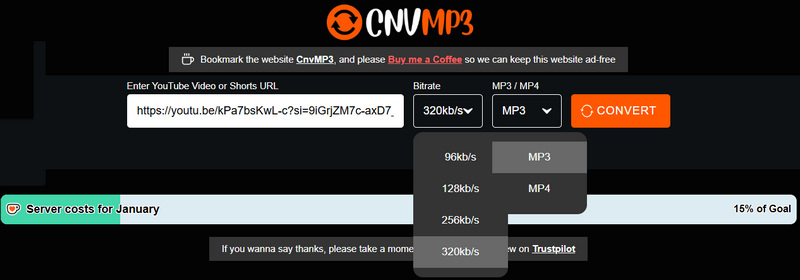
Step 3Paste the YouTube link into the site, select your preferred format and bitrate, and click "CONVERT".
Step 4Locate the downloaded MP3 file in your browser's download output folder. For example, the "Downloads" folder, which is the default destination on Windows computers.
To address the questions users care about most, we conducted a series of tests using the same computer and network environment:
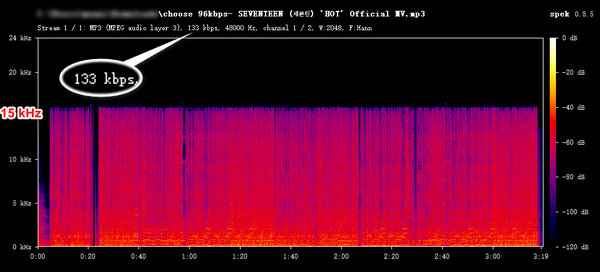
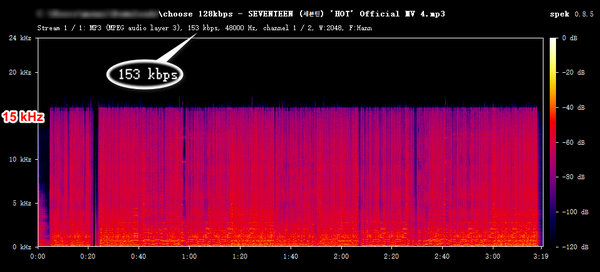
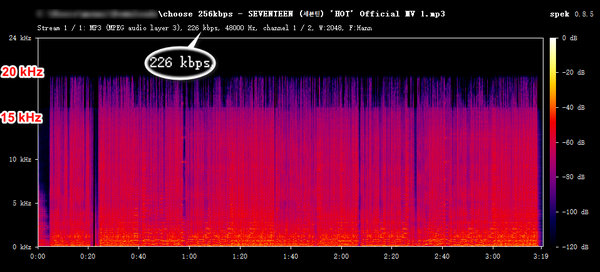
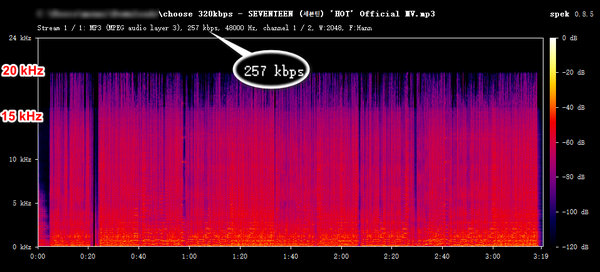
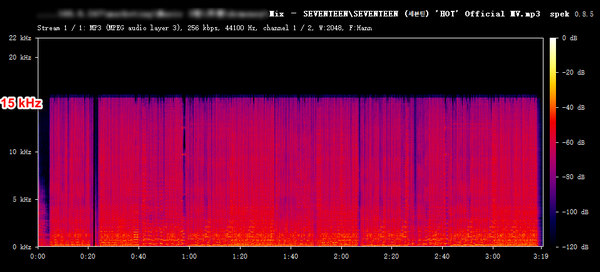
In Test 1, we selected various bitrates (96, 128, 256, and 320 kbps), which ultimately yielded MP3 files with bitrates of 133, 153, 226, and 257 kbps, respectively. The results obtained differ from the settings originally chosen. As shown in the spectrograms, the 96 and 128 kbps options had a frequency cutoff of around 16 kHz, while the 256 and 320 kbps options reached approximately 20 kHz.
Our finding: Selecting 320 kbps does not guarantee that the resulting MP3 file will have a constant bitrate of 320 kbps. The actual encoding mode and audio source also affect the output.
In Test 2, we tested 8 YouTube video links with durations of 22, 58, 60, 62, 90, 91, 179, and 184 minutes, attempting to convert each one to MP3 or MP4. When selecting MP3, videos lasting 22, 58, 60, 62, and 90 minutes were converted successfully. When selecting MP4, only the 22-, 58-, and 60-minute videos were converted successfully. In short, CnvMP3 supports MP3 conversion for YouTube videos up to 90 minutes long and MP4 conversion for videos up to 60 minutes long.
| Format / Video Length (min) | 22 | 58 | 60 | 62 | 90 | 91 | 179 | 184 |
|---|---|---|---|---|---|---|---|---|
| MP3 | ✔️ Success | ✔️ Success | ✔️ Success | ✔️ Success | ✔️ Success | ❌ Failed | ❌ Failed | ❌ Failed |
| MP4 | ✔️ Success | ✔️ Success | ✔️ Success | ❌ Failed | ❌ Failed | ❌ Failed | ❌ Failed | ❌ Failed |
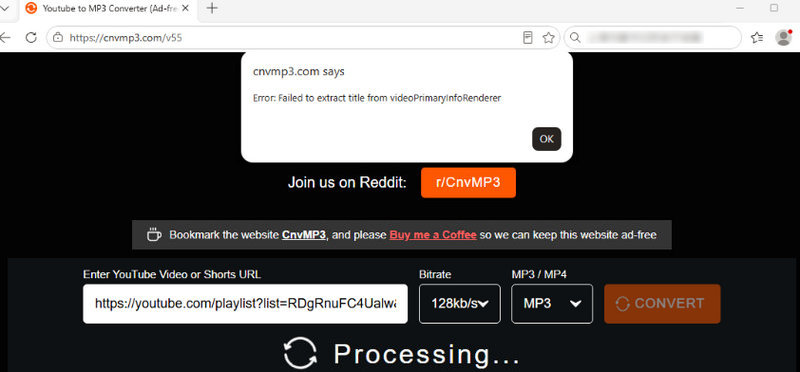
NO. In Test 3, we pasted a YouTube video playlist link to CnvMP3 to convert, which resulted in the error: "Failed to extract title from videoPrimaryInfoRenderer". Therefore, it is clear that CnvMP3 does not support batch downloading entire YouTube playlists, and videos must be downloaded one by one.

Looking to download YouTube playlists in bulk? Consider an alternative to CnvMP3: TuneCable BeatOne. It allows you to download multiple YouTube playlists at once—converting them into MP3, AAC, ALAC, FLAC, AIFF, or WAV formats, making it easy to download a large number of YouTube videos.
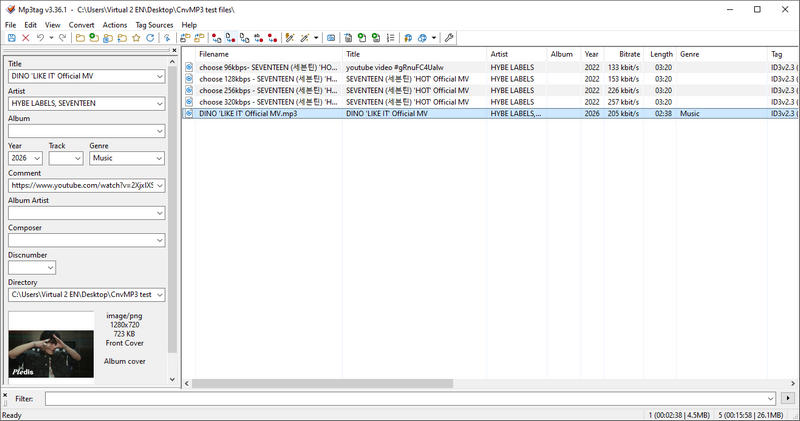
When we open the downloaded MP3 files using Mp3tag, we find that most of them contain only basic tags—such as title, artist, and year—along with cover art. It is worth noting that the "Artist" field is populated with the channel name. If you are downloading music videos, this might make managing the downloaded files somewhat inconvenient.
Although some users have reported that the downloaded audio might not match the original YouTube video, we did not encounter this issue during our testing. If this happens, first check the original video's title and audio source to make sure you copied the correct link. Changing the bitrate alone will not fix an incorrect source.
As a free tool, CnvMP3 is suitable for occasional users who want to download a small number of YouTube links and convert them into MP3 or MP4 files. However, if you need to download entire YouTube playlists (such as collections of official music videos), handle long-duration videos, or ensure your files are neatly tagged, you might want a more robust alternative: TuneCable BeatOne.
TuneCable BeatOne is a desktop application that is completely free of intrusive ads or pop-ups. It simply analyzes the YouTube links to download and extract the audio. Furthermore, if you wish to edit the audio after conversion, TuneCable offers an all-in-one solution, featuring a built-in AI-powered vocal/instrumental separator and an audio editor.

TuneCable BeatOne
| Features | CnvMP3 | TuneCable BeatOne |
|---|---|---|
| Type | Online Tool | Desktop Software |
| Price | Free | Free Trial / Paid |
| Installation | Not Required | Required |
| Audio Output Formats | MP3 | MP3, AAC, WAV, FLAC, AIFF, ALAC |
| Playlist Download | ❌ | ✔️ |
| Metadata | Basic Tags | Extended Tags |
| File Organization | Limited | Custom Folders |
| Video Output | MP4 Supported | MP4 Supported (YouTube Music Videos) |
| Extra Audio Tools | ❌ | ✔️ |
| Best For | Occasional Downloads | Bulk Music Downloads |
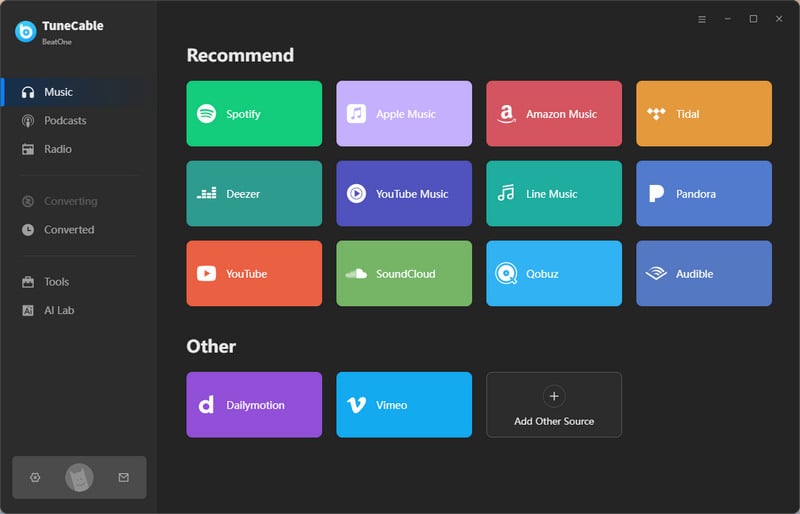
Step 1 Launch TuneCable BeatOne and select "YouTube" from the initial page. Sign in to your YouTube account if needed (optional).
Tips: YouTube Music is a platform dedicated specifically to music, featuring a more comprehensive information structure built around musical works. If your priority is downloading music videos and preserving more complete metadata, "YouTube Music" is the better choice.
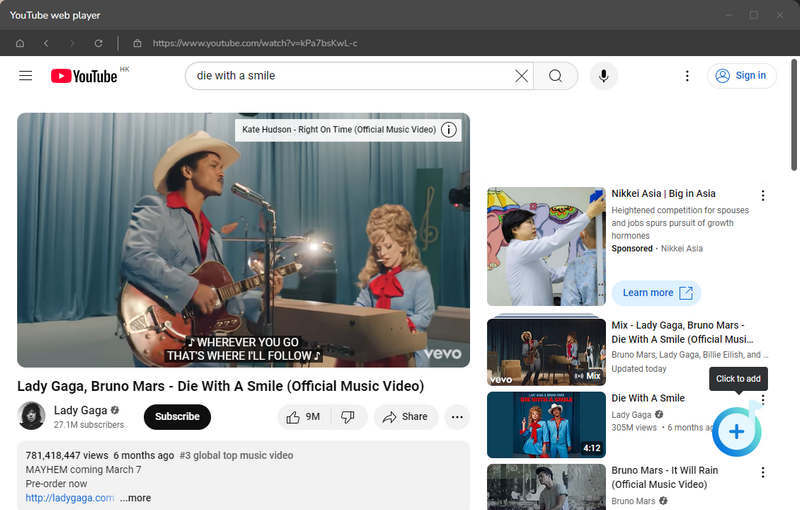
Step 2 Find the YouTube playlist you want to extract audio from, click the "+" icon, select the content you want to download, and click "Add".
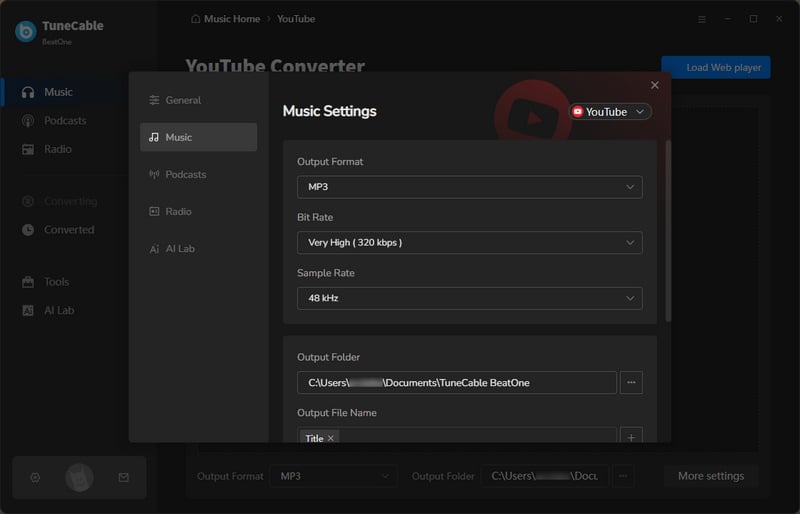
Step 3 Click the "Settings" button, select the output format as MP3, and set other audio quality options.
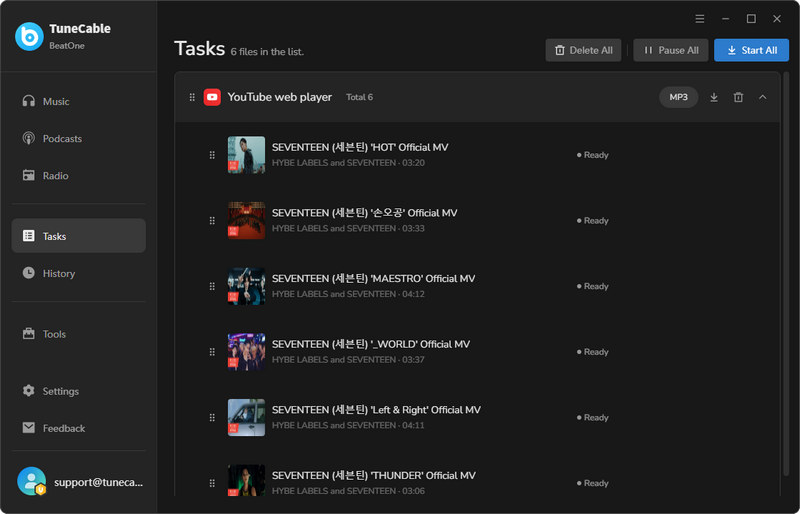
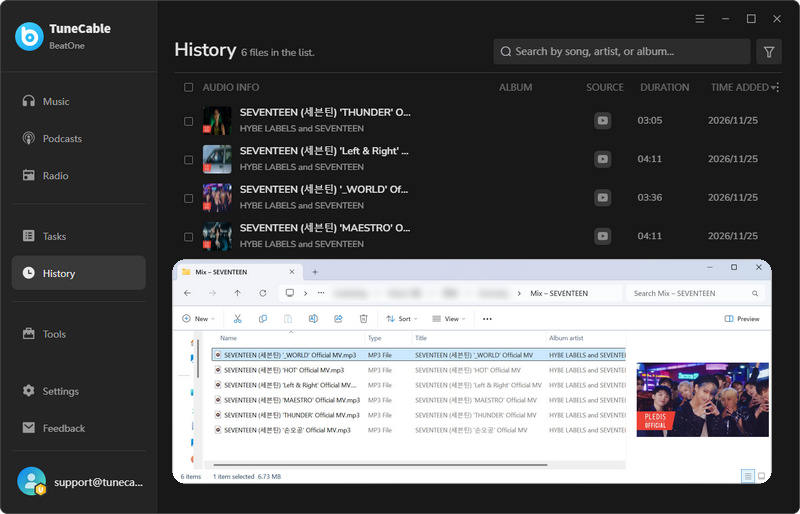
Step 4 Go to "Tasks" and hit "Start All" to start converting YouTube audio to MP3 files. As the download is finished, go to "History" to view the downloaded MP3 files.
Test Notes:
cnvmp3.com is the domain identified as the official website in our review. During our testing, it redirected to /v55 on the same domain. The version path may change over time. Always verify the exact domain rather than relying solely on the website name or design.
Several factors can cause CnvMP3 to stop converting YouTube videos to MP3:
No. Testing reveals that the CnvMP3 website does not support parsing YouTube playlists. It can only download and convert individual YouTube videos into MP3 or MP4 files. If you want to download all the videos in a YouTube playlist, you have to download them one by one.
Yes. Examples include Loader.to, EzMP3, BigMP3, etc. For more YouTube-to-MP3 tools, see: Free YouTube to MP3 Download Sites.
Different tools have different strengths, so choosing CnvMP3 ultimately depends on your needs and priorities. In general, CnvMP3 is well-suited for users primarily looking to download video content from platforms like YouTube or TikTok. Furthermore, without batch downloads or support for formats beyond MP4 video and MP3 audio, CnvMP3 is best geared toward casual, light-duty users with basic downloading needs.
In contrast, TuneCable BeatOne is a professional desktop-based downloader designed specifically for music. It supports a wider range of platforms, offers more output format options, and includes a suite of advanced audio tools. Most importantly, it supports batch-downloading entire playlists, making it a highly efficient solution for users who need to download a large volume of content from YouTube. If you're interested, you may click the button below to try it for free.
 What's next? Download TuneCable BeatOne now!

Ava Morrison | Senior Writer

TuneCable BeatOne - All-in-one Music Solution

