
TuneCable BeatOne
 >
How To >
Music Tips >
>
How To >
Music Tips >
BigMP3 is a free web-based download site that allows users to download music and video in MP3 or MP4 format. It claims to support high-quality MP3 downloads at bitrates of up to 320 kbps. Does BigMP3 truly deliver what it promises? Is it safe to use in 2026? No worries! We tested it! In this BigMP3 review, we'll share our actual test results, including its download quality, speed, ease of use, ads and redirects, and overall safety, and help you understand what you can expect before using it.
| Category | Our Verdict |
|---|---|
| Ease of Use | ✅ Simple and beginner-friendly |
| Registration | Not required |
| Download Speed | ✅ Fast for single downloads |
| Audio Quality | ⚠️ Actual quality may vary |
| Ads & Redirects | ⚠️ Some interruptions may occur |
| Safety | ⚠️ Redirects and pop-up ads require caution |
| Best For | Quick, occasional MP3 downloads |
BigMP3 is a free online tool that converts YouTube Music or YouTube video links into MP3 files. It offers bitrate options of 128, 192, 256, and 320 kbps. It also downloads YouTube videos as MP4 files in resolutions from 360p to 1080p. In addition to music and video downloading, it provides a search function that allows users to explore music. This web-based tool works on any device without requiring logins or software installation. With a few steps, users can download their favorite music for offline listening.
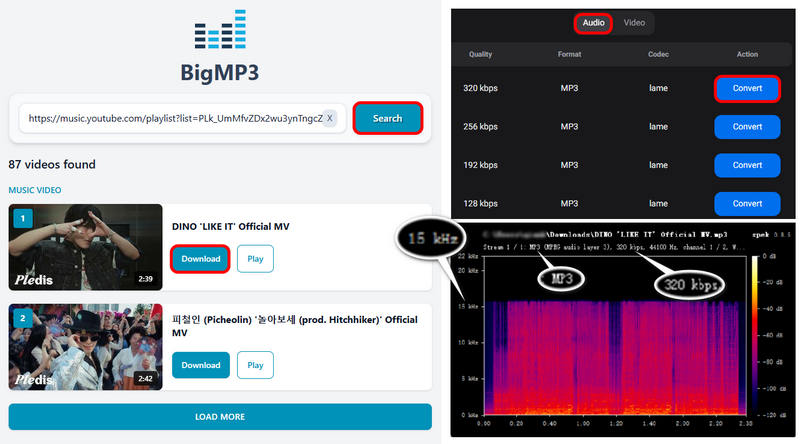
Ads can make big promises, but real-world testing reveals what you actually get. To get a clear picture of how BigMP3 performs, we tested it from several angles. We downloaded a 10-song playlist from BigMP3 and tested the actual audio quality, download speed, and overall download experience. Here are our test setup and real-world test results:
In our testing of a 10-song playlist, all songs were successfully downloaded to the local PC. None of the files are empty or corrupted.
To ensure a more accurate and reliable assessment, we compared the durations displayed on YouTube Music with those of the actual downloaded files. For all 10 downloaded songs, the file duration was 1 second shorter than the official duration. However, we found this shows a negligible impact on our listening experience after listening to these songs in their entirety. This one-second discrepancy did not appear to result in any loss of key audio information. The most likely explanation is that different platforms calculate or round displayed durations differently.
During our testing, the free version of BigMP3 limited downloads to one song at a time. We completed the download process in 4 minutes and 19.63 seconds, with an average download time of approximately 26 seconds per song.
The total duration of the playlist is approximately 29 minutes, meaning the download speed was about 6.7x faster. None of the files showed unusually slow download speeds or required repeated retries.
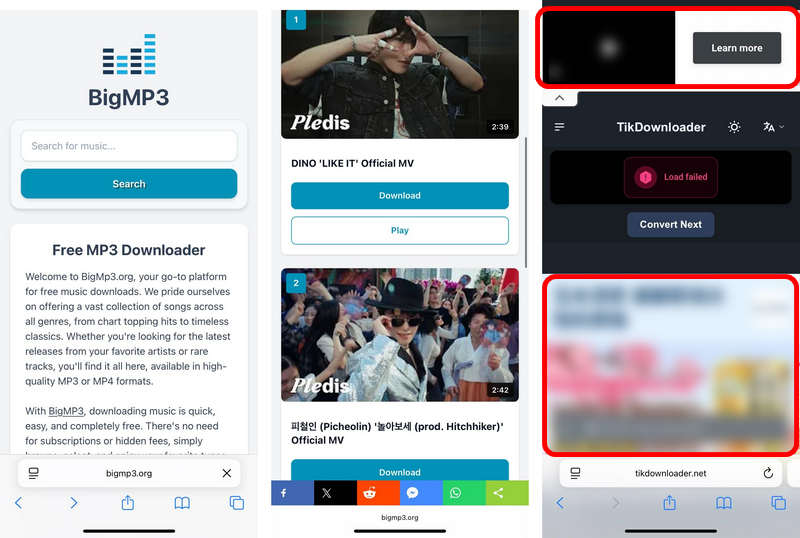
The main interface did not display obvious pop-up ads during our test. However, clicking certain elements triggered redirects, and the final download page displayed pop-up ads, which can affect the download process. In our tests, redirects were triggered not only by clicking standard buttons like "Search" or "Download", but even by clicking random blank areas of the page.
Notably, the download link itself is generated on a redirect page that does contain pop-up ads. To download a single song, we were forced to close at least 2 pop-ups or redirect pages before starting the download.

Looking for a more powerful alternative to BigMP3 downloader? TuneCable BeatOne supports batch downloads, multiple music platforms, and flexible audio formats. You can download music as MP3, AAC, FLAC, WAV, AIFF, or ALAC while keeping ID3 tags, cover art, and lyrics. See our detailed test results.
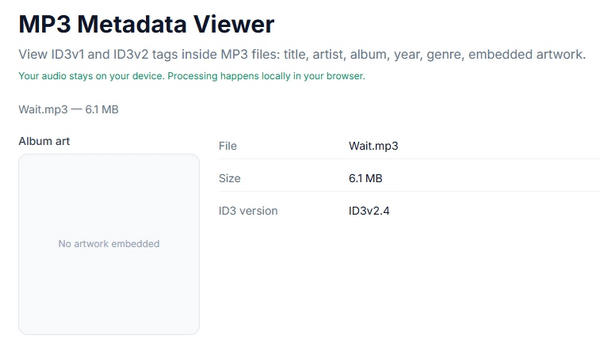
We used Metadata Viewer to check all the MP3 files downloaded from the BigMP3 website and found that none of them contained any saved ID3 metadata—no title, artist, album, cover image, etc.
During testing, we failed to download songs from the BigMP3 website on a mobile device, and redirects were triggered. Also, the audio quality selection module failed to load, making it impossible to generate a download link. As shown in the image below, the download page features intrusive, non-closeable ads at both the top and bottom, which significantly detract from the download experience.
Beyond the fundamental points mentioned above, audio quality and safety are two of the most important factors for users. Our review therefore takes a closer look at both.
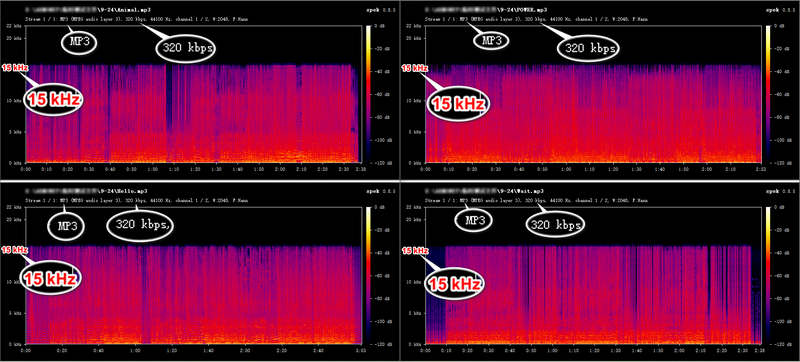
Based on our tests, not really. We were offered quality options of 128, 192, 256, and 320 kbps on the BigMP3 site, and selected 320 kbps for all test songs. The resulting files were indeed labeled as 320 kbps. However, since this label does not necessarily reflect actual audio quality, we used Spek to analyze each file.
None of the MP3 files we downloaded from BigMP3 were genuine 320 kbps files. The figure below shows the spectrograms of several output files from the test. The spectrograms revealed a clear cutoff at approximately 15-16 kHz, suggesting that the true bitrate is likely around 128 kbps, well below the labeled 320 kbps.
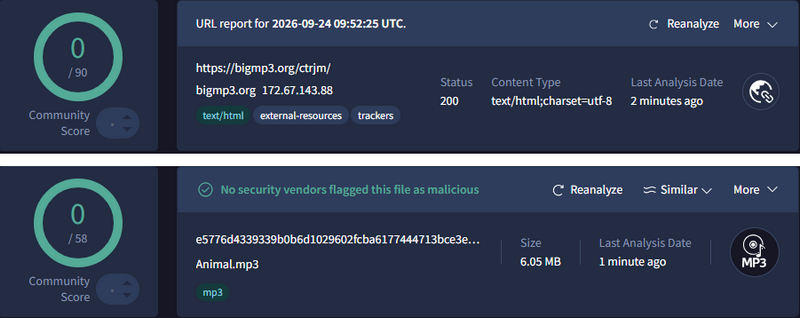
To evaluate the security of BigMP3, we used VirusTotal to assess its website and downloaded files. The tests covered the following areas, with results detailed below:
| Category | Test Result | Test Findings |
|---|---|---|
| VirusTotal Scan | ✅ No detections | 0 detections from 90 / 58 security vendors |
| Website Security | ✅ Passed | HTTPS was enabled, and no browser security warnings were triggered while visiting the BigMP3 website. |
| Ads, Pop-ups & Redirects | ⚠️ Caution | Ads and occasional redirects were encountered during the download process. |
| Downloaded File Safety | ✅ Passed | The downloaded MP3 files were playable and matched the expected format (MP3). |
| Privacy Concerns | ✅ Low Risk | No account registration was required on BigMP3. |
Additionally, the BigMP3 website is accessible and performs its advertised basic conversion and download functions. However, its quality claims should be interpreted carefully based on our tests.
After thoroughly testing BigMP3, we've summarized its key pros and cons below.
Pros
 Completely free.Quick download speed: around 6.7x.No installation or registration is required.
 Cons
 No batch downloading in the free version.Fake 320 kbps MP3, generally around 128 kbps in reality.Redirects and pop-up ads can interrupt the download process.Fails to download MP3 music on mobile device.No metadata saved.
While BigMP3 works well for quick MP3 downloads, some users may look for alternatives with fewer ads (or no ads), better audio quality, batch download support, or more advanced download features. We've found several free alternatives and professional desktop solutions based on different needs.
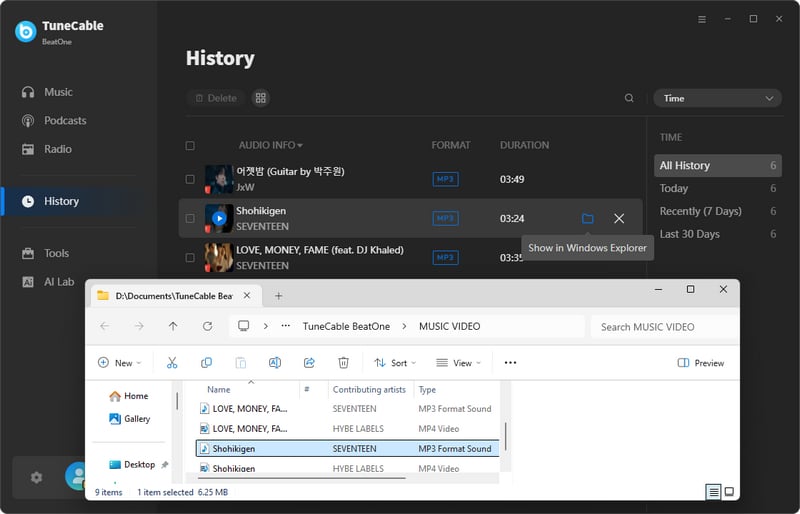
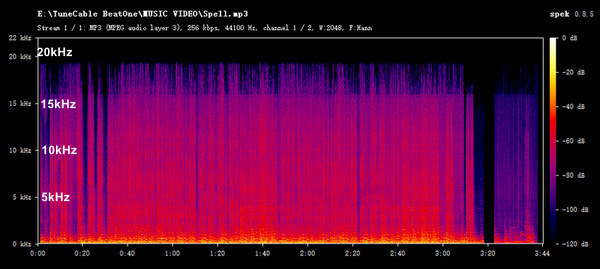
TuneCable BeatOne is a music downloader that supports downloading music from major platforms, such as YouTube Music, Spotify, Tidal, and Apple Music, into MP3, AAC, ALAC, FLAC, AIFF, or WAV formats. This desktop software enables batch downloading of multiple YouTube Music playlists, albums, or YouTube videos as MP3 files at once. It supports high-quality music downloads, including Tidal HiFi, Apple Music Lossless, and Amazon Music Ultra HD.

TuneCable BeatOne
Here are the steps to batch download MP3 music using TuneCable BeatOne:
(We take YouTube Music as an example.)
Step 1 Launch TuneCable BeatOne and click "YouTube Music". Log in to a YouTube account.
Step 2 Open any playlist and click "Click to add". Choose the needed tracks, and hit "Add". To add multiple YouTube Music playlists at once, just click "Add More" and repeat adding.
Step 3 Go to "Settings" to customize the output parameters like output format, bit rate, sample rate, etc.
Step 4 Hit "Convert" button to start downloading.
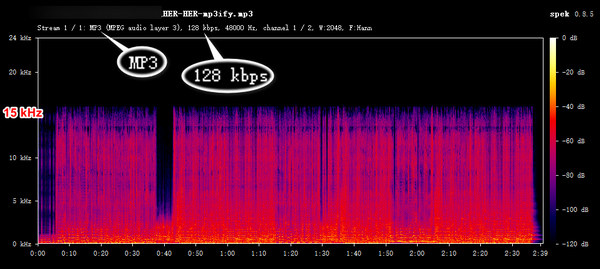
Mp3ify is a free online music download site similar to BigMP3. It allows users to download MP3s by processing YouTube video or music links. Our tests found that free users get 64 or 128 kbps audio quality, and the output matches these specifications. The download process is also very similar to that of BigMP3, which is beginner-friendly.
Step 1 Copy and paste the YouTube Music or video link into the Mp3ify website and click "Search".
Step 2 Select the format and quality (64 or 128 kbps) and confirm.
Step 3 Click "Download to MP3" to complete the download.
| BigMP3 (Online Downloader) |
Mp3ify (Online Downloader) |
TuneCable BeatOne (Desktop Downloader) |
|
|---|---|---|---|
| Quick Single Downloads | ✅ | ✅ | ✅ |
| Free | ✅ | ✅ | Trial/Paid |
| No Installation | ✅ | ✅ | — |
| Batch Downloads | — | — | ✅ |
| Playlist Downloads | — | Limited | ✅ |
| Metadata | Basic | Basic | ✅ |
| Multiple Platforms | Limited | Limited | ✅ |
| Advanced Audio Options | Limited | Limited | ✅ |
Not really. Our tests found that even when 320 kbps is selected, the actual audio quality achieved is only 128 kbps.
BigMP3 may not work due to temporary website issues, failed searches, or conversion errors. Try refreshing the page, searching for another song, or using a different browser. If the problem persists, consider a BigMP3 alternative.
No. Our tests on iPhone failed to generate a download link, although the website itself could be accessed on mobile devices.
No. BigMP3 only supports downloading songs one by one. If you need to download music in batches, we recommend using TuneCable BeatOne—a BigMP3 alternative that supports downloading multiple playlists or albums at once.
*Note: This tutorial is provided for personal and educational purposes only. Please respect copyright regulations and the rights of content creators when using any tools or methods discussed.
In this article, we put BigMP3 to the test, evaluating its download speed, ads, metadata handling, and mobile usability. While not a flawless tool, BigMP3 can be suitable for occasional desktop downloads when convenience and a free service are the main priorities. For those requiring batch downloading and more flexible output settings, TuneCable BeatOne, a robust alternative to BigMP3, is a better fit, catering to advanced users and those seeking high performance. Of course, if you simply need a free backup for when BigMP3 isn't working, an online tool like Mp3ify will suffice. Regardless of the tool, it is always wise to vet it carefully before use. There is no single "best" tool, only the one that best suits your specific needs.
 What's next? Download TuneCable BeatOne now!

Ava Morrison | Senior Writer
TuneCable BeatOne

