
 >
How To >
Music Tips >
>
How To >
Music Tips >
Many users turn to a handy online music downloader to download free MP3 music for offline listening. If you have ever searched for similar tools like that, you may have heard of MP3Paw, a web-based free music converter designed for downloading and converting online music to MP3s. Here, we will provide an in-depth review of this tool, covering its features, user guide, real-world user experience, pros and cons, common problems and fixes, and feasible alternatives.
MP3Paw music download site is a music search engine and free online music downloader that allows users to not only download MP3s but also search for and play music directly on the platform. In addition, it is also a lightweight YouTube video downloader, making it easy for users to download their favorite music videos from YouTube. As a web-based tool that requires no installation or subscription, MP3Paw music download site is best for casual users who aren't particular about audio quality and only need to download a couple of songs from time to time.
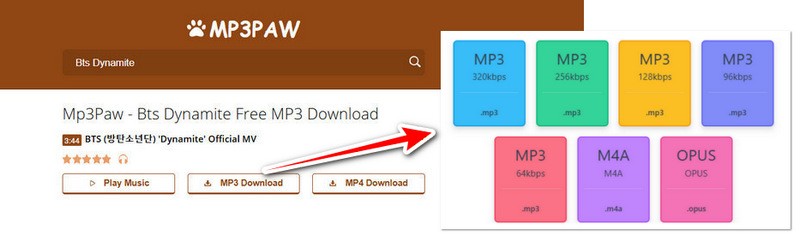
The main function of MP3Paw is to download music as MP3 files for free. Selectable output qualities include 64 kbps, 96 kbps, 128 kbps, 256 kbps, and 320 kbps. Additionally, it supports M4A and OPUS output formats, but output quality selection is not available for these two formats. You may follow the step-by-step guide below to download free MP3 music on MP3Paw.
Tip*: If you want to search and download free music on MP3Paw, please enter the song title or artist name in the search bar. Then, go to the next step.

Feeling unsafe downloading music from MP3Paw, or that MP3Paw is no longer working? You can choose a safer, more reliable, ad-free, and redirect-free tool: TuneCable BeatOne! This professional tool is designed for downloading music from YouTube Music, Spotify, Tidal, Apple Music, etc., to MP3, AAC, ALAC, FLAC, AIFF, or WAV formats on Windows and Mac. It also supports batch downloading of entire playlists, albums, etc. If needed, simply click the button on the right to download it for a try.
According to our survey, many users have encountered some problems while using MP3Paw. We have listed several common problems and their solutions below. If you encounter similar problems, you can try to fix them yourself.
One of the most common problems is that the MP3Paw music download website is inaccessible. This is likely because the website's domain name has changed. Users may see a 404 error message when visiting the URL. Alternatively, the website might be involved in illegal or prohibited activities and have been blocked by the ISP.
Solution: In this case, you can find its new domain name online. People on social platforms like Reddit often share new MP3Paw domains. However, you should always verify these posts carefully, as they may not be trustworthy. Alternatively, you can look for an alternative to MP3Paw.
Some users have reported that the download button is not working and the download cannot be initiated. Music download sites like MP3Paw often generate download links via pop-ups or new tabs. If the download button doesn't work, it's probably because your browser's pop-up blocker is blocking the download window.
Solution: Check the right side of your browser's address bar and see if there is a small icon with a red cross or a message saying "Pop-up has been blocked". If so, click it, select "Allow pop-ups" or "Always allow", and then click the download button again. Alternatively, you can turn off all of your browser's ad-blocker extensions and then click the MP3Paw download button again.
Free music download sites like MP3Paw don't charge users. Their revenue mainly comes from advertising. To keep the site running, they embed numerous redirects within the workflow. Therefore, when you click the download button, it will immediately redirect you to the ad page.
Solution: The simplest solution is to directly close these ad pages. Another solution is to install a browser extension (such as uBlock Origin), which can automatically block most pop-ups and redirects, allowing you to proceed directly to the download process.
Some users have reported that the downloaded files are corrupted or incomplete. This could be due to network interruptions, insufficient storage space, or conversion failures.
Solution: First, check that your network is stable and the save location has enough storage, then try downloading again. If it still doesn't work, the conversion failure is likely due to a problem with the source file. In this case, the best solution is to find an MP3Paw alternative.
The original MP3Paw website effectively disappeared around 2020 to 2021. As we mentioned earlier, websites with names or interfaces similar to MP3Paw that we find online are usually imitations. These websites have no direct connection with the original MP3Paw, and most of them also pose high security risks. If you're looking for available MP3Paw alternatives in 2026, please refer to the section below. We'll provide you with a safe and stable desktop music downloader, as well as free online MP3 music download sites. And you can choose according to your needs.
TuneCable BeatOne is a comprehensive, one-stop music downloader that supports downloading music from multiple music platforms such as YouTube Music, Spotify, Apple Music, Tidal, and Amazon Music. In addition to MP3, it also supports AAC, ALAC, FLAC, WAV, and AIFF output formats, giving users a wider range of options for their music files. Furthermore, it supports saving key song metadata such as title, artist, album name, and year, making it easy for users to manage the downloaded music files. Most importantly, it supports batch downloading multiple playlists or albums with just a few clicks, a feature that is ideal for users with large music collections. It also has many useful built-in tools, such as a free podcast or radio player and downloader, an AI audio splitter, a format converter, and more. Check out the feature box for more.

TuneCable BeatOne
Step 1Choose A Music Platform
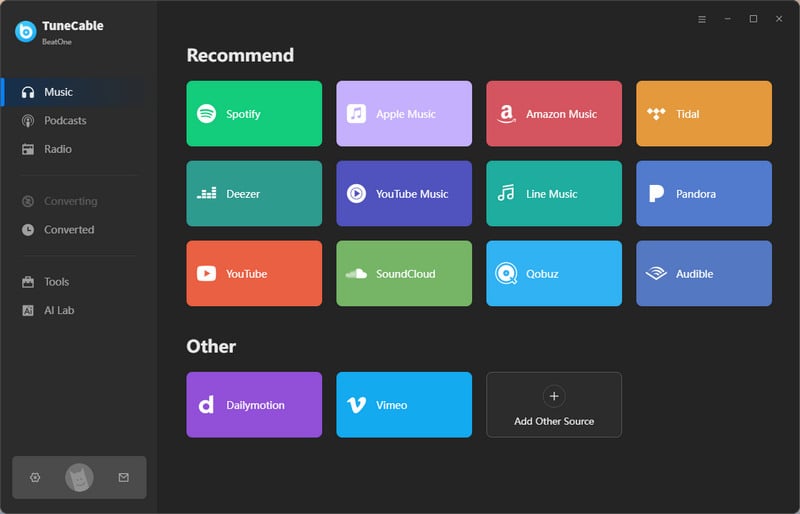
TuneCable BeatOne supports downloading music from multiple music platforms. On the initial screen, please select your preferred platform. Here, we'll use YouTube Music as an example. Then, you can log in to your YouTube Music account.
Step 2Add Songs to Task List
Find your favorite songs, playlists, or albums on the YouTube Music web player, then click the "+" icon in the bottom right corner to parse music.
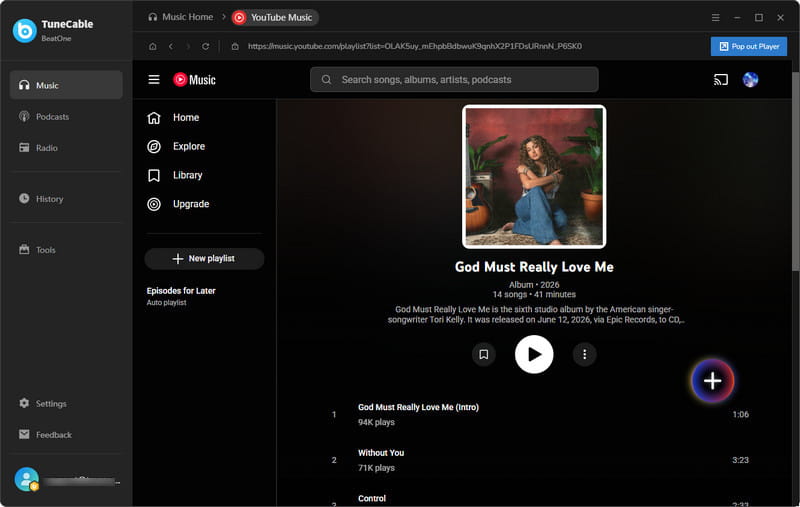
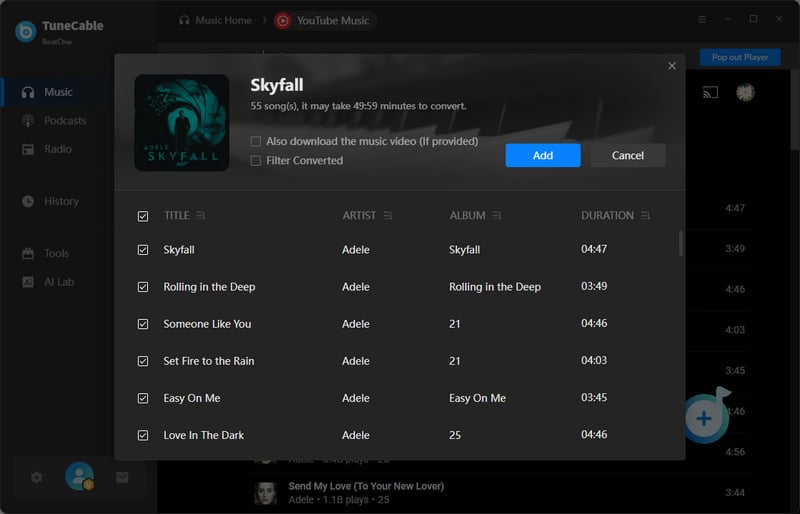
Next, select the needed tracks in the pop-up window and click "Add" to add them to the download queue.
Step 3Change Music Convert Settings
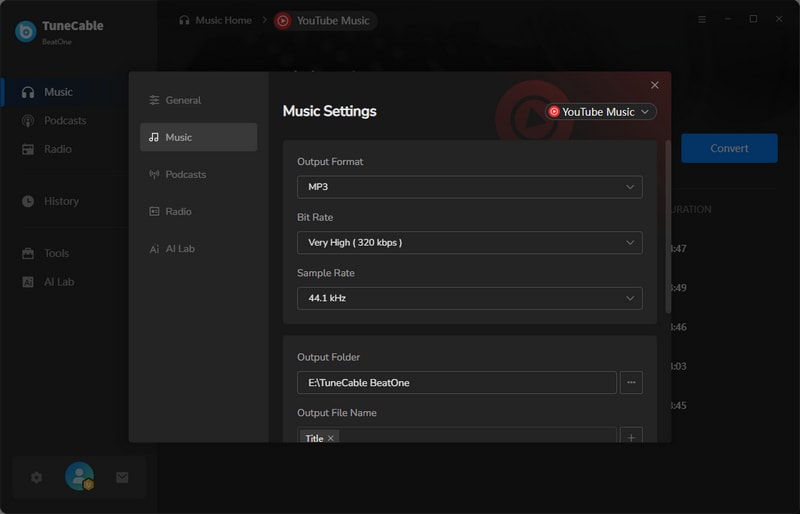
Click the "Settings" button to enter the output settings interface. You can customize the output format, bit rate/bit depth, sample rate, output path, etc. The changes will be applied once the window is closed.
Step 4Download Music to MP3 or Other Formats
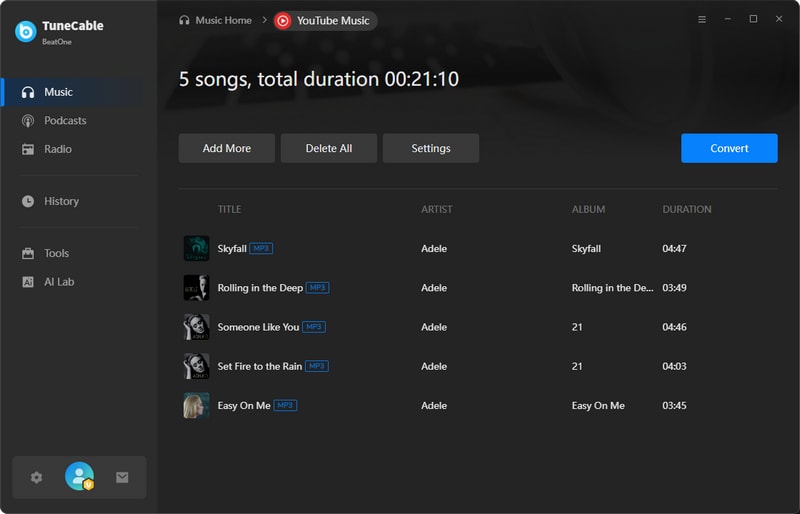
Click the "Convert" button to start the download immediately. TuneCable can run at speeds up to 10x. Just need to wait patiently for the download to complete.
Step 5Unlimited Use of Downloaded Songs
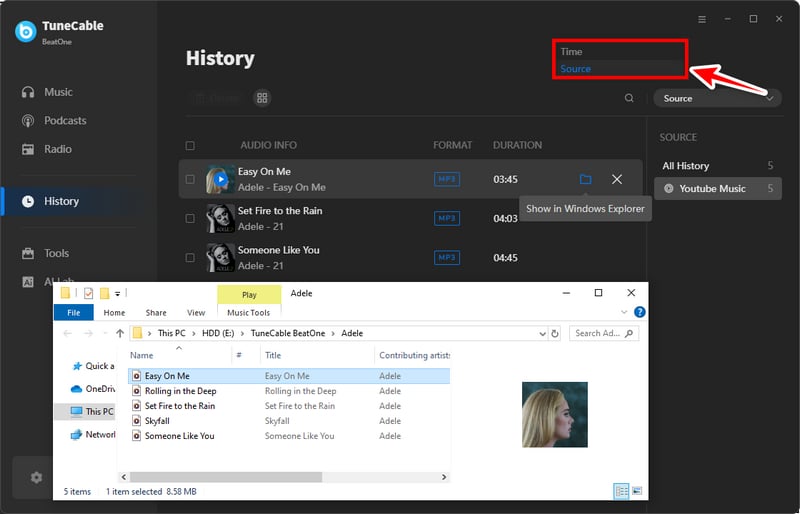
After the download is complete, you can view the download history in the "History" section. Click the file icon next to the song, and your downloaded music file will be shown in Windows Explorer or Finder. At this point, you can use the music files downloaded to your local device without any restrictions.
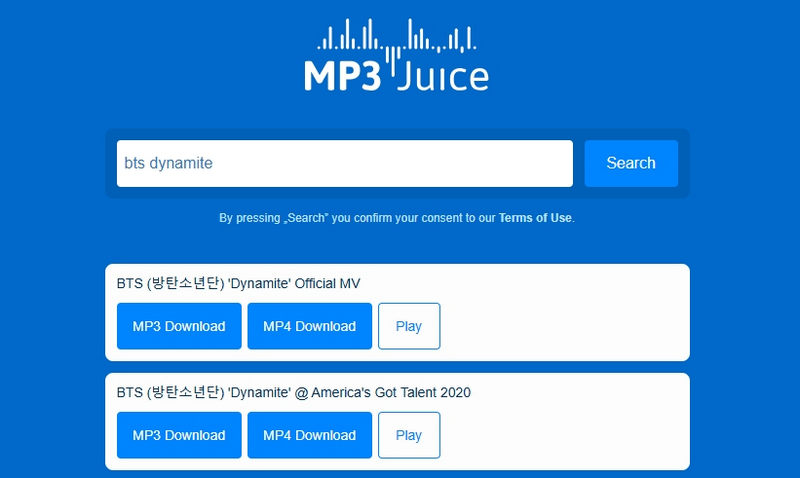
If you still prefer free online MP3 music download sites, you can try MP3Juice, another online MP3 music download site that is similar to MP3Paw. It only supports one output format, MP3. This online music download site only allows users to search for songs by entering keywords. URL is not acceptable on this site. Although it's free, selectable music is limited. After matching, the website will list the matching results (usually about 16 options) for the user to choose from. You can refer to the following steps to download music:
| Feature | MP3Paw | TuneCable BeatOne | MP3Juice |
|---|---|---|---|
| Platform Support | Web-based (Browser) | Windows & macOS | Web-based (Browser) |
| Output Format | MP3 | MP3, AAC, ALAC, FLAC, WAV, AIFF | MP3 |
| Output Quality | 320 kbps | Lossless, HiRes, HD/Ultra HD, HiFi, etc. | about 192 kbps |
| Conversion Speed | Fast | Fast⚡Up to 10x | Medium |
| Batch Download | ❌ only 1 song at a time | ✅ Download multiple playlists at once | ❌ only 1 song at a time |
| Metadata | ❌ no metadata | ✅ Full metadata | ❌ no metadata |
| Ad-Free UI | ❌ | ✅ | ❌ |
For bulk downloads, you'll need to switch to a more professional music downloader, such as TuneCable BeatOne, which supports bulk downloads of playlists, albums, and singles from platforms like YouTube Music, Spotify, Tidal, and Apple Music.
Up to 320kbps for MP3s. Audio quality selection is not supported for the M4A and OPUS output formats.
In general, a desktop music converter, such as TuneCable BeatOne, is safer than free online music downloaders. If you insist on using online websites to download MP3 music, be careful to verify their authenticity and make sure to enable ad-blocking features to avoid being redirected to virus-infected pages.
This article provides an in-depth review of MP3Paw, covering how to use it, real-world user experience, advantages and disadvantages, common problems, and fixes. Unfortunately, free music download sites like MP3Paw have gradually disappeared, and the original MP3Paw music download site has vanished from the internet. For those who want to download free MP3 music, finding reliable alternatives is essential.
This article explores 2 options: TuneCable BeatOne and MP3Juice. The former is a desktop music converter, while the latter is an online music download site similar to MP3Paw. Desktop music downloaders are generally more stable and secure, making them our recommended option. Furthermore, compared to free online music download sites, the desktop music downloader, TuneCable BeatOne, offers more powerful download capabilities. Its key advantages include batch playlist and album downloads, multi-platform support, and compatibility with 6 output formats, making it a more reliable and versatile solution. If needed, just click the button below to try it out!
 What's next? Download TuneCable BeatOne now!

Ava Morrison | Senior Writer
TuneCable BeatOne - All-in-one Music Solution

