
TuneCable Apple Music Converter
Apple Podcasts has attracted a global audience thanks to its free access and user-friendly interface. True to Apple's design philosophy, the Podcasts app is simple and intuitive. More importantly, most of its content remains free of charge. However, due to platform restrictions, listeners are generally limited to enjoying their shows on Apple devices through the official Podcasts app. Can we download Apple Podcasts for offline listening on non-Apple devices? And is it possible to download Apple podcasts to MP3 format? The following article delves into these common questions and offers 4 proven ways to address them.
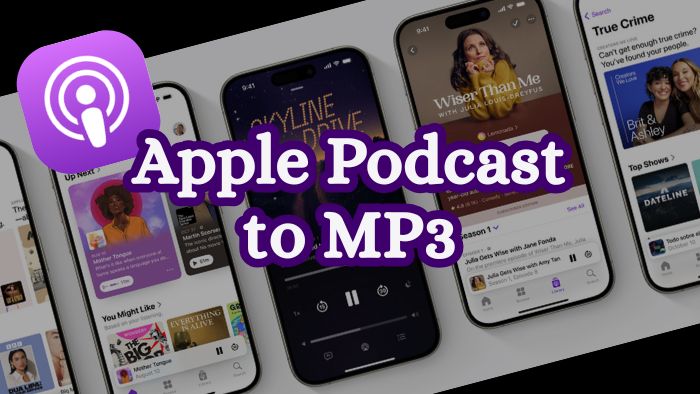
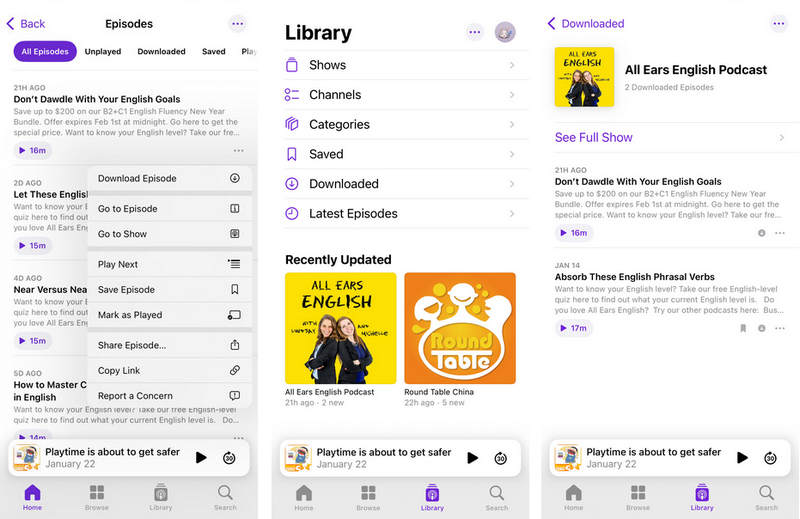
The Podcasts app on Apple devices offers a lot of free content, and its offline listening feature is enabled for all users at no fee. Next, we will explain how to download podcast episodes for offline listening on your iPhone, iPad, or Mac.
It's important to note, however, that due to its use of a proprietary format, the Podcasts app does not provide direct access to MP3 files. Even downloaded episodes remain accessible only through the app itself. Therefore, this method is only suitable for users who would like to listen to podcasts within Apple's ecosystem.
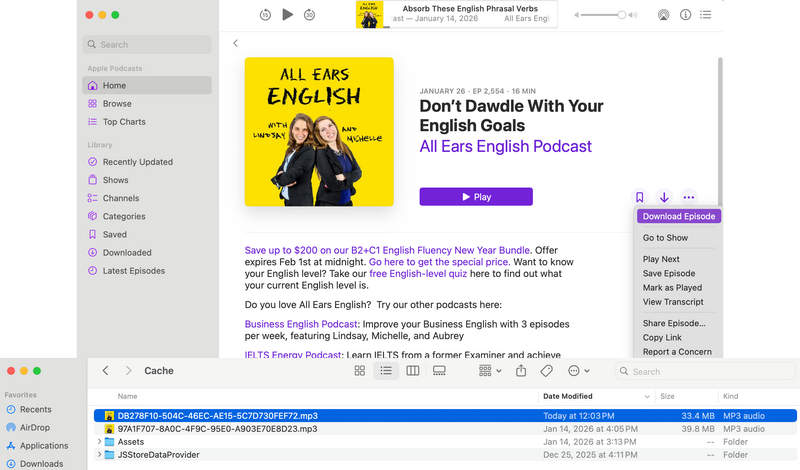
If you're a Mac user, you're much luckier, as you have the opportunity to obtain Apple Podcasts files in MP3 format. Just follow these steps:
Although you can access the podcast's MP3 files in Finder on your Mac, it's important to note that the MP3 files are not named after the episode titles, but rather by a string of random English letters or numbers. To find the corresponding downloaded podcast MP3 file, you'll need to go to the output folder immediately after finishing downloading one episode, find the most recently modified MP3 file, and rename it. Otherwise, it would be very difficult to tell the specific episode afterward.
⚠️This Method Is Best For:
TuneCable BeatOne is a professional music downloader that supports downloading music from various platforms such as Spotify, Apple Music, YouTube Music, Tidal, Amazon Music, LINE MUSIC, Deezer, and SoundCloud. Its built-in tools, including AI Optimize, AA/AAX Converter, Format Converter, Burn CD, Tag Editor, and Audio Editor, allow you to edit your audio files all in one place. It also includes free Podcasts and Radio modules, enabling users to download entire podcast series in MP3 format in batches.
Apple Podcasts' catalog covers almost all well-known and independent podcast sources, including but not limited to major global media outlets such as BBC, NPR, and CNN, professional networks and platforms like Wondery, and technology and business media such as The Verge. TuneCable BeatOne aggregates podcasts from over 10,000 top-tier sources, including BBC, TED, Podbean, The Verge, Wondery, Podbay, and NPR, enabling one-stop global access. On TuneCable BeatOne, many popular podcasts such as The Joe Rogan Experience, Dr. Death, This American Life, Office Ladies, and Stuff You Should Know are all available.
⭐ 100K+ Downloads | 🚀 Easy & Fast | 🔄 Regular Updates | 🔒 100% Clean

After installing TuneCable BeatOne, please follow the steps below to download your favorite Apple podcasts as MP3 files to your local device for free:
Step 1 Launch TuneCable BeatOne and click "Podcasts" in the left-side menu bar.
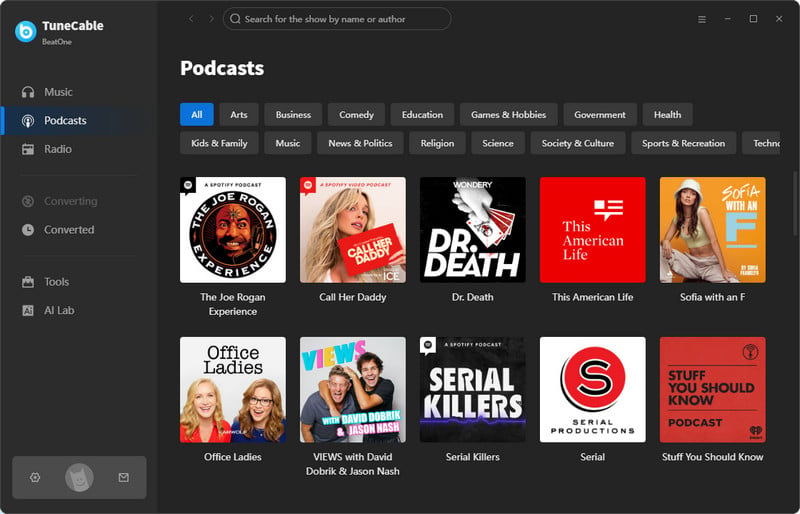
Step 2 Search for a popular Apple Podcast show in the upper-right search bar and click on it to go to the details page.
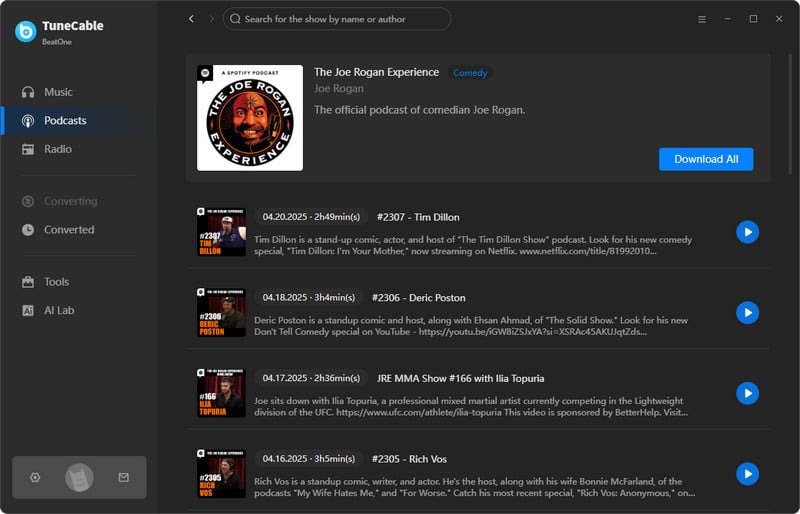
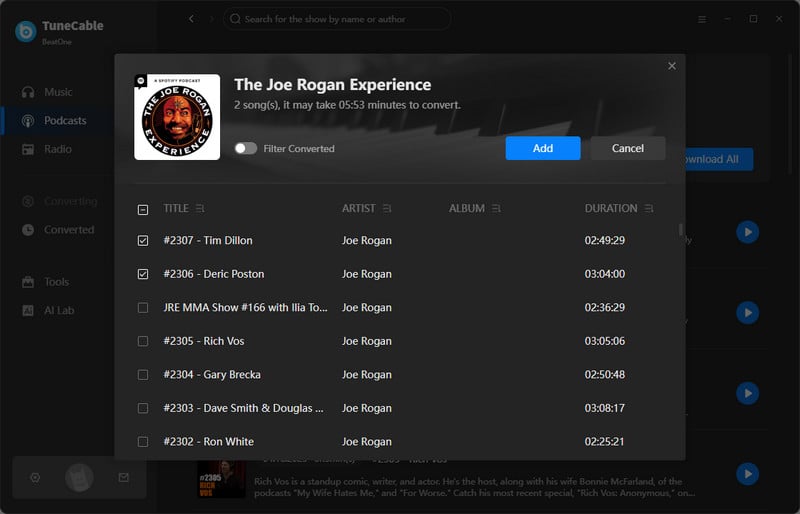
If you only want to download a specific episode, hover your mouse over the episode title and click the download button to start the download immediately. On the contrary, if you need to download multiple podcast episodes from one podcast collection, you may click "Download All". Then, in the pop-up window, select the episodes you need, click "Add", and then hit "Download" to start downloading Apple podcasts to MP3s.
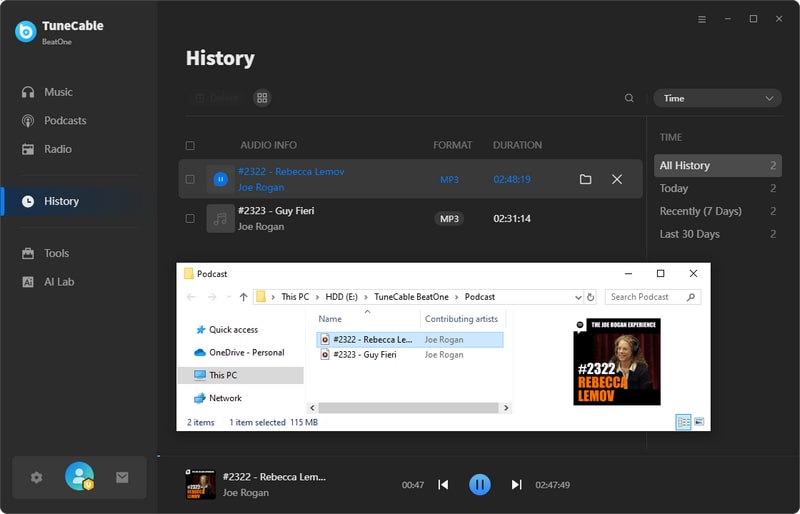
Step 3 Go to the "History" module to view the downloaded Apple podcast episodes. They will be named after the episode title and saved in MP3 format in the output folder. Additionally, you can also play your favorite podcast episodes directly on TuneCable, either online or offline.
⚠️This Method Is Best For:
TuneCable iMusic Converter is a dedicated tool for downloading Apple Music tracks, playlists, or podcasts. This Apple podcast to MP3 converter supports output formats including MP3, AAC, ALAC, WAV, FLAC, and AIFF. Whether you want to download Apple podcasts to MP3 format or other formats, you can do so with ease. The downloaded files can be used for various purposes, such as adding them to Premiere Pro as video editing material, playing them offline on Android TV, or using them for offline remixing in Serato DJ. You may install it and follow the steps below to download Apple podcasts to MP3:
Key Features of TuneCable iMusic Converter:
⭐ 100K+ Downloads | 🚀 Easy & Fast | 🔄 Regular Updates | 🔒 100% Clean

Here is how to download Apple Music tracks locally using TuneCable iMusic Converter:
Step 1 Launch TuneCable iMusic Converter and select "iTunes App" or "Music App".
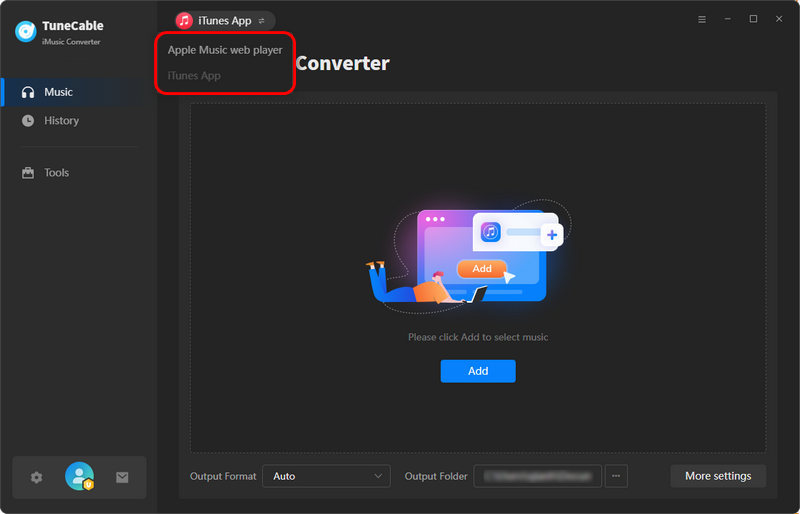
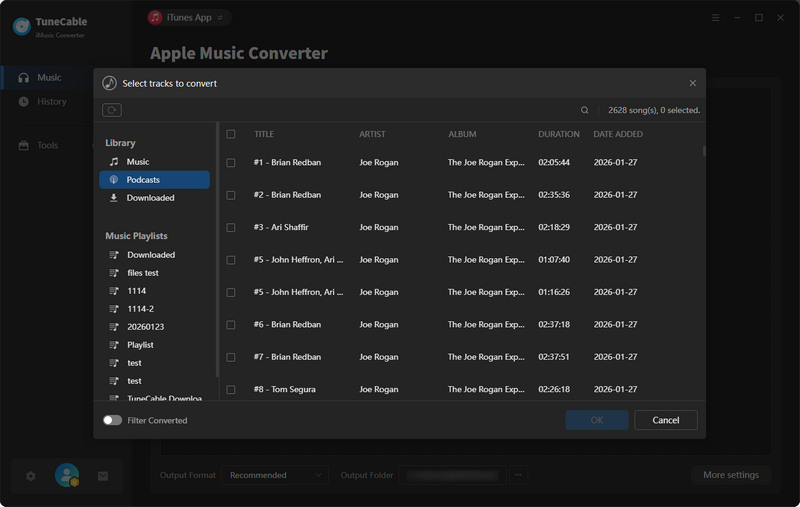
Step 2 Open the Podcasts app on your Apple device and make sure you have followed your favorite podcasts program. Click the "Add" button in the middle of the TuneCable program, then click the "Podcasts" list on the left (the podcasts you follow will appear in this list). Next, select the podcast episodes you want to download and click "OK".
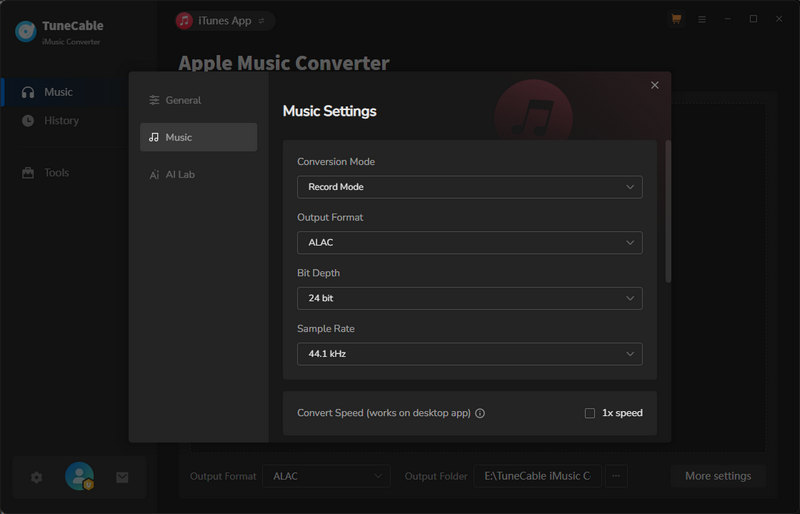
Step 3 Click "Settings" and change the output format to MP3.
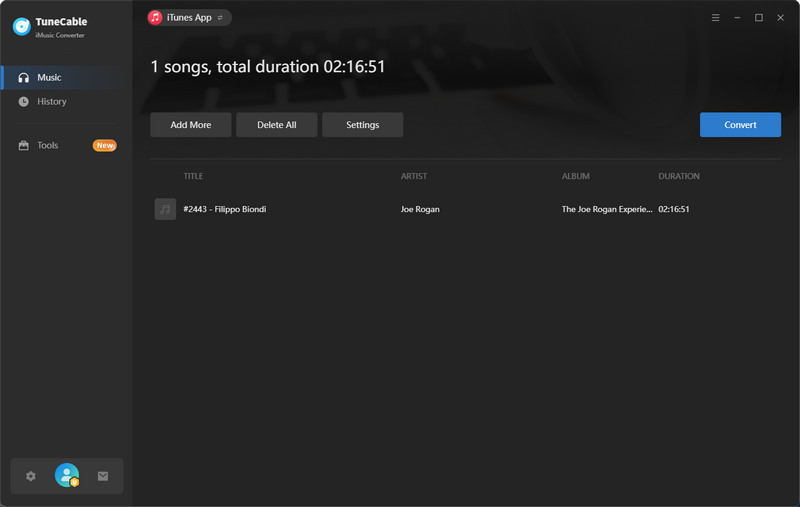
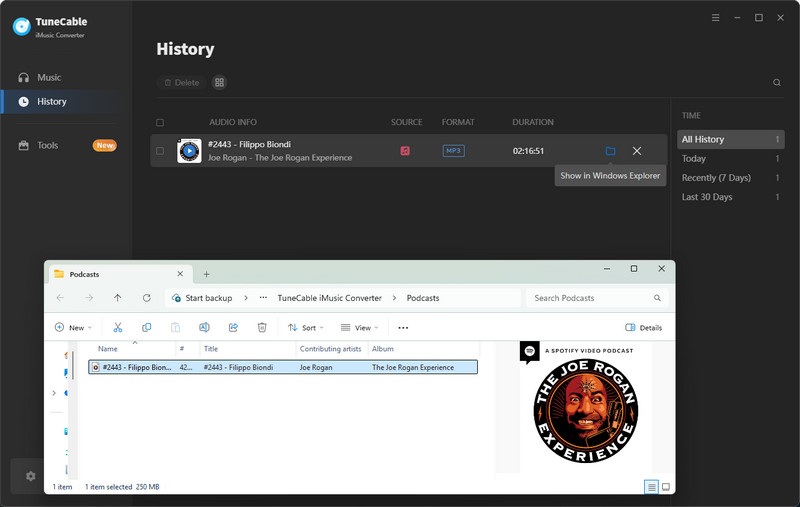
Step 4 Click "Convert" to start downloading your favorite Apple podcasts to your local device. You can view the downloaded podcast episodes by going to the "History" module. From there, you can go to the output folder and transfer the Apple Podcasts MP3 files to any device for offline listening.
⚠️This Method Is Best For:
PodcastToMP3 is an online Apple Podcast to MP3 converter that allows users to search for podcasts and download them as MP3 files. It supports batch downloading of up to 100 of the latest episodes of one single podcast program.
How to Use PodcastToMP3 to Download Apple Podcast to MP3:
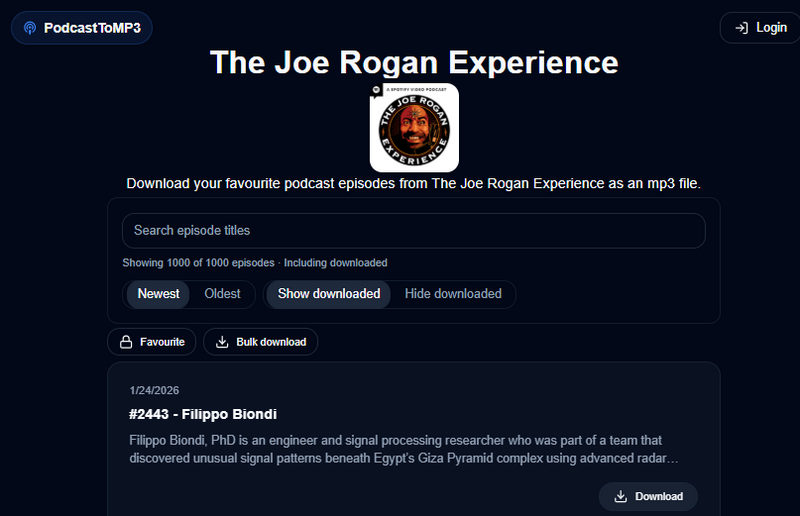
⚠️This Method Is Best For:
| TuneCable iMusic Converter | TuneCable BeatOne | Podcasts App | PodcastToMP3 | |
| Output Format (Podcasts) | MP3, AAC, ALAC, FLAC, WAV, AIFF | MP3 | MP3 (on Mac) | MP3 |
| Conversion Speed | Fast (Up to 10x) | Fast (Up to 10x) | Medium | Medium |
| Supported OS | Windows & MacOS | Windows & MacOS | iOS, iPadOS, MacOS | No limitations (Any browser will work) |
| Batch Download Podcasts | ✅ (Batch download multiple podcast programs) | ✅ (Batch download one podcast program) | ❌ | ✅ (Batch download up to 100 latest episodes of one single podcast program) |
| Output File Name | Episode title (Supports custom output file names) | Episode title | Random English letters or numbers | Podcast program name - Episode title |
YES. You will need to use an Apple Podcast to MP3 converter, such as TuneCable iMusic Converter and TuneCable BeatOne, to download the podcast as an MP3 file first, and then transfer it to your MP3 player.
On iOS and iPadOS, users cannot directly access the cached files of downloaded Apple Podcasts episodes, while on macOS, these files are stored locally in a designated folder. You can follow the steps in Part 1 to find the cached podcast MP3 files on your Mac. The typical cache folder path is "/Users/"your device name"/Library/Group Containers/243LU875E5.groups.com.apple.podcasts/Library/Cache".
The official Podcasts app on Apple devices does not support batch downloading of podcast episodes. You will need to use third-party tools such as TuneCable iMusic Converter and TuneCable BeatOne. The former supports batch downloading of multiple episodes from different podcast series, while the latter provides a free podcast channel that supports downloading multiple episodes from a single podcast series.
This article introduces four proven working methods for downloading Apple Podcasts as MP3 files, including both desktop and online tools. We provide specific guides for each tool, outline their ideal user groups, and conclude with a comparison of all four methods. Overall, TuneCable iMusic Converter and TuneCable BeatOne are suitable for users who need to download Apple Podcasts in batches, while the other two methods are better for those who only occasionally need to download one or two podcast episodes. Which Apple Podcast to MP3 converter is right for you? Click the download button and try them out now!
 What's next? Download TuneCable BeatOne now!

Ava Morrison | Senior Writer


