
 >
How To >
Music Tips >
Want to convert music from YouTube to FLAC for your music library? Don't know which YouTube to FLAC converter is best for you? Here, we tested and compared 3 tools on audio quality, ease of use, metadata preservation, etc. Whether you prefer a desktop tool or an online solution, you can choose the option that best suits your needs.
Sadly, NO. In fact, YouTube streams audio in lossy formats, which means some audio data has already been discarded during compression. The term "FLAC quality" is commonly associated with lossless audio. FLAC is a lossless audio format that preserves the data it receives without further quality loss. However, a FLAC file does not necessarily contain true lossless audio.
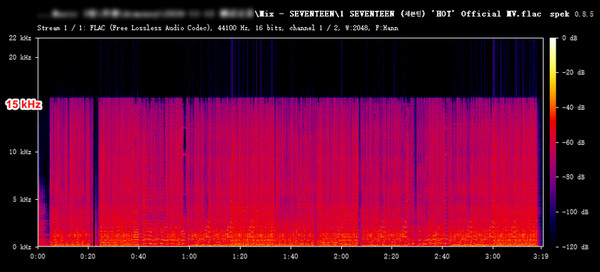
Since the original YouTube audio has already undergone lossy compression, converting it to FLAC cannot restore the missing audio data or turn it into true lossless audio. The resulting FLAC file may be losslessly encoded, but its audio content remains limited by the quality of the original source.
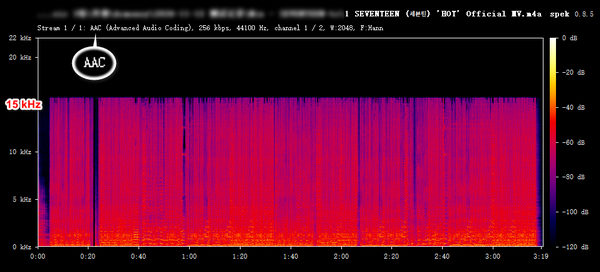
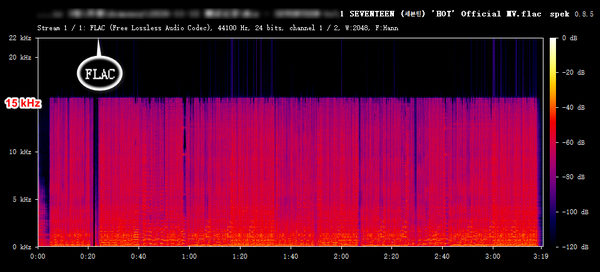
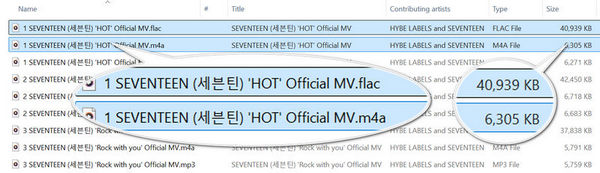
Note: Our tests found that converting the same YouTube audio to AAC and FLAC resulted in nearly identical audio quality. The main difference was file size: the FLAC version was noticeably larger, but offered no perceptible improvement in sound quality.
| YouTube | YouTube Music | |
|---|---|---|
| Audio Format | AAC / Opus | AAC / Opus |
| Quality Options | Auto or High (Up to 256 kbps for eligible music videos and Art Tracks) | Low (48 kbps); Normal (128 kbps); High (256 kbps) |
Note: Changing audio quality settings is currently available to Premium users. Audio quality options and bitrates are based on Google's official documentation. Actual playback quality may vary depending on the source track, device, and network conditions. See Google's official YouTube Music audio quality guide and YouTube Premium help center for details.
Although converting YouTube audio into FLAC files will not improve sound quality, it can still be useful in certain situations:
| Comparison | TuneCable BeatOne | yt-dlp & FFmpeg | Loader.to |
|---|---|---|---|
| Type | Desktop Software | Desktop Command-Line | Online Tool |
| Supported Source | YouTube / YouTube Music | YouTube / YouTube Music | YouTube |
| Metadata & Cover Art | ✔️ | Limited by default | Partial metadata; no cover art |
| Playlist Batch Download | ✔️ | ✔️ | ❌ |
| Ad-free & No Redirects | ✔️ | ✔️ | ❌ |
| Login Requirement | Optional | ❌ (Not required for public videos) | ❌ |
| Best For | Beginners & Batch Playlist Downloads | Advanced Users | Occasional Downloads |
Note: We tested all three converters using the same YouTube video.
TuneCable BeatOne is a desktop application designed for users who need to download playlists in bulk. Beyond FLAC, it also supports MP3, AAC, ALAC, AIFF, and WAV, giving users more flexibility in choosing output formats for different needs and devices. Moreover, TuneCable allows users to download music without signing in to a YouTube or YouTube Music account. It offers download speeds of up to 10x for YouTube audio and YouTube Music tracks, making it easy to download large playlists quickly.

TuneCable BeatOne
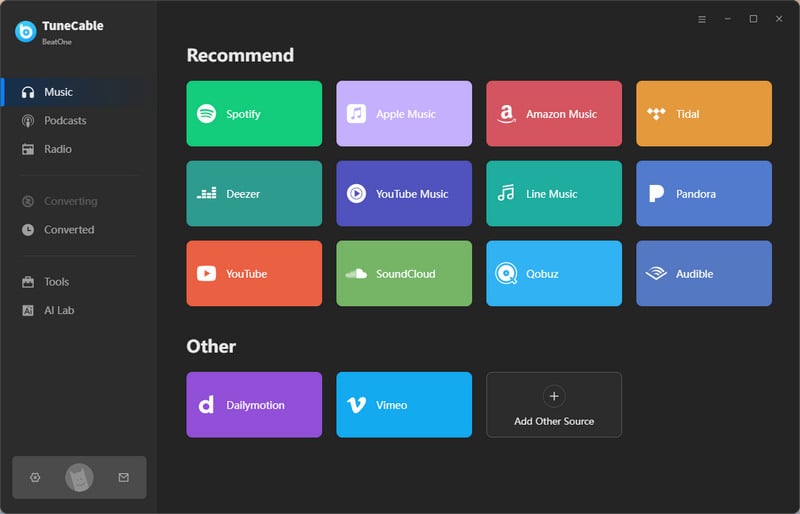
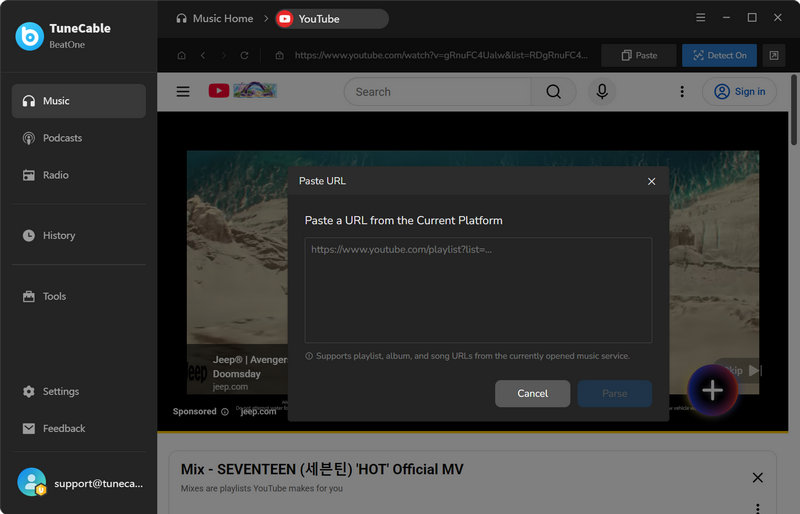
Step 1 Launch TuneCable BeatOne and select "YouTube" from the initial page. Sign in to your YouTube account if needed (optional).
Note: Logging into a YouTube account is optional. TuneCable allows users to download music without an YouTube / YouTube Music account, and it also supports both Free and Premium accounts. Furthermore, since YouTube Music focuses more on musical content, such as albums, playlists, and singles, it is the recommended source if you require better audio quality and more complete metadata. Conversely, if your primary goal is to extract audio from YouTube videos (e.g., music videos or video podcasts), selecting the "YouTube" option is the better choice.
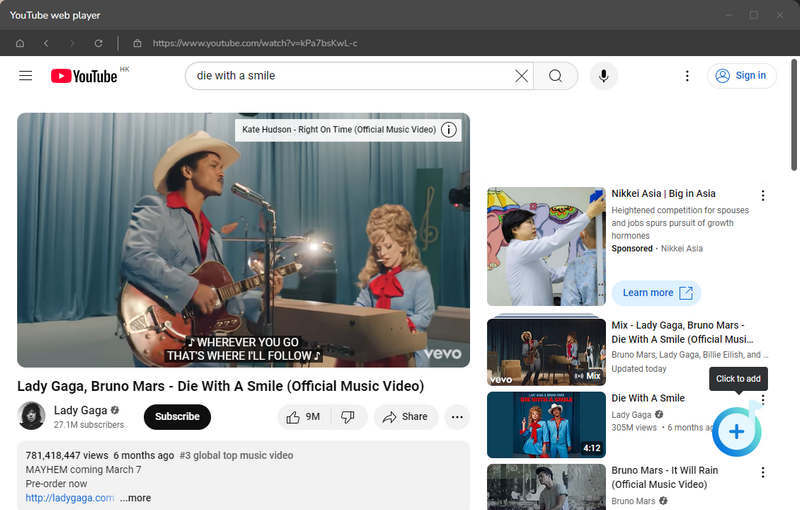
Step 2 Find the YouTube playlist you want to extract audio from, click the "+" icon, select the content you want to download, and click "Add".
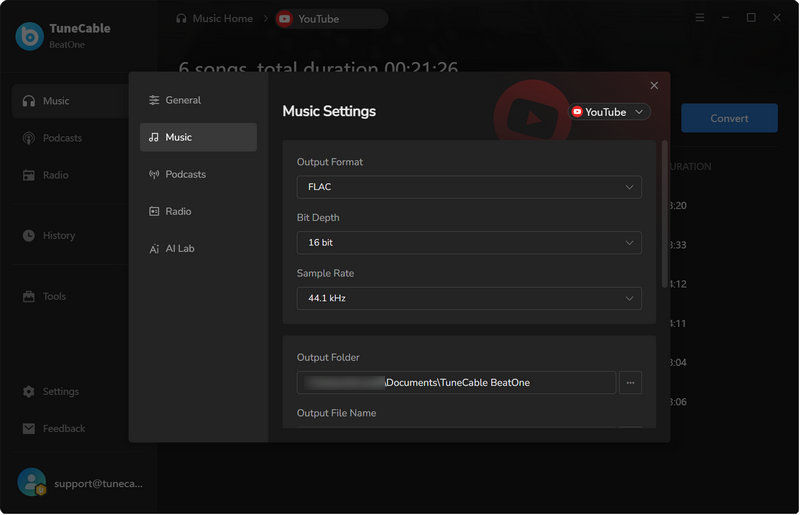
Step 3 Click the "Settings" button, select the output format as FLAC, and set the desired parameters such as bit depth and sampling rate.
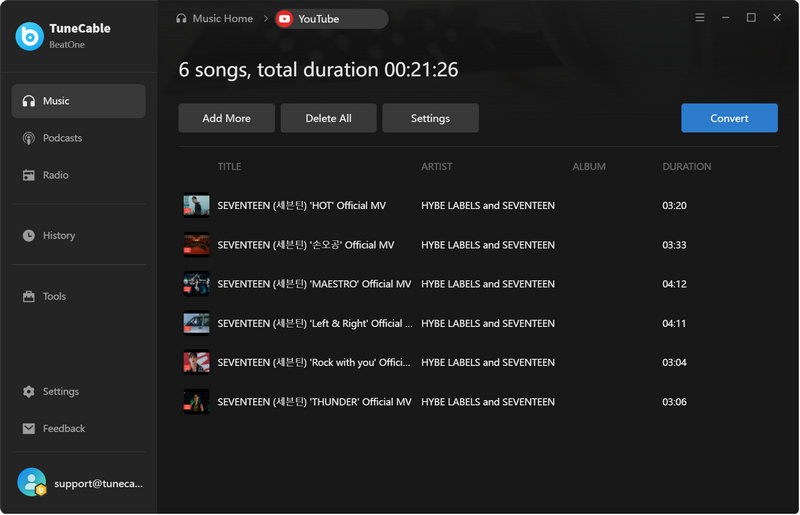
Step 4 Click "Convert" to start converting YouTube audio to FLAC format. Finally, you can go to "History" to view the downloaded files.
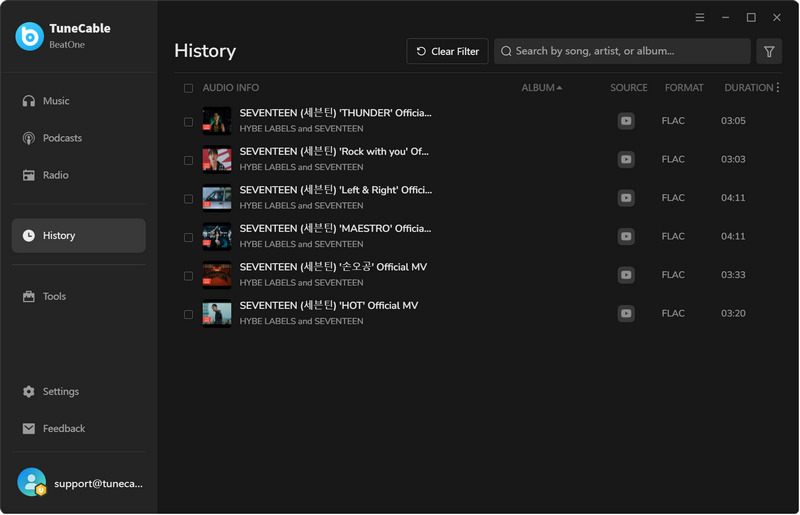
Test Notes:
yt-dlp is a command-line downloading tool designed to fetch videos from YouTube and a wide range of other websites, while FFmpeg handles the processing, such as converting or extracting, of the downloaded multimedia files. The official documentation for yt-dlp explicitly states that if you use the -x flag (to extract only the audio) and wish to convert it into a format like FLAC, you must have FFmpeg installed. This approach involves a certain technical learning curve and is better suited for professionals.
Below are the detailed steps for converting YouTube videos to FLAC for free using yt-dlp and FFmpeg.
Step 1 Install yt-dlp and FFmpeg
Download yt-dlp.exe from its official GitHub page. Also, download an FFmpeg essentials build archive and extract it to a dedicated folder. Open PowerShell and run the following commands (pressing Enter after each) to complete the installation: winget install yt-dlp, winget install ffmpeg.
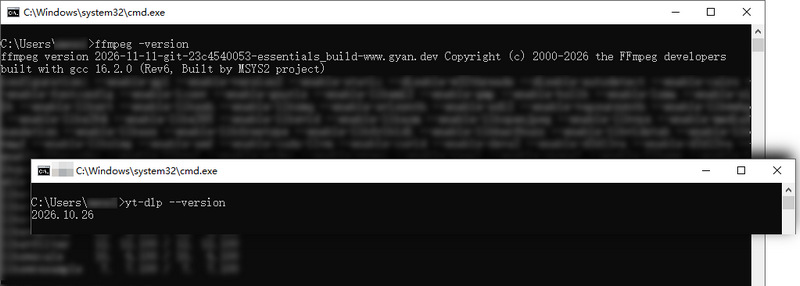
Step 2 Set the Download Location
Press Win + R, type cmd, and press Enter to open Command Prompt. Then enter the following command: cd %USERPROFILE%\Music. This sets your Music folder as the download location, making the converted files easy to find.
Step 3 Download YouTube Video as FLAC
To extract audio from a single YouTube video and save it in FLAC format, run yt-dlp -x --audio-format flac "VIDEO URL". Replace VIDEO URL with the actual YouTube video URL you want to download audio from. To download all videos in a YouTube playlist and convert their audio to FLAC, use yt-dlp -x --audio-format flac -o "%(playlist_index)02d - %(title)s.%(ext)s" "PLAYLIST URL". This command downloads the entire playlist and numbers the files according to their playlist order. Once the download is complete, you can find the files in that directory.
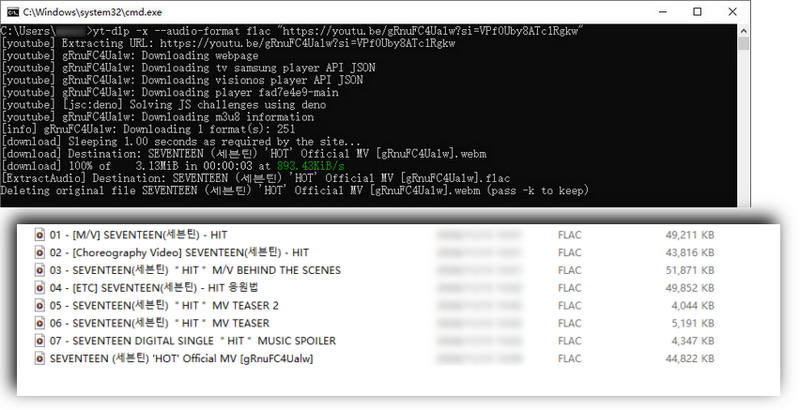
Test Notes:
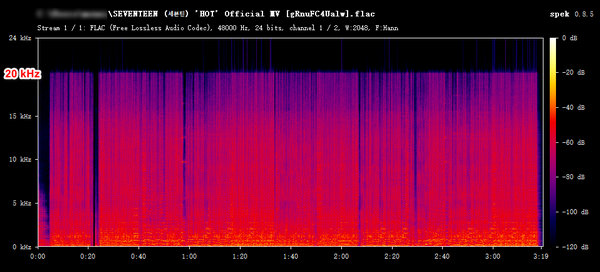
If you are looking for a lightweight way to download YouTube audio in FLAC format, free online tools are a great option. These tools are compatible with virtually any device, allowing you to download music directly through a web browser. In this article, we will use one such online tool as an example.
Loader.to is a web-based, free online YouTube downloader. It allows you to extract content from YouTube video links and convert it into various formats, including MP3, M4A, WEBM, AAC, FLAC, OPUS, OGG, and WAV. You can download music without installing any software or logging in to a YouTube account.
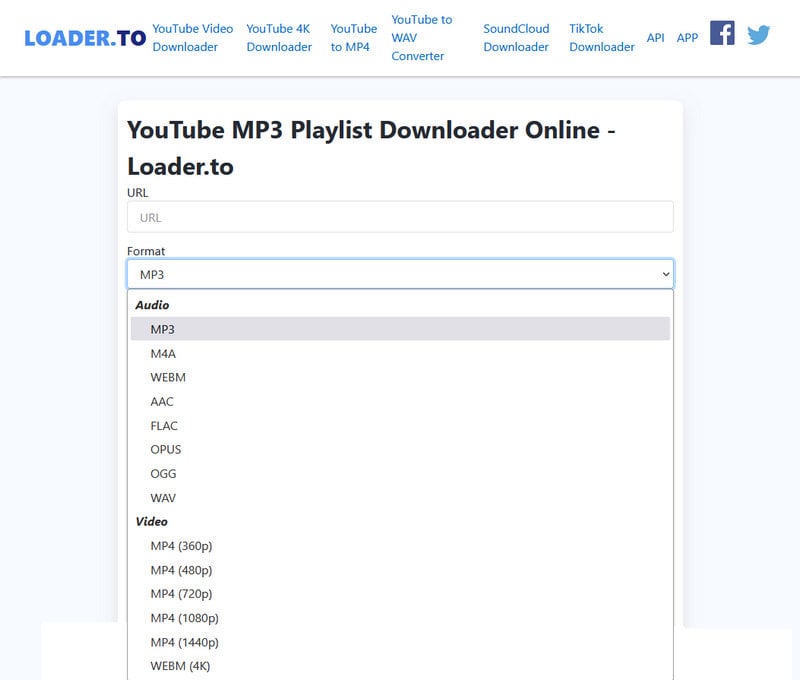
Step 1 Copy and paste the video link into the Loader.to website, select "FLAC" as the output format, and click "Download".
Step 2 Wait for the progress bar to complete, then locate the downloaded YouTube FLAC file in your "Downloads" folder.
Test Notes:
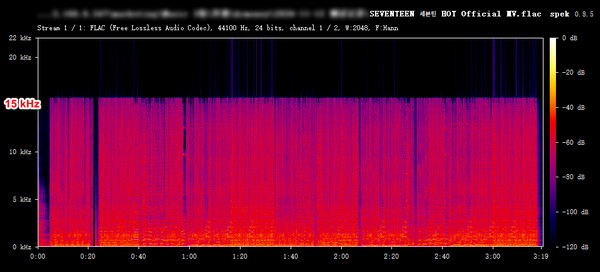

Yes, you can use the three methods described in this article to download YouTube audio in FLAC format. However, please note that the highest audio quality available on YouTube itself is 256 kbps AAC/Opus, which is a lossy audio stream. Converting it to FLAC format will not improve the audio quality.
Yes. With TuneCable BeatOne, you can download multiple playlists in bulk. Its new feature allows users to paste and parse several playlists at once, significantly boosting download efficiency. Additionally, it also lets you select individual songs from a playlist to download.
You can use the built-in format converter in TuneCable. You can refer to these detailed steps to convert the local YouTube audio file to FLAC format.
No. The YouTube audio source is lossy-compressed. Converting it to a FLAC file will not improve the audio quality. It will only result in a larger file size.
It depends on your needs. If you don't mind larger file sizes and want to avoid further lossy compression, then FLAC is the better choice. If you prefer smaller file sizes for everyday use, then MP3 is the better option.
All three tested methods can save YouTube audio as FLAC files, but none can turn YouTube's lossy audio streams into true lossless recordings. The best option depends on your needs.
Free online tools are well-suited for casual users who only need to download a song or two. Meanwhile, tools like yt-dlp and FFmpeg, while also completely free, are not ideal for beginners. They are more technical and complex to operate, requiring a higher level of expertise. TuneCable BeatOne, on the other hand, serves as a versatile, all-around solution, making it a great choice for average users who need to perform batch downloads. Overall, it offers greater functionality than online tools and is significantly easier to use than yt-dlp.
 What's next? Download TuneCable BeatOne now!

Ava Morrison | Senior Writer
TuneCable BeatOne - All-in-one Music Solution

