
 >
How To >
Spotify Music Tips >
>
How To >
Spotify Music Tips >
SpotiDown is a free online Spotify downloader that is designed to download and save music from Spotify as MP3 files. It is an attractive option for those who don't want to pay the Spotify Premium fee while being able to download music for offline listening. Is it safe to use? Is it still available in 2026? How does it work, or is there any alternative to it? Let's dig deeper in this full SpotiDown review.
SpotiDown is a web-based online tool that features downloading Spotify tracks, playlists, and albums. It claims to save Spotify music as MP3 files with up to 320 kbps quality.
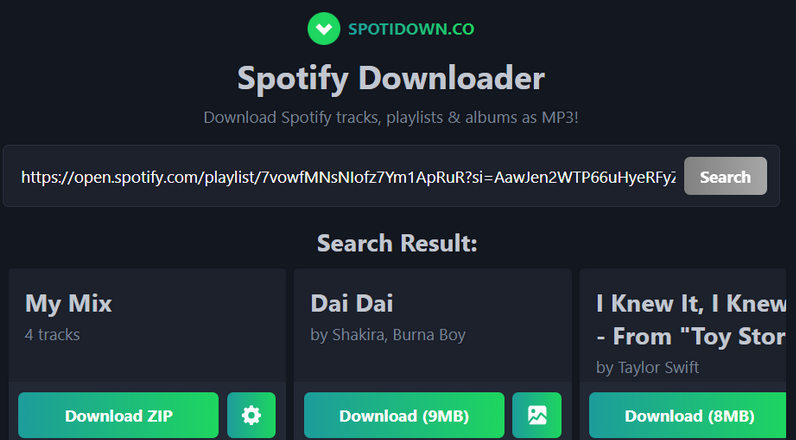
SpotiDown is certainly handy, but it comes with a clear catch: the domain keeps changing or going down, and the audio quality isn't great. However, its advantage lies in its convenience and flexibility. No software installation is required. It allows users to download Spotify music with any device via a web browser. That said, you can download and listen to music offline on the go.
Before delving into a detailed review of SpotiDown, you can quickly browse the summary box below to have a glance at the differences between online Spotify downloaders like SpotiDown and Desktop Spotify downloaders like TuneCable Spotify Downloader.
| SpotiDown (Online Downloader) |
TuneCable Spotify Downloader (Desktop Downloader) |
|
|---|---|---|
| Download Speed | ⚡ | ⚡ |
| Batch Download | ✅ | ✅ |
| Output Formats | MP3 | MP3 / FLAC / WAV / AAC / AIFF / ALAC |
| Audio Quality | Up to 320 kbps*(claimed) | Up to Spotify Lossless ⭐ |
| Stability | ⚠️ Domains may change | 🛡 Stable & reliable |
| Ad-free | ❌ | ✅ |
| Test Result | Fake 320 kbps MP3 from YouTube | Real 320 kbps MP3/Lossless FLAC |
| Best For | Temporary downloads | Regular & professional users |
Some SpotiDown users have pointed out on Reddit that tracks downloaded through SpotiDown don't match the original versions on Spotify. Actually, most online Spotify downloading tools, such as SpotiDown, have a similar workflow: extracting metadata of the track (title and artist) from a Spotify URL, matching it with the corresponding video on YouTube, and then extracting the audio from the video. This allows users to obtain an MP3 file ultimately. In other words, tools like SpotiDown do not download music directly from Spotify, but rather from YouTube.
During our testing, we noticed that there were several similar "SpotiDown" websites online. These websites share very similar domain names, including https://spotidown.co/, https://spotidown.me/, https://spotidown.app/, and https://spotidown.net/. Their operating logic is essentially the same: parse the Spotify URL, match it with the YouTube video, extract the audio, and convert it into an MP3 file. So which of its domains are still working in 2026? And what is the real audio quality of the downloaded files? We'll explore these in greater detail below.
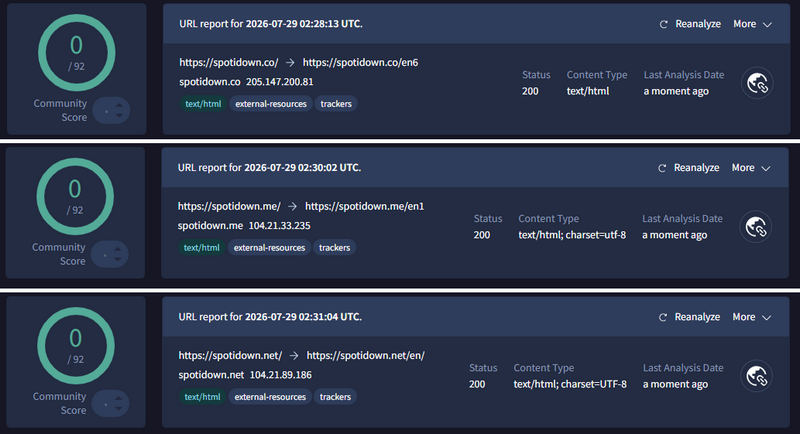
Is SpotiDown safe? This is one of the biggest concerns for users before trying it. We tested the URLs of the 4 domains above using VirusTotal, and the security scan results are as follows. You may browse the following table quickly and select a safe website to access.
| Website | VirusTotal Detection | Redirects | Ads / Pop-ups | Security Risk | Status |
|---|---|---|---|---|---|
| spotidown.co | 0/92 | Low | Medium | Low | Active |
| spotidown.me | 0/92 | Medium | Medium - High | Low - Medium | Active |
| spotidown.net | 0/92 | Medium | High | Low - Medium | Active |
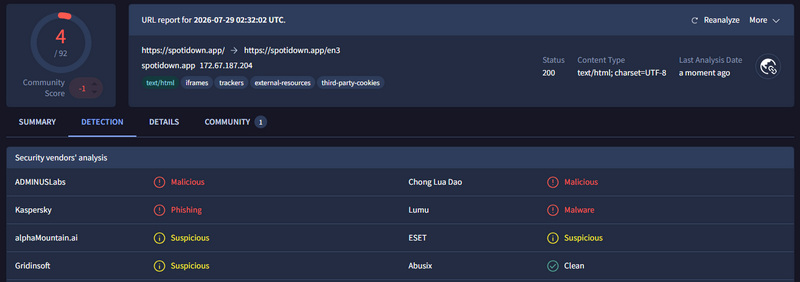
| spotidown.app | ⚠️ 4/92 | Medium | Medium - High | ⚠️ High | ⚠️ Suspicious |

Tired of pop-ups and ads? Looking for a safe Spotify to MP3/FLAC downloader? You may give TuneCable Spotify Downloader a try! It's 100% clean and virus-free. It works on Windows, Mac, and Android devices, and can download Spotify Lossless FLAC or 320 kbps MP3 files. Detailed usage guidelines can be found in Part 3.
According to the VirusTotal scan results, spotidown.app received a 0/92 detection score, with several vendors identifying it as malicious, phishing-related, or suspicious. Therefore, users should be cautious when visiting this domain.
The other tested websites received a 0/92 detection score on VirusTotal. However, this should not be interpreted as a guarantee of safety. It only means that no security vendors detected threats in the scanned sample at the time of testing. Online downloader websites may still pose risks through aggressive advertisements, unexpected redirects, browser notification abuse, or unsafe downloads.
While these websites remain accessible, users should avoid installing any browser extensions or downloading executable files such as EXE/APK installers from them. Any downloaded files should be scanned separately with VirusTotal before use.
After analyzing the safety aspects of different SpotiDown domains, we further tested their real-world performance, including download capabilities, output formats, and actual audio quality.
| Website | Batch Download | Output Format | Ad-Free Download Experience | Playlist, Album, Artist & Track URL Support |
|---|---|---|---|---|
| spotidown.co | ✅ | MP3 | ✅ | Partial support (Album URLs unavailable) |
| spotidown.me | ✅ (Premium only) | MP3 | ❌ | ✅ Supported |
| spotidown.net | ❌ | MP3 | ✅ |
Partial support (Playlist URLs unavailable; only some tracks from Album and Artist URLs can be parsed) |
| spotidown.app | ✅ | MP3 | ❌ | ✅ Supported |
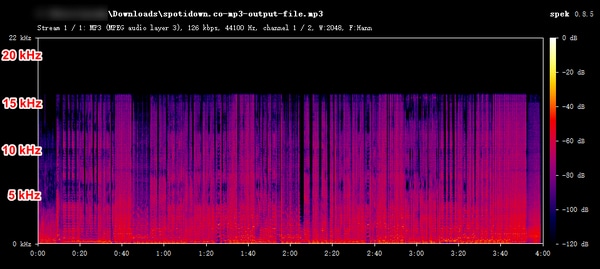
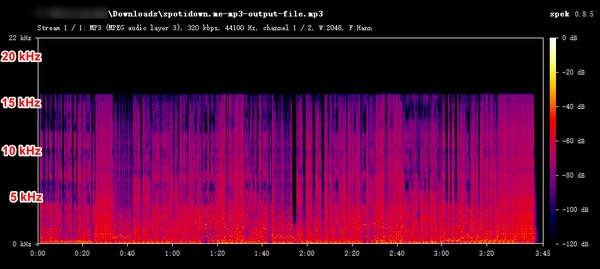
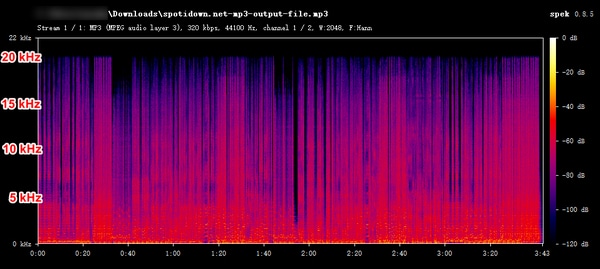
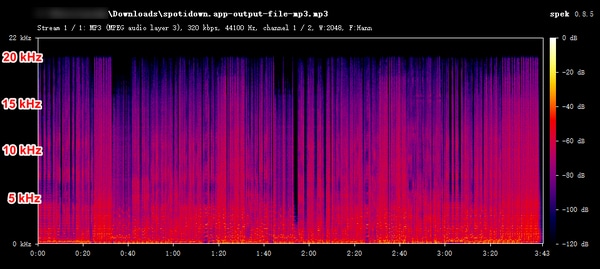
For audio quality evaluation, we used Spek to analyze the MP3 files downloaded from each website and assess their actual audio quality. All tests were conducted using the same song to ensure a fair comparison.
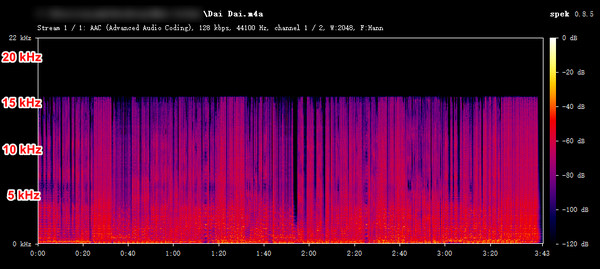
The results show that the MP3 files downloaded from spotidown.co and spotidown.me have relatively poor audio quality. Although both of them claim to provide 320 kbps MP3 files, the actual bitrate is only around 126 to 128 kbps. In particular, the file downloaded from spotidown.me has an actual quality of only about 128 kbps while it labels its files as 320 kbps, indicating that it is a fake 320 kbps MP3 file that has been upscaled from lower-quality sources.
In comparison, the files downloaded from spotidown.net and spotidown.app show much better audio quality. The analysis confirms that both provide 320 kbps MP3 files with a frequency spectrum consistent with high-quality MP3 encoding. However, neither of these 2 websites supports downloading Spotify Lossless audio in FLAC format, so they cannot provide true lossless-quality downloads.
Free tools are not always perfect. Although they are sufficient for most casual users, they often compromise on stability and audio quality. If you would like to download Spotify music in real Lossless quality in FLAC format, or are looking for an alternative to SpotiDown when it is down, then you may check out the following alternative solutions.
We collected some viable SpotiDown alternatives available in 2026 for different types of users.
For users who need to batch download multiple Spotify playlists at once or pursue higher audio quality like Spotify Lossless FLAC, a desktop Spotify downloader is their optimal choice. TuneCable Spotify Downloader desktop version is compatible with both Windows OS and macOS. It is a powerful Spotify downloader that features downloading Spotify tracks, playlists, albums, podcasts, and videos in bulk. While retaining high-quality music (like Spotify Lossless FLAC and 320 kbps MP3), it also keeps full ID3 tags and lyric files after conversion. Other key features include:

TuneCable Spotify Downloader
Note: TuneCable Spotify Downloader also works on Android devices.
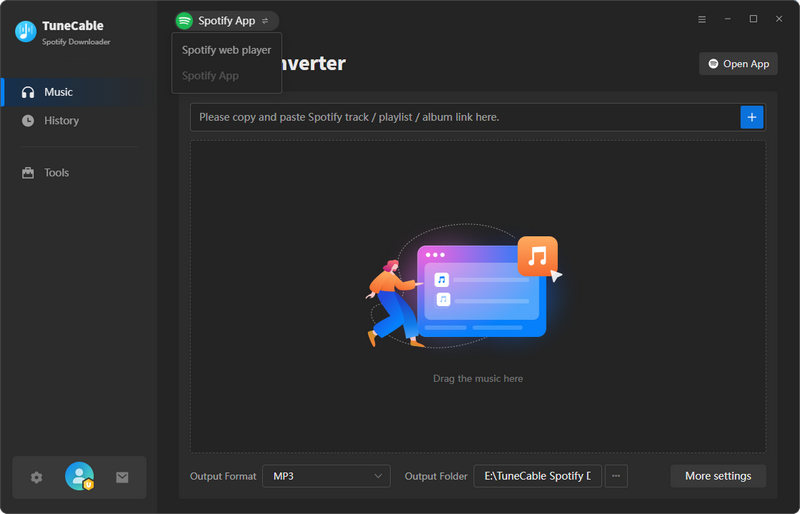
Step 1 Launch TuneCable, switch to "Spotify App" in the top bar. Log in to a Spotify Premium account. Enable "Lossless" audio quality in the Spotify app.
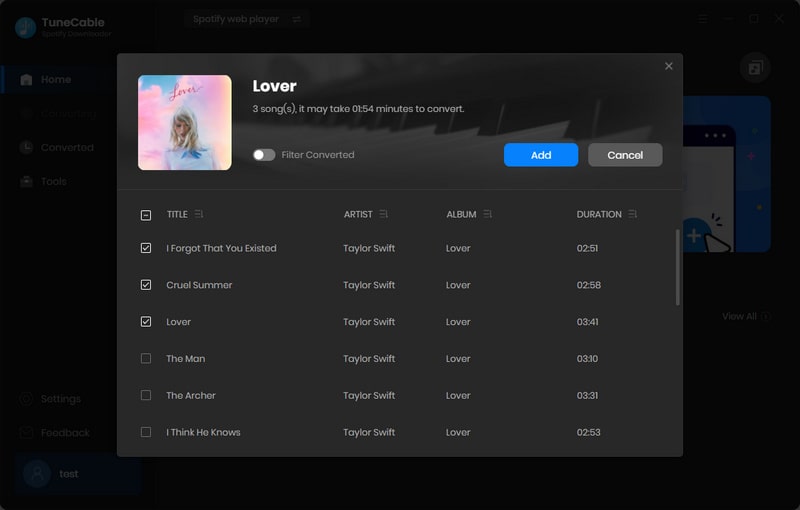
Step 2 Open any song, album, or playlist. Hit "+" to load all tracks currently displayed. Next, select the tracks you want to download, and hit "Add" to move them to download queue. Click "Add More" to add other songs if needed.
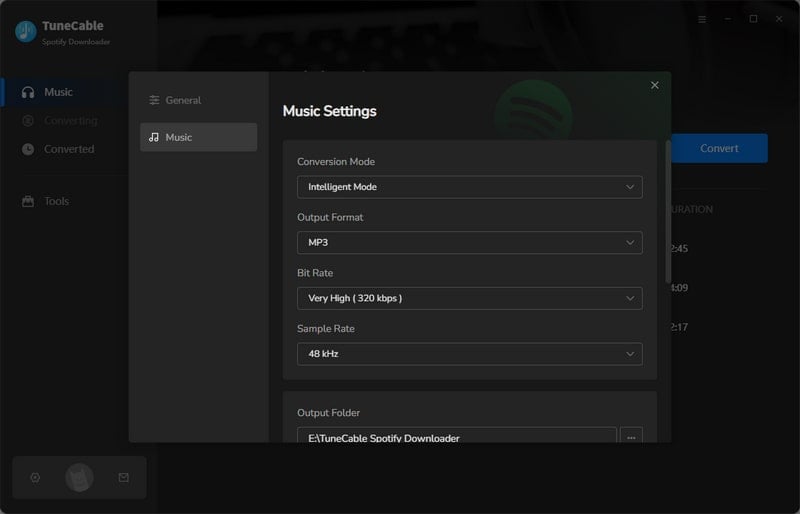
Step 3 Click "Settings" to set important parameters such as output format, output file name, and bit depth/bit rate. To download Spotify Lossless FLAC files, we recommend selecting "Recommended" as the output format. In this case, TuneCable will download the best audio quality automatically.
Note: To download 24-bit lossless FLAC audio from Spotify, make sure the original track is available in this quality tier before starting the download.
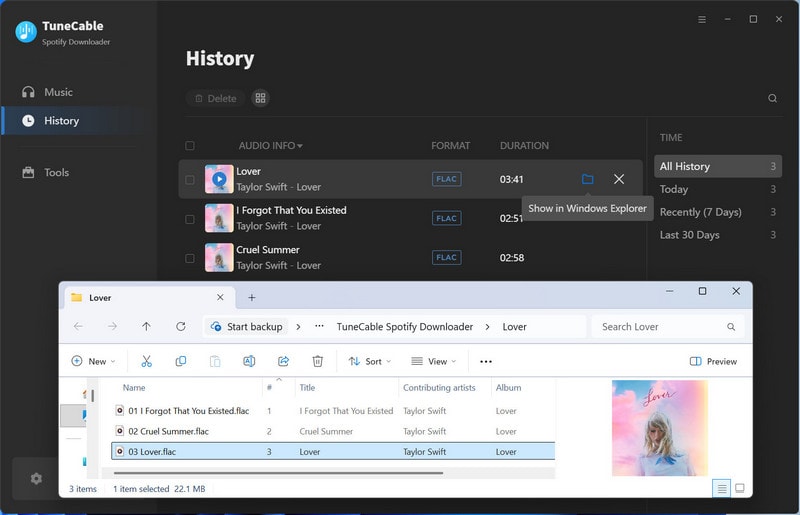
Step 4 Click "Convert" to instantly start downloading Spotify music. Once it is complete, go to the "History" section to view the downloaded music.
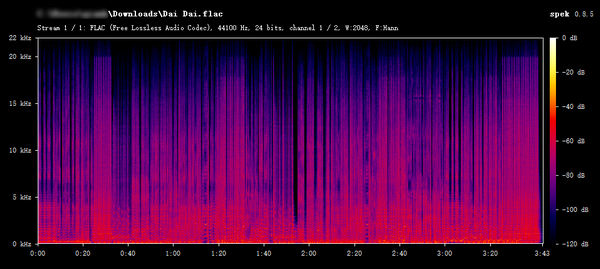
The high-frequency extends above 20 kHz. It shows a full high-frequency range with no obvious signs of lossy compression. The track downloaded via TuneCable demonstrates quality consistent with Spotify Lossless-level audio.
For users who want to batch download Spotify tracks directly to their Android phones for offline listening, the Android version of TuneCable Spotify Downloader is a safe and reliable choice. Like the desktop version, it supports downloading Spotify tracks, playlists, and albums. Supported output formats include MP3, AAC, FLAC, and WAV, making it convenient for Android users to download Spotify music anytime, anywhere. Users can also customize the output organized way to manage the offline music library efficiently.

Step 1 Go to the top bar and tap on "Login Spotify".
Step 2 Open any Spotify playlist or album and click the blue "+" button. Select the needed tracks from the list. Tap on "Download", and choose the output format and quality. Then click "←" to begin the download.
Step 3 Go to "Library" to view and play the downloaded Spotify music.
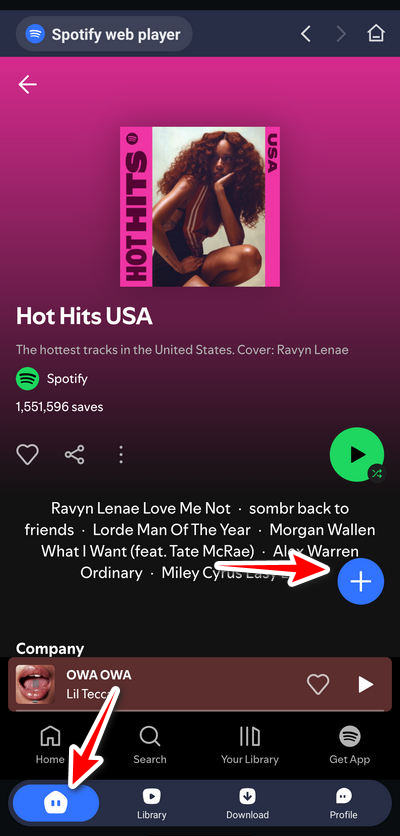
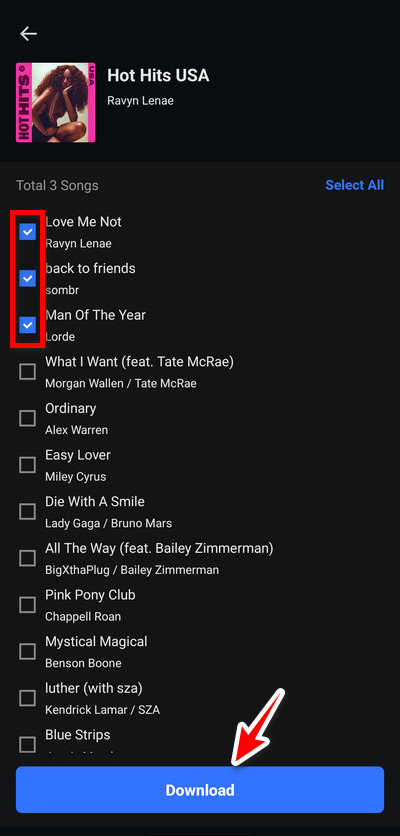
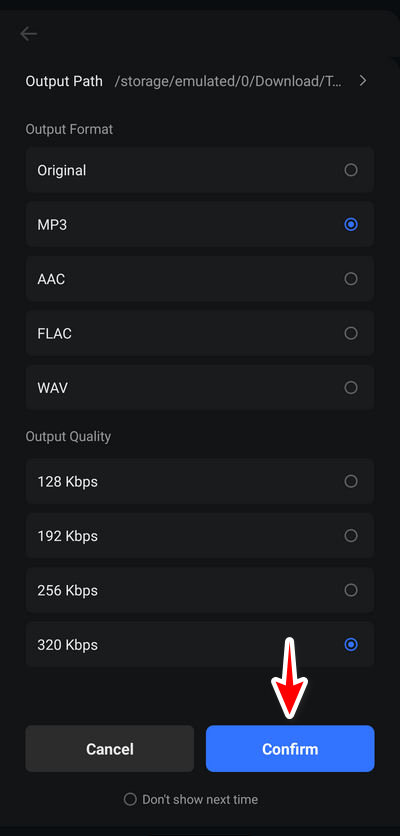
Online Spotify downloaders like SpotiDown operate in a similar way. Their biggest advantage is that no software installation is required. Simply access them through a browser, and you can download Spotify music as MP3 files easily.
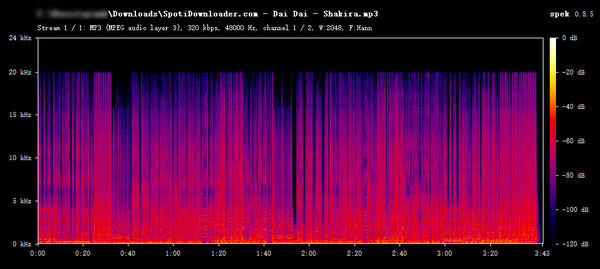
Spotidownloader is another viable free SpotiDown alternative. Since the steps for downloading music are similar to those of SpotiDown, we will focus here primarily on its performance and the actual audio quality of the output.
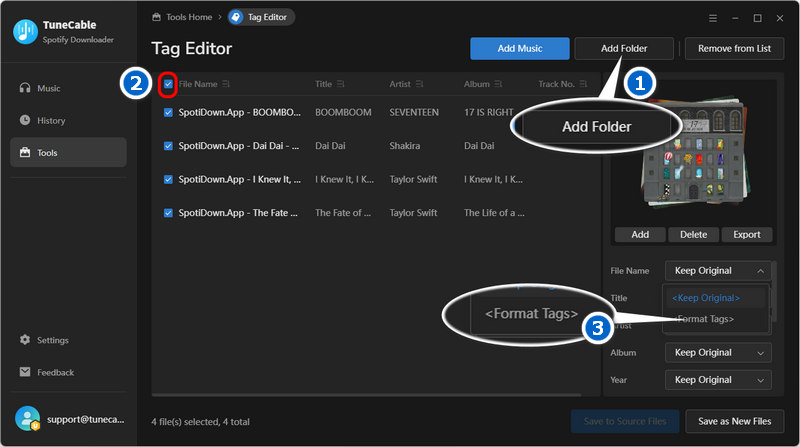
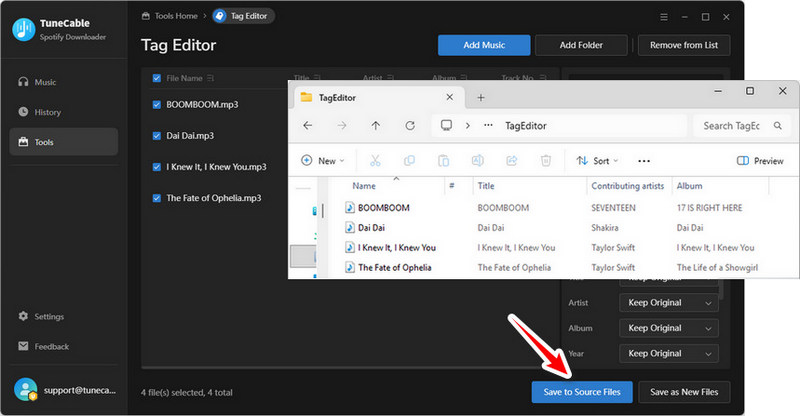
Some online websites, such as spotidown.app, default to naming their output files as "website name + song title". Modifying the names of each file individually is very time-consuming. You can use the Tag Editor embedded in TuneCable to batch edit them. Click "Tools" in the TuneCable menu, and select "Tag Editor". Then follow these steps:
You can try the following solutions:
As a free online Spotify downloader, SpotiDown is an easy-to-use option for users who want to download Spotify music occasionally at no cost. However, its limitations in download stability, audio quality control, and advanced features make it less suitable for users with higher requirements.
For better audio quality like Spotify Lossless FLAC and faster or batch downloading, you may need a more powerful and safer desktop Spotify downloader like TuneCable Spotify Downloader. Of course, if you prefer free tools, we have also introduced alternative free online solutions you can try when SpotiDown stops working, as well as a dedicated option designed specifically for Android users. Overall, the best tool depends on your needs. Always consider security, audio quality, and download reliability before choosing a Spotify downloader.
 What's next? Download TuneCable Spotify Downloader now!

Ava Morrison | Senior Writer
TuneCable Spotify Downloader


