
 >
How To >
Spotify Music Tips >
>
How To >
Spotify Music Tips >
You may already have come across Spotdownloader if you've ever tried downloading Spotify songs as MP3 files with some online tools. But is Spotdownloader still working in 2026? Is it safe to use? Before relying on any online downloader, it's worth taking a closer look. In this review, we'll put Spotdownloader to the test, focusing on download success rates, speed, actual audio quality, supported link types, and potential security risks to help you decide whether it's worth using.
Spotdownloader is a web-based Spotify downloader known for offering free MP3 downloads without requiring software installation or a Spotify account. Users are allowed to download Spotify playlists or albums as ZIP files or single MP3 files. It also claims to offer high-quality 320 kbps Spotify track downloads with all metadata saved.
However, as of October 2026, our manual testing confirmed that visiting spotdownloader.com automatically redirects to spotidown.co. Therefore, these features should be evaluated based on the currently accessible destination website.
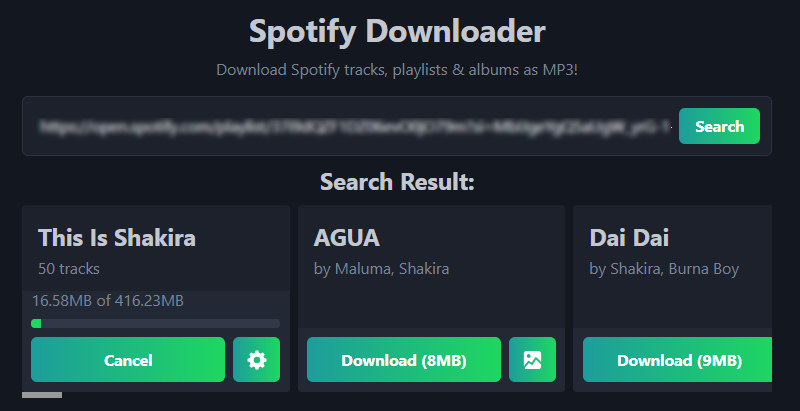
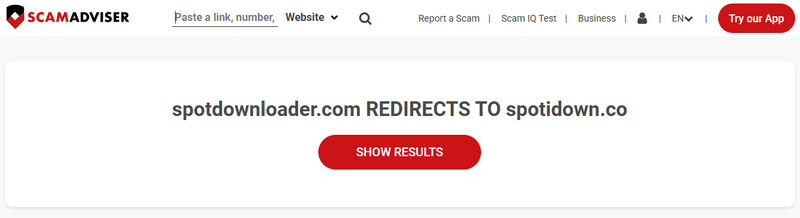
Spotdownloader.com is still accessible, but not as a standalone website. Its redirect is documented by ScamAdviser. However, the redirected website is branded as "Spotify Downloader" rather than "Spotdownloader". It offers similar features, including free Spotify-to-MP3 downloads, and claims to support high-quality audio output.
Although spotdownloader.com redirects to spotidown.co, we could not verify whether the two domains share the same owner or operator. Neither website provides a clear explanation for the redirect, so the reason remains unknown.
During our investigation, we also came across a third website, spotdownloader.org, which closely resembles spotdownloader.com. The similarities suggest a possible connection between the two sites, but we couldn't verify whether they share the same ownership or whether a domain migration took place. Here are the key similarities we observed across the three websites:
Note: It is not confirmed whether these domains are operated by the same team or whether the new site is safe. We recommend checking the destination URL carefully and avoiding suspicious pop-ups or unexpected downloads.
| Spotdownloader.com | Spotidown.co | Spotdownloader.org | |
|---|---|---|---|
| Current Status | Redirects to Spotidown.co | Accessible | Accessible (Spotisaver backend) |
| Display Name | N/A | Spotify Downloader | Spot Downloader |
| MP3 Downloads | N/A | ✅ | ✅ |
| Spotify Single Track Downloads | N/A | ✅ | ✅ |
| Playlist Batch Download | N/A | ✅ Batch download as ZIP | ❌ Only one song at a time |
| Free-Tier Limitations | N/A | No limit observed during testing | 5 downloads / day |
| Operated by the Same Entity | Unconfirmed | Unconfirmed | Unconfirmed |

Tired of searching for accessible, free online tools to download Spotify music as MP3s? Looking for a reliable, worry-free solution for downloading Spotify tracks? Try TuneCable Spotify Downloader—available for Windows, Mac, and Android—which lets you download Spotify playlists, albums, and individual songs to local storage. It supports various formats, including MP3, AAC, FLAC, and WAV.
As of our testing, spotdownloader.com redirects visitors to spotidown.co. Therefore, our review evaluates the online downloader available at the destination website rather than a separate service hosted directly on spotdownloader.com.
Step 1 Paste the Spotify link into the website and click "Search".
Step 2 Once the parsing is complete, click the "Download ZIP" or "Download" button.
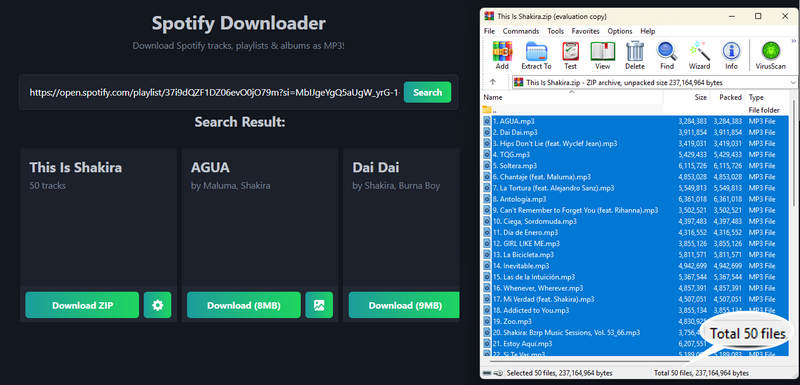
Our Test Environment: We tested the Spotify downloader available through spotidown.co on October 23, 2026, using a 50-song Spotify playlist. We measured the total download time, checked the extracted MP3 files, inspected their metadata, and used Spek to analyze audio frequency characteristics. The results below reflect this specific test and may vary depending on the playlist, network conditions, and website updates.
| Test Metrics | Test Results |
|---|---|
| Total Songs Tested | 50 |
| Successfully Extracted Songs | 49/50 (98%) |
| Total File Size | 416.23 MB |
| Total Playlist Duration | 2h 45min |
| Total Download Time | 18:24.43 |
| Average Download Time per Song | 22.09 seconds/song |
| Download Speed | 8.96× |
During testing, we found that although the downloaded ZIP file contained the full set of 50 songs, one of the files appeared to be corrupted upon extraction.
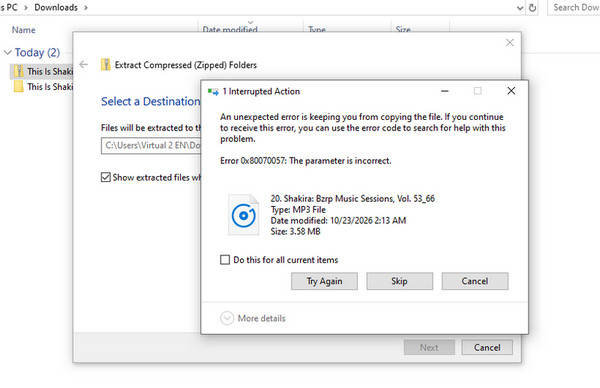
The website claims to offer 320 kbps MP3s. Does Spotdownloader really offer 320kbps? Sadly, NO.
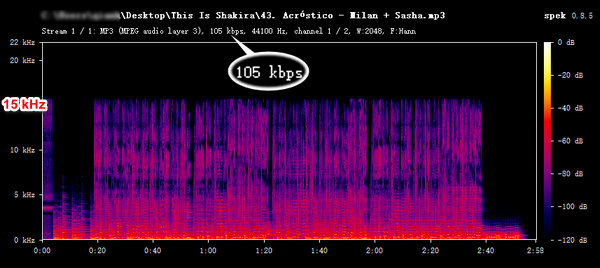
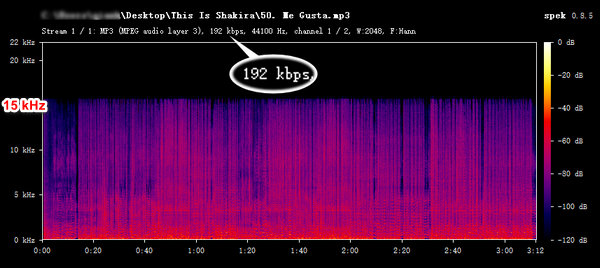
To get a clear, straightforward read on the output, we ran the MP3 files through Spek for spectral analysis. It turns out that the downloaded MP3 files have nominal bitrates ranging from 105 to 192 kbps, well below the advertised 320 kbps. Below we present the spectrograms of the 105 kbps and 192 kbps MP3 files downloaded from Spotdownloader (spotidown.co):
The ability to download playlists and preserve metadata is a key criterion for evaluating a Spotify downloader. In our review, we found that Spotdownloader offers a playlist download feature, allowing users to download an entire playlist at once as a ZIP file. Taking a 50-song playlist as an example, we downloaded the full collection as a ZIP file, extracted its contents, and analyzed each of the output MP3 files individually. Below, we detail our testing process for the playlist download feature and the results we obtained.
| Test Metrics | Test Content | Test Results |
|---|---|---|
| Playlist Parsing | Can it correctly parse Spotify playlist links and display the full playlist? | ✅ |
| Playlist Download Volume | Can it download multiple playlists at once? | ❌ |
| Download Success Rate | Are all songs in the playlist successfully downloaded—are any missed or skipped? | ⚠️ 1 file failed to extract (49/50) |
| Error Handling | Does it provide an error notification, and is there an option to retry if it fail to download a song? | ❌ |
| Track Order | Does the order of the downloaded songs match the original playlist? | ✅ |
| File Organization | Does it automatically create a folder for the playlist, and are the file names clear? |
✅ Folder name: playlist name (e.g., "This is Shakira") File name: playlist index + title (e.g., "1. Dai Dai") ⚠️When downloading one single track, it will not create a folder, and the file is only named by the song title. |
| Test Metrics | Test Content | Test Results |
|---|---|---|
| Title & Artist | Are the song title and artist name correct? | ✅ |
| Album Information | Are the album title and album artist correct? | ✅ |
| Album Artwork | Is the correct album artwork embedded? | ✅ |
| Release Date | Is the release date or year correct? | ✅ |
Pros:
 Cover art download: Allows for downloading individual song album covers.Free to use and simple to operate.Web-based & no additional software installation required.Supports downloading an entire playlist at once.
Cons:
 Inconsistent MP3 quality: Some tested files had reported bitrates below the advertised 320 kbps.Domain uncertainty: The original domain redirects to another website without a clear explanation of their relationship.Download failures: Downloads are not 100% successful. You may need to try multiple times.
Security is one of the primary concerns for users when utilizing online tools like Spotdownloader. At the beginning of this article, we noted that spotdownloader.com currently redirects directly to spotidown.co. Consequently, for this review, we focused our security checks on the destination website, spotidown.co. We evaluated its security based on the following aspects.
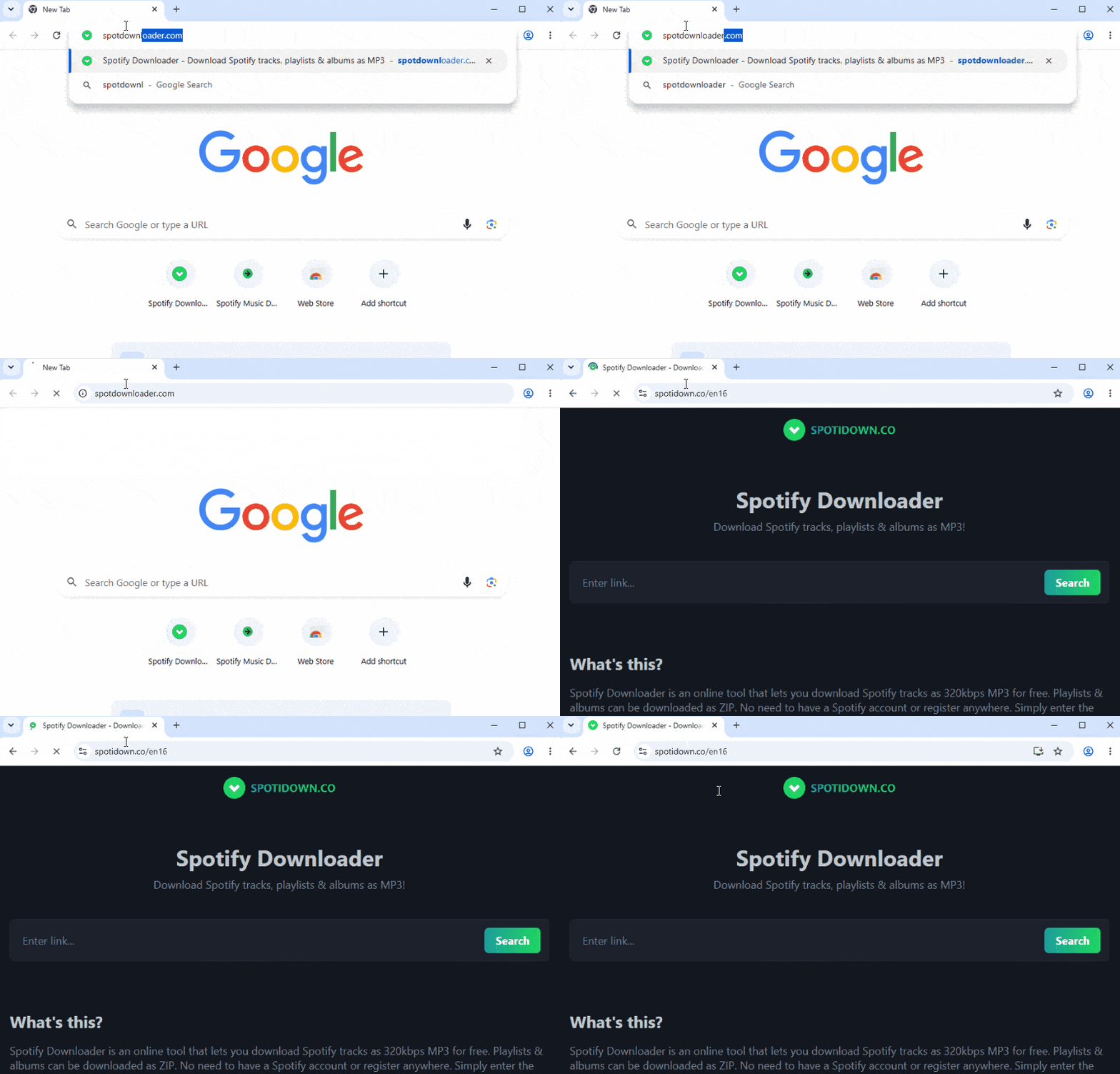
We evaluated the website using several security checks, including URL reputation scans, connection security, redirect behavior, and on-site browsing. The results below reflect our observations during testing on October 23, 2026.
| Security Test | Tool / Method | Test Results |
|---|---|---|
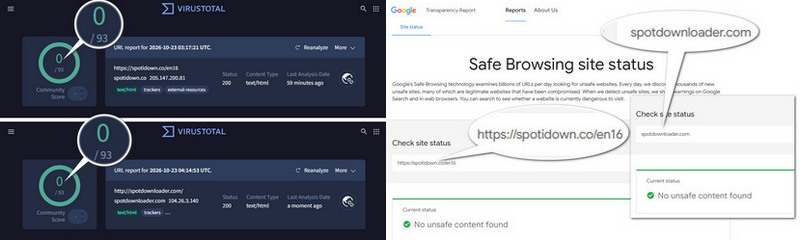
| URL Reputation | VirusTotal | ✅ 0/93 security engines flagged the URL |
| Safe Browsing Status | Google Safe Browsing | ✅ No unsafe content found |
| HTTPS / SSL Configuration | SSL Labs | ✅ A grade |
| Redirect Behavior | DevTools | ⚠️ Redirect detected |
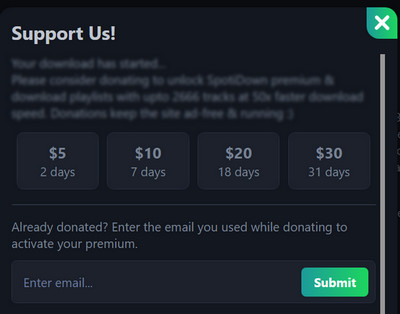
| Ads & Pop-ups | Manual browsing | ⚠️ Donation pop-up detected |
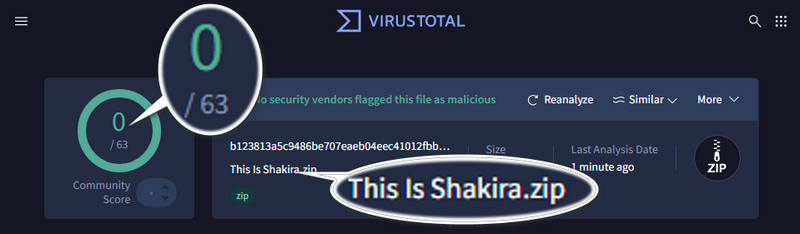
| Downloaded File Scan | VirusTotal | ✅ 0/63 security engines flagged the file |
Note: These results reflect the checks performed at the time of testing. A clean scan does not guarantee that a website is completely safe, and results may change over time.
The VirusTotal results do not flag either spotdownloader.com or spotidown.co as malicious. Furthermore, we used Google Safe Browsing to check for any unsafe content, and neither domain was flagged as unsafe at the time of testing.
Finally, we tested the security of these websites using SSL Labs, and both spotdownloader.com and spotidown.co received an "A" rating.
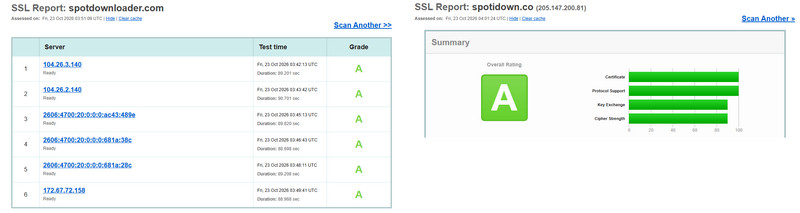
Note: An A rating indicates strong HTTPS configuration, but it does not independently verify the website's trustworthiness or the safety of its downloadable files.
During our testing, aside from the initial redirects, we did not encounter any obvious ads, such as site banners or floating side ads, on the destination websites. However, we did observe a pop-up after the download finished, encouraging users to donate to become "premium" users. It requires users to provide an email address after completing payment to activate the premium status. We advise against making payments or submitting personal information. Please exercise caution to avoid the potential exposure of your private data.
Additionally, we scanned the downloaded ZIP file using VirusTotal, and none were flagged as malicious.
Based on our tests, the website showed no obvious security warnings from the security checking tools we used. However, we observed a redirect and a donation pop-up during testing. While neither necessarily indicates malicious activity, users should verify the destination URL and avoid clicking unfamiliar buttons. Overall, the results are encouraging, but they do not guarantee that the website or every file it provides is completely safe.
We have compiled some common issues reported by users regarding "Spotdownloader not working", along with their corresponding solutions, as detailed below:
Possible Causes: The website has changed its domain name; the website is temporarily down; or there are network issues.
What You Can Try: Check whether the original website redirects to a new domain, and verify the destination URL before using it. Consider searching for alternatives to Spotdownloader. Try clearing your browser cache or switching to a different network, then try again.
Possible Causes: The Spotify link is not supported. Or it is a private link.
What You Can Try: Check whether the link type is in a format supported by the website and has public access permissions. Try parsing different types of links, such as those for individual tracks, albums, or playlists.
Possible Causes: Song matching failed. The download request was interrupted or timed out due to network issues.
What you can try: Re-parse the link and click download. If the download fails for only some tracks in a playlist, try parsing the links for the individual songs instead and download them one by one.
Spotdownloader can be a convenient option for occasional Spotify MP3 downloads, especially if you prefer a free browser-based tool. However, our testing revealed some limitations, including inconsistent audio quality, a corrupted file in the downloaded playlist, and uncertainty surrounding its domain redirect.
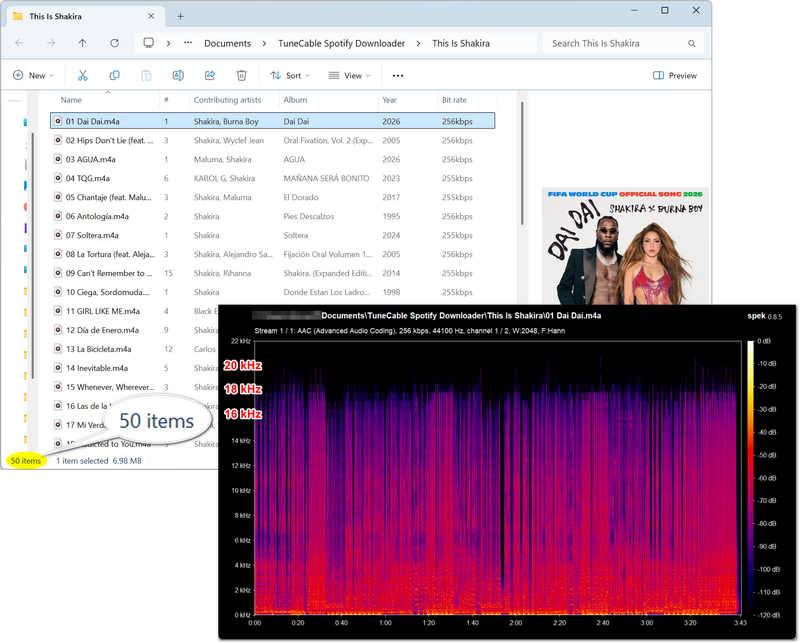
If you regularly download Spotify albums or playlists and need more control over output formats and file organization, TuneCable Spotify Downloader is worth considering. Available for Windows, Mac, and Android, it supports batch processing, customizable file naming, and multiple audio formats, including MP3, AAC, FLAC, ALAC, AIFF, and WAV.
It offers an ad-free desktop experience without relying on third-party online download pages. Unlike online tools that can only download one playlist at a time, this software allows for the batch downloading of multiple playlists. Furthermore, it supports a wide range of Spotify content, including albums, podcasts, and audiobooks.
| Features | Spotdownloader | TuneCable Spotify Downloader |
|---|---|---|
| Type | Web-based tool | Desktop software / Mobile app |
| Batch Download | One playlist at a time | Multiple playlists at once |
| Supported Output Formats | MP3 | MP3, AAC, ALAC, FLAC, AIFF, WAV |
| Download Speed | ~9x | Up to 40x |
| Custom File Naming | ✅ | ✅ |
| Organized Output Folders | ❌(Only sorted by playlist) | ✅(Sorted by playlist, album, artist, etc.) |
| Save Lyrics | ❌ | ✅ |
| Save Album Covers | ✅ | ✅ |
| Supported Platforms | Any browser on any OS | Windows, Mac, Android |
| Free of Ads & Redirects | ❌ | ✅ |

TuneCable Spotify Downloader
Step 1 Click the button above to download TuneCable Spotify Downloader. Once installed, launch the program and log in to your Spotify account.
Step 2 Open the playlist, album, or other content. Click the "+" button to analyze the link. Select all or choose the specific tracks you want, then click "Add" to include them in the task list. You can click "Add More" to continue adding other playlists or tracks.
Step 3 Go to "Settings" to configure parameters such as output format, bit rate, and sample rate. Selecting "Recommended" is advised, as this allows TuneCable to automatically determine the optimal audio quality and format for your download.
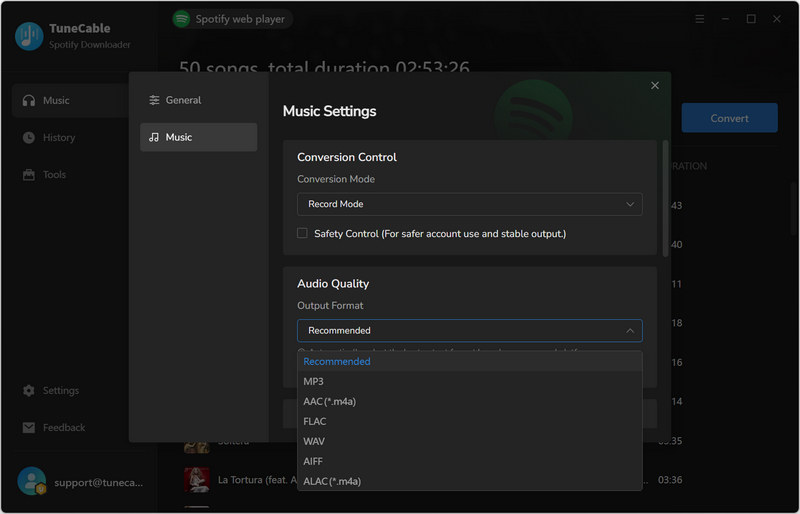
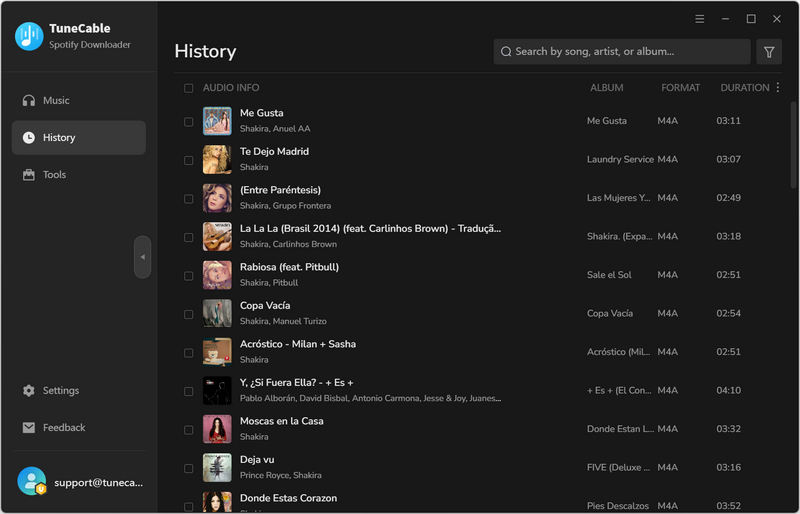
Step 4 Click "Convert" to start the download. Then check the downloaded Spotify tracks in "History".
Yes. During our testing, the basic MP3 download features were available for free without registration or software installation. The website also displayed an optional donation prompt for premium access.
Yes. However, you can only process and download one playlist at a time. If you need to download multiple playlists, you must wait for the current download to finish before you can process and download the next one. If you wish to download multiple playlists at once, you might consider alternative solutions, such as TuneCable Spotify Downloader.
Yes, it runs through a browser. Users can access the Spotdownloader MP3 download site via a browser on their iPhone or Android device.
No. Our testing revealed that the highest actual output quality is only about 128kbps.
Based on our 2026 review, Spotdownloader is generally suitable for casual users who only occasionally download a small number of Spotify songs or playlists. It is free and easy to use. However, our 50-song test revealed inconsistent audio quality and one corrupted file. While our security checks found no major warnings, users should remain cautious about the unexplained domain redirect and donation pop-up.
For users who wish to download multiple playlists and albums in bulk, require a wider range of flexible output formats, or need to efficiently manage their downloaded Spotify music, TuneCable Spotify Downloader offers a more professional and comprehensive alternative.
 What's next? Download TuneCable Spotify Downloader now!

Ava Morrison | Senior Writer
TuneCable Spotify Downloader


