
 >
How To >
Music Tips >
>
How To >
Music Tips >
Among the many SoundCloud to MP3 converters, KlickAud is one of the most popular options. Why has it attracted so many users? How does it work? And why are some looking for alternatives to KlickAud lately? If you are looking for a reliable SoundCloud to MP3 converter, then don't miss out on this article. Here, we will provide a comprehensive review of KlickAud, covering its key features, pros and cons, the best KlickAud alternative for desktop, as well as some convenient online alternatives for any device.
 Part 1. What is KlickAud? Part 2. Best Desktop KlickAud Alternative - TuneCable BeatOne Part 3. Best Online KlickAud Alternatives - Free Sites Quick Comparison: Which Is the Best KlickAud Alternative? FAQs about KlickAud
 Part 1. What is KlickAud?
Simply put, KlickAud is a free online tool that supports saving tracks from SoundCloud in MP3 format. Basically, it obtains the tracks by parsing a specific URL. This site requires no software installation. It is a convenient web-based tool for users who would like to build a personal MP3 music library.
⚠️Notice*:
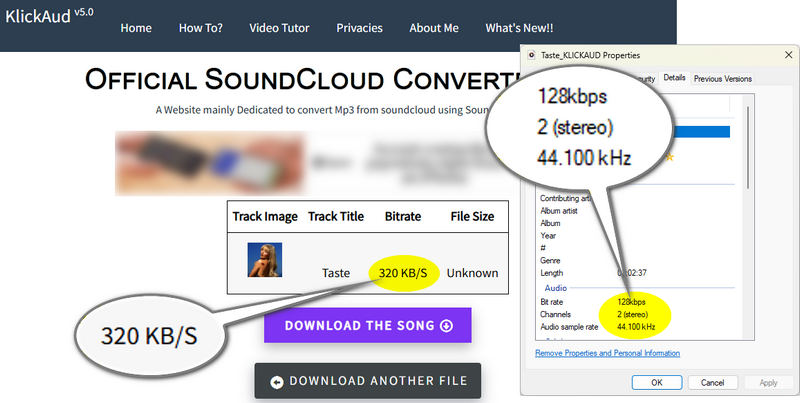
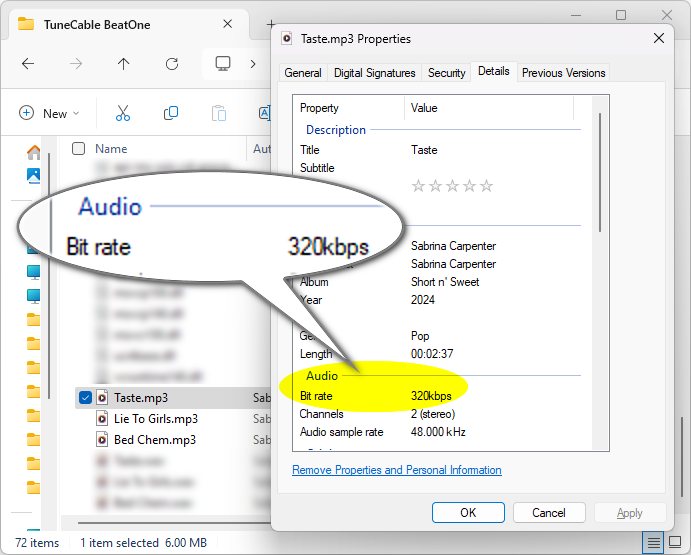
In this review, the same SoundCloud track ('Taste' by Sabrina Carpenter) was used to test multiple tools. While KlickAud indicates an output bitrate of 320 kbps, our test shows that the actual bitrate is 128 kbps, revealing a significant discrepancy. If you value output audio quality, we recommend clicking the button on the right to try the more professional KlickAud alternative, which can download SoundCloud tracks as 320kbps MP3s.
Pros
 It is completely free.It is easy to use.No installation is required.
Cons
 Only one song can be downloaded at a time. (No batch downloading playlists or albums.)The website interface is cluttered and contains many advertisements.It advertises 320kbps quality, but the downloaded file is actually only 128kbps.This service may have ceased active maintenance, as its last update was at the end of 2024.Output files are missing detailed ID3 tags (metadata like artist and album).
Despite being a free and handy online tool as noted above, KlickAud comes with the limitations typical of free-tier services. Need a more stable, reliable, and user-friendly KlickAud alternative with better sound quality, but don't know where to start? Don't worry, there are better options available, both in desktop software and online tools. Let's take a look at them one by one.
Part 2. Best Desktop KlickAud Alternative - TuneCable BeatOneTuneCable BeatOne is a professional desktop music downloader for Windows and Mac, specifically designed for downloading music from multiple music platforms such as SoundCloud, Spotify, Apple Music, and Tidal. TuneCable BeatOne boasts a clean, ad-free interface, providing a comfortable and clear downloading experience. Most importantly, it supports batch downloading the entire playlist or album at once, which is a significant advantage over KlickAud. In comparison, TuneCable offers more output formats, such as MP3, AAC, ALAC, FLAC, WAV, and AIFF. For those who want to build a private SoundCloud MP3 offline music library, TuneCable is the indispensable tool.
In terms of stability, TuneCable BeatOne is superior. Unlike the web-based tool KlickAud, TuneCable offers regular updates, professional customer service, and a dedicated technical support team. Users can contact the TuneCable support team to report any issues or ask for any technical support. Furthermore, as a professional music downloader, TuneCable BeatOne features built-in tools like a Format Converter, Audio Editor, and AI Audio Splitter, delivering a more advanced audio processing experience. Now, just click the button and follow the steps below to download your favorite SoundCloud tracks to local storage.

TuneCable BeatOne
Step 1 Launch TuneCable BeatOne and Select SoundCloud
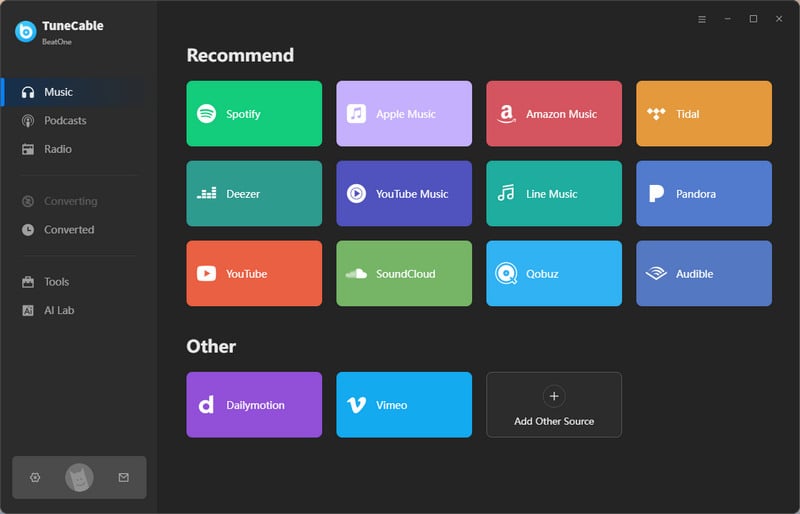
Click the download button and install TuneCable BeatOne on your computer. Launch it and select "SoundCloud" on the initial screen. Then, log in to your SoundCloud account.
Step 2 Adjust SoundCloud Output Settings
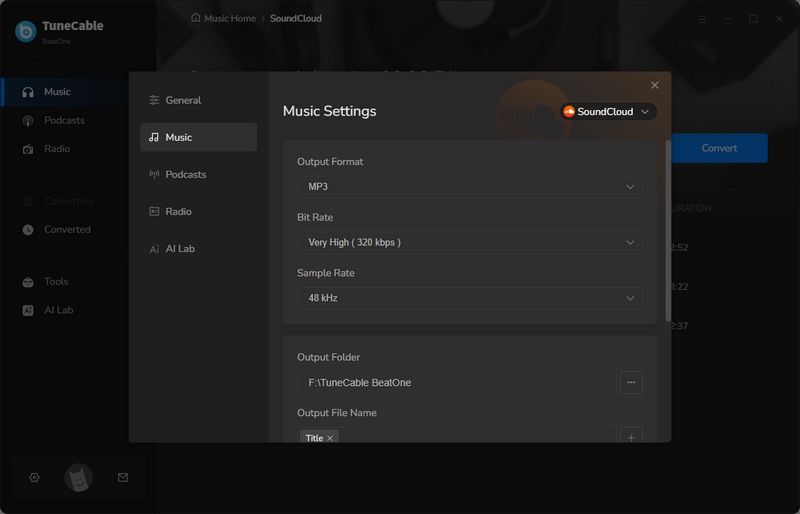
Navigate to the "Settings" window by clicking the gear icon in the lower left corner. Set the output format, bitrate, sample rate, output path, etc. Next, close the window to apply the changes.
Step 3 Choose Songs from SoundCloud to Download
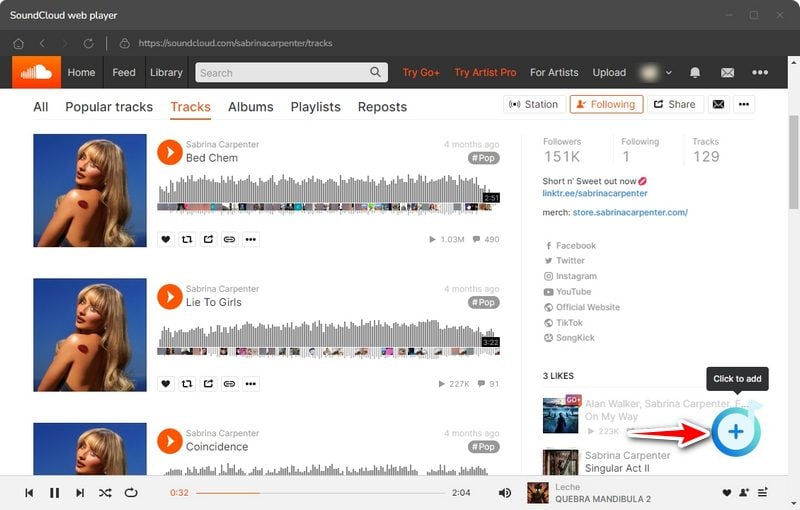
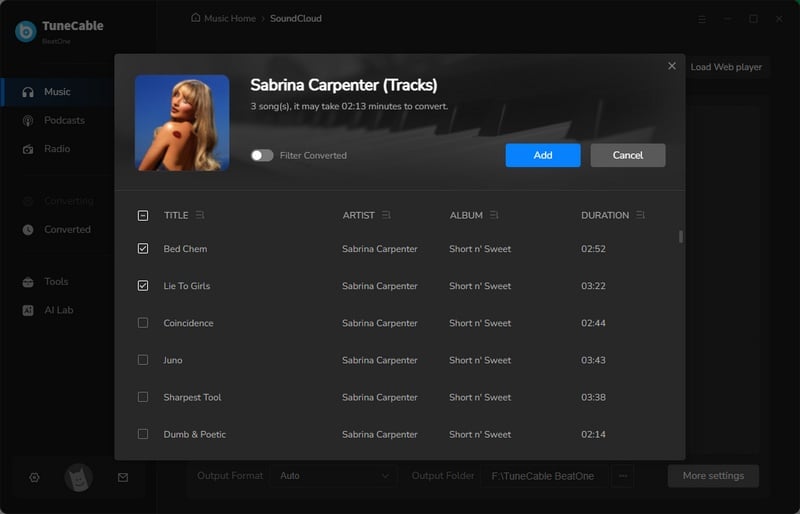
Back to the embedded SoundCloud web player in TuneCable. Search for the needed song, the specific album, or playlist. Then, click the "Click to add" button to parse the music. For your convenience, all the tracks are selected by default on the pop-up. If you need to download the entire playlist or album, just click "Add" to move all the tracks to the ready list. If not, you should deselect all the songs and tick the tracks you want and hit "Add".
Step 4 Download SoundCloud Tracks to Local Storage
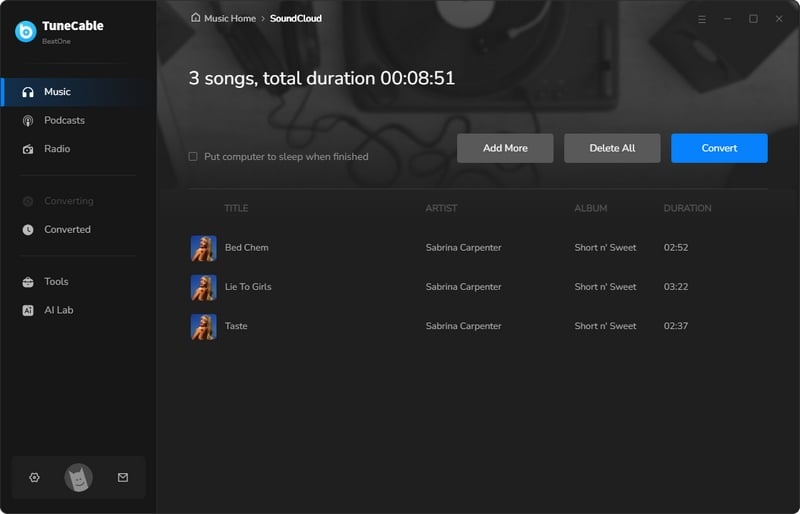
As everything is all set, just hit the "Convert" button to get your downloads started instantly.
Step 5 Locate the Downloaded SoundCloud Music
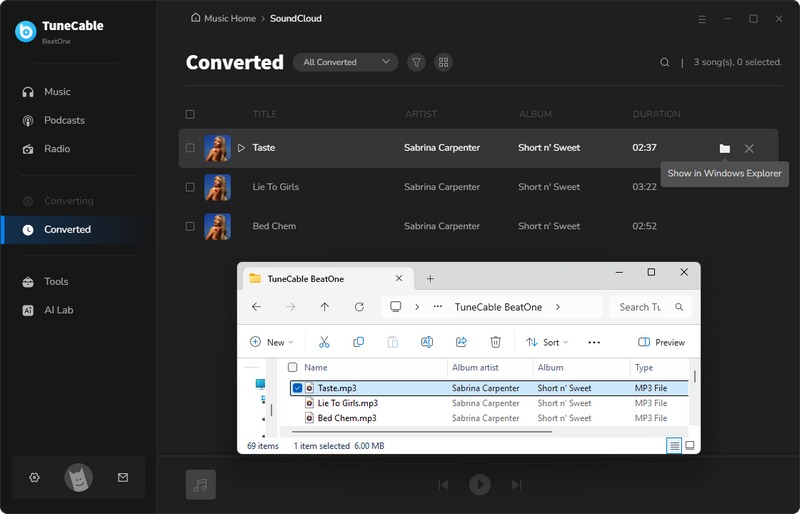
You can view downloaded SoundCloud tracks in the "History" section. To quickly locate a downloaded file, just click the folder icon to open its containing directory.
Pros
Ad-free UI.Supports downloading the entire playlist and multiple playlists at one time.Support modifying bitrate, sample rate, output format, output organized, output path, output file naming, etc.Up to 10x conversion speed.Lossless output quality.Supports saving full ID3 tags like artist, title, year, genre, cover art, album, etc.Advanced Tools: AI Audio Splitter, Audio Editor, Format Converter, Tag Editor, etc.Cons
There are trial restrictions.Currently, it can only be used on Windows or Mac computers. Part 3. Best Online KlickAud Alternatives - Free SitesBesides the KlickAud alternative for desktop use mentioned above, there are some free online SoundCloud to MP3 converters suitable for temporary use when your computer isn't readily available. Similar to KlickAud, the core principle of these free websites is to parse track links from SoundCloud to obtain the audio. We recommend two more practical tools here.
🔗 https://soundclouddl.cc/
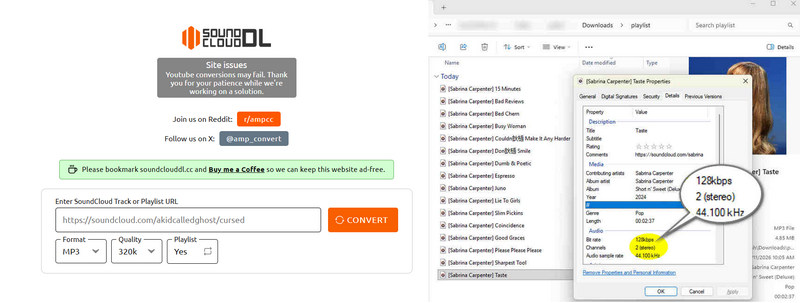
Soundclouddl.cc is a web-based online SoundCloud to MP3 converter. It supports downloading SoundCloud tracks or playlists to MP3 or M4A format. Additionally, bitrate selection is available. And this online tool supports saving basic ID3 tags such as album, artist, title, year, and genre. Compared to KlickAud, it offers more features and better usability.
Pros
Free to use.Two formats are available - MP3 and M4A.Supports downloading the entire playlist at once.Supports bitrate selection: 64-320kbps.Supports saving basic ID3 tags such as album, artist, title, year, and genre.Cons
You have to click the download button several times before the download finally starts, which can be a bit cumbersome.Custom output file names are not supported.The actual output quality is only 128kbps.The interface contains some advertisements.The output file naming format is "[Artist Name] xxxx (Song Title)", and some song titles are garbled.When downloading an entire playlist, some songs may be missed.Only one playlist can be downloaded at a time, and when downloading an entire playlist, it can only be saved as a ZIP file named "playlist". Unzipping is required, which is cumbersome when downloading multiple playlists.🔗 https://soundloadmate.com/enB13
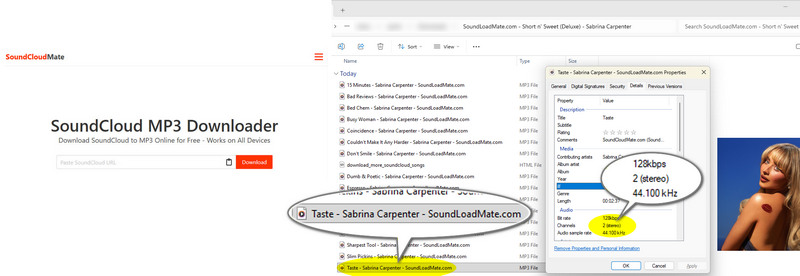
SoundCloudMate is designed to convert SoundCloud tracks or playlists to MP3s. As a free online website, it has no device restrictions. Whether you're a mobile or desktop user, you can access it through any browser to download SoundCloud music.
Pros
Free to use.Supports downloading the entire playlist.Cons
The interface is cluttered with ads.Does not support modifying bitrate, output format, etc.Download speed is slow, and many ads pop up during the downloading process.Output file naming format is fixed: Song Title - Artist - SoundLoadMate.com. The output quality is only 128kbps, and only the MP3 format is supported.Only minimal metadata (e.g., artist and cover art) is preserved.Looking for more online SoundCloud to MP3 Converters? You may be also interested in this article: Top 5 SoundCloud to MP3 Converters
Quick Comparison: Which Is the Best KlickAud Alternative?| KlickAud | TuneCable BeatOne | Soundclouddl.cc | SoundCloudMate | |
| Output Format | MP3 | MP3, AAC, ALAC, FLAC, WAV, AIFF | MP3, M4A | MP3 |
| Conversion Speed | Medium | Fast (Up to 10x) | Medium | Slow |
| Supported OS | Any browser on any device | Windows & MacOS | Any browser on any device | Any browser on any device |
| Output File Name | Song Title_KLICKAUD.mp3 | Customizable: Track Number, Title, Artist, Album, Playlist Index, Year, Disc Number, {Disc Number} | [Artist Name] Song Title.mp3 | Song Title - Artist - SoundLoadMate.com.mp3 |
| Stability | 👎 (The latest update was at the end of 2024.) | 👍 (Update regularly) | 👎 Unknown | 👎 Unknown |
| Save Metadata | ❌ | ✅ (eg. album, artist, title, year, genre, cover art, etc.) | ✅ (eg. album, artist, title, year, genre, etc.) | ✅ (Only artist) |
| Batch Download | ❌ | ✅ (Multiple playlists at a time) | ✅ (One playlist at a time) | ✅ (One playlist at a time) |
| Supported Platforms | SoundCloud | SoundCloud, Spotify, Apple Music, Tidal Music, YouTube Music, Amazon Music, YouTube, Qobuz, Deezer Music, Pandora, etc. | SoundCloud | SoundCloud |
| Ad-free UI | ❌ | ✅ | ❌ | ❌ |
| Output Organized | ❌ | ✅ Customizable: Playlist, Artist, Album, Genre, Year, Disc Number, New Folder Level (/) | ❌ | ❌ |
| Extra Advanced Tools | ❌ | ✅ Format Converter, AI Audio Splitter, Export to iTunes, AA/AAX Converter, Burn CD, Tag Editor, Audio Editor, etc. | ❌ | ❌ |
FAQs about KlickAudIt depends. The tool operates in a legal gray area. It's legal only if the artist explicitly allows downloads or the music is in the public domain. Furthermore, it's important to note that downloaded music can only be used for private purposes.
There are several possible reasons. Being an online tool, KlickAud is susceptible to server instability and other technical issues. Therefore, it's likely to stop running from time to time. Additionally, KlickAud used to change its domain name. If users do not know that, they may be unable to access the site normally. Also, online tools update along with the SoundCloud platform. Without timely updates, they may become unavailable.
No. It only supports downloading one single track at once. If you need to download multiple playlists in bulk, it is recommended to use a KlickAud alternative for desktop, such as TuneCable BeatOne, which supports downloading multiple SoundCloud playlists at once and is suitable for users who need to download a large number of songs.
According to our tests, most of the files are 128kbps MP3s.
The Final ThoughtsThis article provides a detailed review of KlickAud, introducing its key features, step-by-step user guide, and pros and cons. Indeed, KlickAud is not a perfect tool. That's why people are looking for an alternative to KlickAud. Driven by user needs, we recommend 3 KlickAud alternatives suitable for different situations, including desktop software and free online tools. If you're unsure which to choose, you can check the quick comparison table at the end of the article to select a tool and give it a try. For users who need batch downloads and are looking for a reliable and clean SoundCloud music converter, TuneCable BeatOne is clearly the best choice. Click the button below to try it!
 What's next? Download TuneCable BeatOne now!

Ava Morrison | Senior Writer
TuneCable BeatOne - All-in-one Music Solution

