
 >
How To >
Spotify Music Tips >
>
How To >
Spotify Music Tips >
Looking for a Spotify downloader for 320kbps MP3 downloads? You've probably tried plenty of services boasting 320kbps quality, only to find that the final file is stuck at 128kbps or even lower. So, which ones actually deliver real 320kbps, and which ones only claim to?
To help you find the best option, we tested and compared today's leading Spotify downloaders. Here, we don't take marketing claims at face value. We let the test results speak for themselves.
Before we explore each tool in detail, let's start with a quick comparison of all the Spotify downloaders we tested.
| Tool Name | Tool Type | Claimed Quality | Real-World Quality | Batch Download | ID3 Tags | No Ads | Conversion Speed | Current Status |
|---|---|---|---|---|---|---|---|---|
| TuneCable Spotify Downloader | Desktop Software | 320kbps (or 24-bit/44.1 kHz) | True 320kbps (or 24-bit/44.1 kHz) | ✅ | ✅ (Artist, Title, Artwork, Album, Year, etc.) | ✅ | Fast (up to 40x) | ✅ Stable (Actively maintained) |
| Spotidownloader | Online Website | 320kbps | 320kbps | ✅ | ✅ (Title, Album, Artist, Year) | ⚠️ Many pop-ups & redirections | Fast | ⚠️ Working but unstable |
| SpotiDown.net | Online Website | 320kbps | 320kbps | ❌ | ✅ (Title, Album, Artist, Year) | ✅ | Fast | ⚠️ Working but unstable |
| SpotiDown.app | Online Website | 320kbps | 320kbps | ✅ | ✅ (Title, Album, Artist, Year) | ⚠️ Many pop-ups & redirections | Fast | ⚠️ Working but risky |
From the comparison table above, we noticed that some Spotify to MP3 converters actually output fake 320kbps files. Let's uncover the truth behind these Spotify downloads.
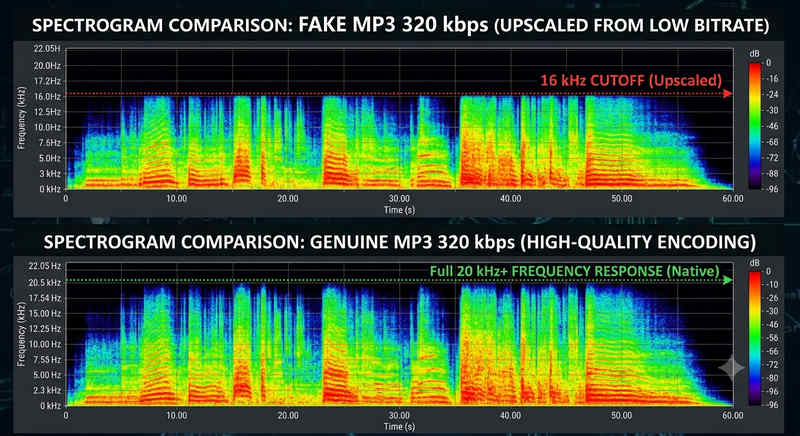
The main reason many online downloaders deliver fake 320kbps Spotify MP3 downloads is simple: the original audio source they use is not actually 320kbps. These tools usually extract audio from YouTube and YouTube Music (which support 128–256 kbps AAC/Opus), then upscale and re-encode the audio into 320kbps MP3 files. In this case, it makes no improvement in the audio quality and only increases the file size. In the end, you will get an MP3 file with a 320kbps label, but the underlying audio quality remains limited by the original source.
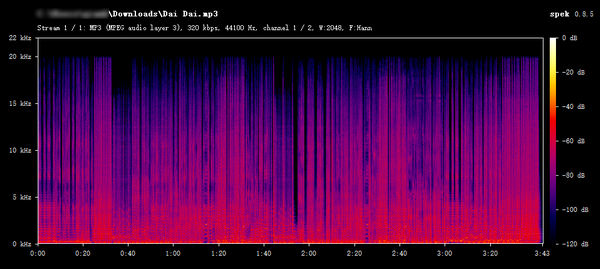
A file's bitrate label alone doesn't guarantee its actual quality, while spectrum analysis provides a much more reliable way to see clearly whether it is truly a real 320kbps or simply a re-encoded, fake 320kbps MP3 file.
Here are the differences between the two:
The spectrum comparison below clearly shows the difference between genuine and fake 320kbps audio.
Web-based online tools are suitable for occasionally downloading a few Spotify songs, while the desktop Spotify Downloader offers superior performance and is ideal for batch downloading Spotify playlists or albums. Overall, it's a more stable tool that delivers true 320kbps quality.
The core reason lies in its audio source. Desktop Spotify downloaders capture the audio that the Spotify desktop app streams and convert it to a file in a common format like MP3, AAC, FLAC, etc. Meanwhile, it keeps the original bitrate and the corresponding ID3 tags. With a Spotify Premium account, users are even able to get Spotify Lossless (24-bit/44.1kHz) audio.
TuneCable Spotify Downloader is a professional tool for downloading Spotify songs, albums, playlists, podcasts, music videos, and audiobooks in bulk at up to 40x faster speed. It is the optimal desktop Spotify 320kbps downloader to handle big Spotify playlists. In addition, it can retain full metadata and export lyrics files, ensuring better organization and playback across different music players.
TuneCable Spotify Downloader
Here are the simple steps to download Spotify 320kbps MP3 music via TuneCable.
Step 1 Launch TuneCable, switch to "Spotify App" in the top bar. Log in to a Spotify Premium account.
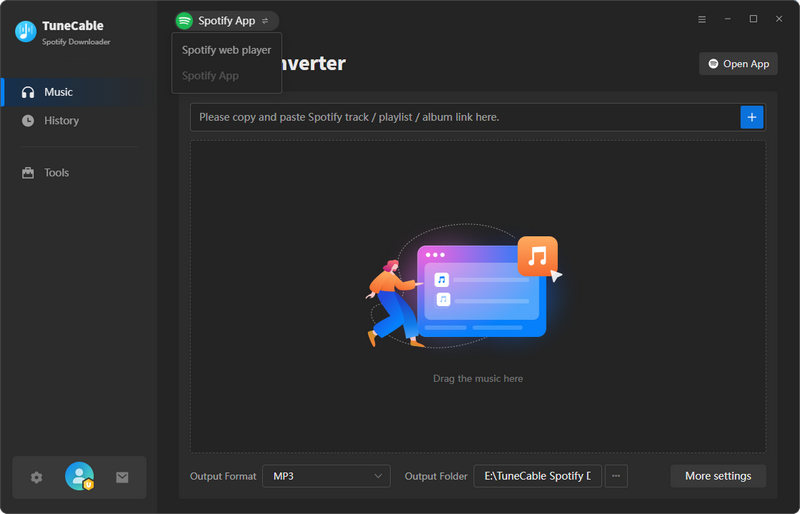
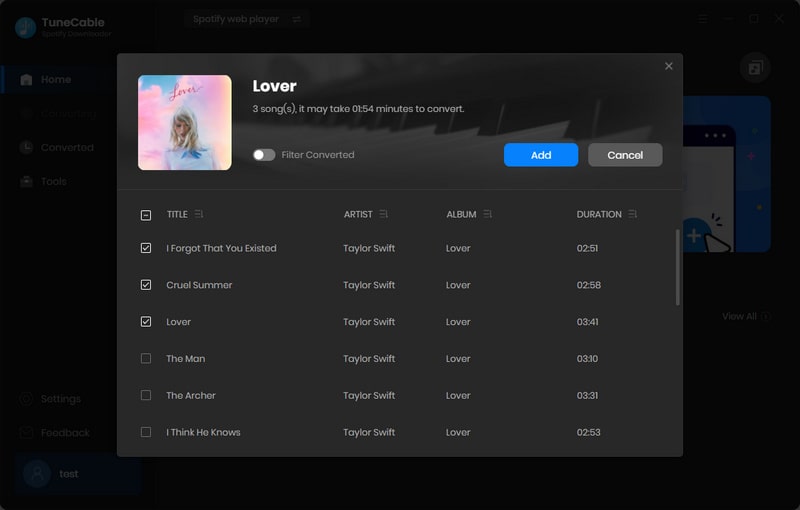
Step 2 Find any Spotify track, playlist, or album in the Spotify app. Hit "+" and tick all the tracks you need. Click "Add" to get them ready. For more songs, you can click "Add More" to choose more to download.
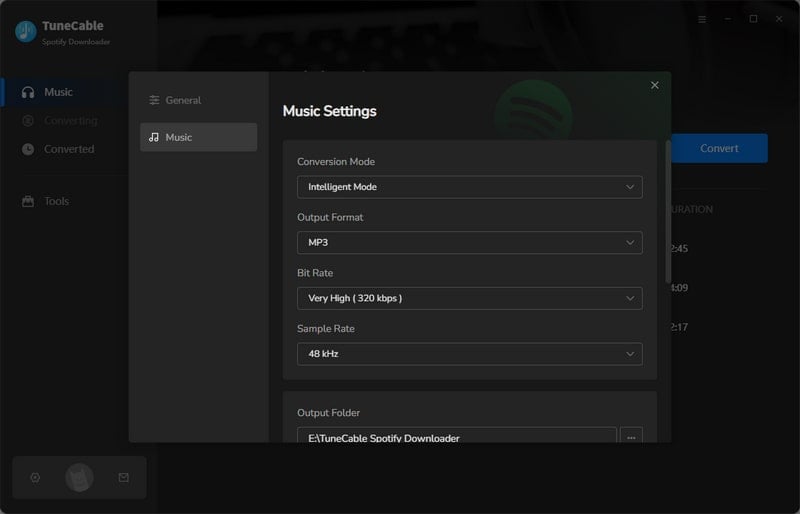
Step 3 Click "Settings" to modify output format, bitrate, sample rate, conversion mode, and more. For real 320kbps Spotify MP3 downloads, just choose "Record Mode", "MP3", and "320kbps".
Note: If you need more than 320kbps MP3, choose "Recommended" as the output format. You will get up to 24-bit/44.1kHz Spotify lossless FLAC audio (with a Premium account).
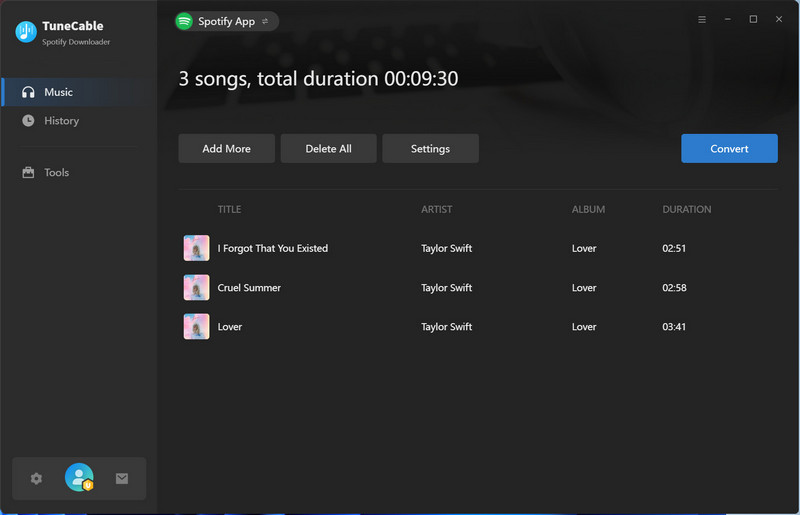
Step 4 Hit "Convert" to download music from Spotify to local storage.
Based on the spectrum below, it is clear that TuneCable is a real 320kbps Spotify Downloader.
While most online Spotify downloaders trade off performance and audio quality for convenience, we wanted to find out whether any online tools can actually provide 320 kbps audio quality and support batch downloading. Let's explore the results in this section.
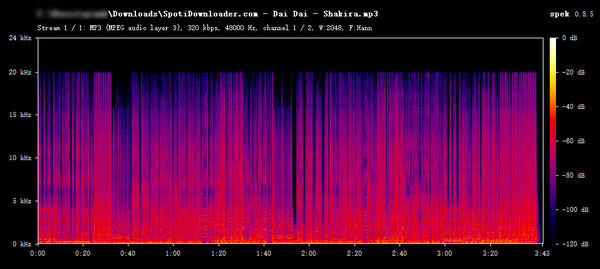
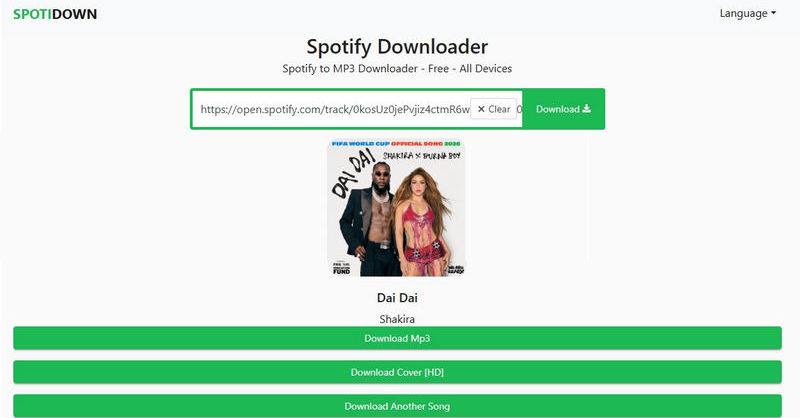
Spotidownloader is a Spotify to MP3 320kbps downloader that supports downloading an entire Spotify playlist as a ZIP file. It's still working in 2026, and it is completely free. You can download Spotify music directly from the website easily.
Step 1 Go to the Spotidownloader website, paste the Spotify track, playlist, or album URL into the search bar, and click "Download".
Step 2 After the link is resolved, click "Download MP3" twice to download the Spotify file to the local device.
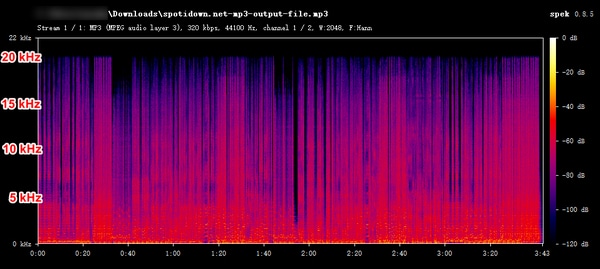
The SpotiDown.net website clearly states that it can download full playlists or complete albums, and supports downloads up to 320kbps MP3 quality for the best listening experience.
Step 1 Copy and paste the URL of a Spotify track, album, or artist to the SpotiDown.net website and click the "Download" button.
Step 2 Click the "Download track" button to download Spotify tracks one by one.
Spotidown.app is an online Spotify to MP3 converter that can download Spotify tracks in high-quality MP3 format. It can parse and extract Spotify music from albums, playlists, and artist URLs. It's compatible with various devices and offers great flexibility.
Step 1 Go to the spotidown.pp website, paste the URL, and click "Download".
Step 2 Click "Download MP3" and wait for the parsing. Then hit "Download MP3" again to download the Spotify file to the local device.
Yes, some online websites support downloading Spotify tracks in MP3 format with 320kbps quality without logging into a Premium account. However, you need to carefully verify the safety and reliability of the website. Do not visit malicious websites or click on suspicious links.
Online Spotify 320kbps downloaders put speed first. To save processing time, they only extract the audio and don't read the tags, so the converted MP3 contains no song metadata but only the audio alone. Using professional desktop software like TuneCable Spotify Downloader, however, usually does well in preserving the song metadata.
Probably because the files are actually a fake 320kbps file downloaded via some Spotify to MP3 online downloaders. The downloaded files are sourced from YouTube or YouTube Music, upscaled and re-encoded into 320kbps MP3 files. The real sound quality is not real 320kbps.
Instead of readily believing advertising claims, we analyzed every downloaded file with Spek to verify its exact audio quality in person. Yes, there are some excellent online tools that enable 320kbps MP3 downloads. However, only a small number of Spotify downloaders can make it, while others merely claim to support 320kbps. While they are lightweight and suitable for downloading a few Spotify tracks from time to time, the risks involved should not be underestimated. We should be cautious when accessing these websites.
Conversely, desktop Spotify downloaders like TuneCable Spotify Downloader, although relatively bulkier, excel in bulk downloading large playlists and albums and preserving higher audio quality like Spotify Lossless, making them ideal for professional users. The best Spotify downloader for different users may vary depending on their specific needs. Just choose the tool that best suits your requirements!
 What's next? Download TuneCable Spotify Downloader now!

Ava Morrison | Senior Writer
TuneCable Spotify Downloader


