
TuneCable BeatOne
 >
How To >
Music Tips >
>
How To >
Music Tips >
YouTube Music has become one of the most widely used music streaming platforms, thanks to its huge music library and seamless integration with the YouTube ecosystem. However, when it comes to audio quality, many users still have questions about whether it supports lossless streaming and how it compares to other services like Spotify, Apple Music, and TIDAL. In this guide, we will take a closer look at YouTube Music’s audio quality, explain why it does not currently offer lossless playback, and explore whether its sound quality is really “good enough” for everyday listening. We will also show you how to optimize playback settings for the best possible experience and answer the most frequently asked questions about YouTube Music lossless audio.
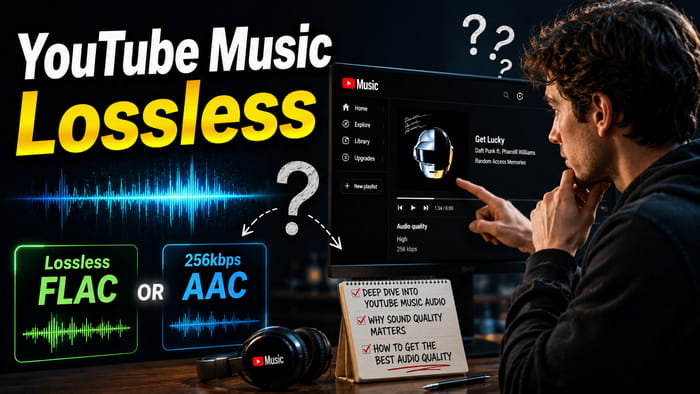
The short answer is no. As of 2026, YouTube Music does not offer lossless audio streaming. The highest audio quality available on YouTube Music is AAC 256kbps for Premium subscribers. While YouTube Music is known for its vast music catalog, personalized recommendations, and seamless integration with YouTube, it still falls behind several competitors in terms of audio fidelity. The table below compares YouTube Music with other major music streaming services, including the maximum audio quality available for free and paid plans, as well as current subscription pricing.
| YouTube Music | Spotify | Apple Music | Amazon Music | SoundCloud | TIDAL | |
|---|---|---|---|---|---|---|
| Free User | 128kbps AAC & OPUS | 160kbps AAC | ❌ | ❌ | 128kbps MP3 | ❌ |
| Subscriber | 256kbps AAC & OPUS | 24-bit/44.1kHz FLAC | 24-bit/192 kHz ALAC | 3730kbps (24-bit/192kHz) FLAC | 256kbps AAC | 24-bit/192 kHz FLAC |
| Pricing(2026.8 updated) | $11.99/month | $12.99/month | $11.99/month | $11.99/month | $11.99/month | $11.99/month |

Want to download unlimited lossless music for offline listening? TuneCable BeatOne allows you to download and save up to 24-bit lossless FLAC and ALAC audio from Spotify, Apple Music, TIDAL, Amazon Music, and other streaming platforms. It preserves ID3 tags, metadata, album artwork, and playlists, making it easy to build and manage your personal music collection.
For the majority of listeners, AAC 256kbps audio already provides excellent sound quality. On standard headphones, earbuds, car speakers, or Bluetooth devices, the difference between high-bitrate AAC and lossless audio is often difficult to notice. Since most YouTube Music users listen casually rather than through high-end audio equipment, Google may see limited demand for a dedicated lossless tier.
Unlike audiophile-focused platforms such as TIDAL, YouTube Music's biggest strengths are its recommendation algorithm, music videos, remixes, live performances, and user-generated content. Many users choose YouTube Music because they can seamlessly switch between official tracks, videos, live recordings, and rare uploads that may not be available elsewhere. As a result, Google may prioritize content diversity and user engagement over ultra-high-quality audio.
Lossless audio files are significantly larger than compressed AAC files. A typical three-minute song streamed at 256kbps may consume around 6–8 MB of data, while the same track in lossless FLAC format could require 20–40 MB or more. Offering lossless audio to millions of users would substantially increase storage, bandwidth, and infrastructure costs. Maintaining YouTube's enormous music and video ecosystem already requires massive resources, making lossless streaming a more complex investment.
Unlike services such as Apple Music, TIDAL, and Amazon Music, YouTube Music is closely tied to the broader YouTube platform. A significant portion of music-related content on YouTube originates from:
Many of these sources were never uploaded in lossless quality. Even if YouTube Music introduced FLAC streaming, a large amount of content would still be limited by the quality of the original upload.
Many people assume that a higher bitrate automatically means better sound quality. Following that logic, Spotify's 320kbps Ogg Vorbis should always sound better than YouTube Music's 256kbps AAC. However, audio compression is much more complex than a simple bitrate comparison.
Different codecs use different compression technologies. AAC is generally considered more efficient than MP3 and can often deliver similar perceived quality at lower bitrates. In blind listening tests, many listeners struggle to distinguish between AAC 256kbps, Ogg Vorbis 320kbps, and even lossless audio under normal listening conditions. As a result, a lower bitrate does not necessarily mean worse sound quality.
Although Spotify offers up to 320kbps Ogg Vorbis streaming, some listeners report that YouTube Music sounds clearer or more detailed. This perception is largely due to differences in audio codecs and playback processing rather than bitrate alone.
YouTube Music uses AAC encoding, which is generally considered more efficient than older audio codecs at similar quality levels. As a result, AAC 256kbps can deliver audio quality that is comparable to—or in some cases subjectively preferred over—Spotify's 320kbps Ogg Vorbis streams.
It's also worth noting that factors such as loudness normalization, playback devices, and the original recording quality often have a greater impact on the listening experience than small differences in bitrate. This is why some users prefer YouTube Music's sound despite its lower bitrate on paper. We have listed both sources below, you can listen and judge by yourself.
While YouTube Music does not support true lossless audio streaming, you can still maximize playback quality and achieve the best possible listening experience with a few simple optimizations.
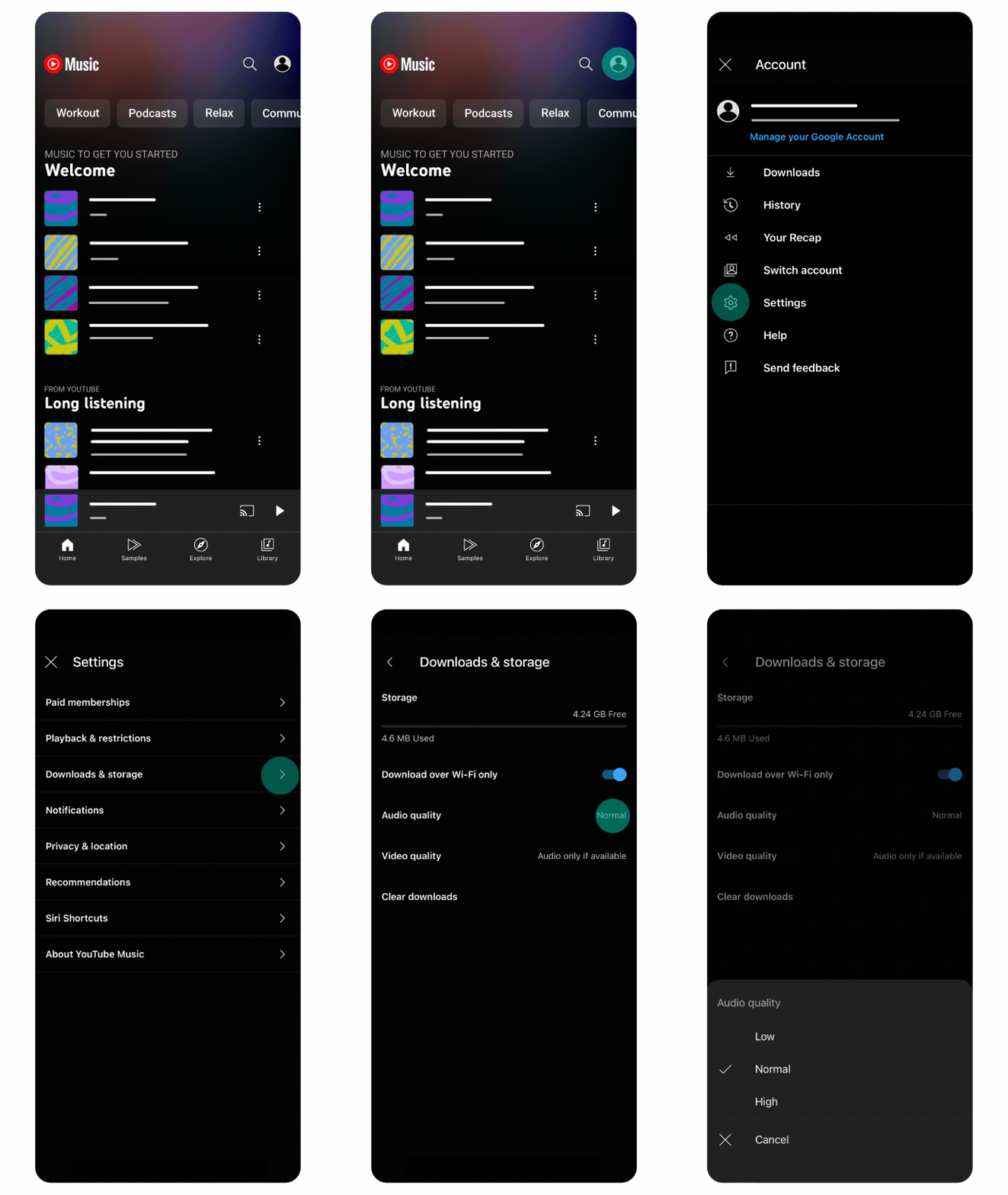
YouTube Music Premium members can select the bitrate at which music is streamed and downloaded. If you haven’t selected a quality setting, it will automatically be set to the “Normal” bitrate for your location.
Step 1 In the YouTube Music app, tap on your profile picture.
Step 2 Go to Settings > Download & storage > Audio quality.
Step 3 Select "High".
Audio quality is not only determined by streaming bitrate, but also by your playback chain. For a more accurate and detailed listening experience, consider the following:
Besides using quality headphones or a DAC, properly adjusting your equalizer settings can also improve your listening experience. A well-tuned EQ helps enhance clarity, balance frequencies, and adapt the sound to your headphones or speakers. If you're not sure where to start, check out our guide on YouTube Music Equalizer Settings to learn how to get the best sound from YouTube Music.
For users who want maximum flexibility and offline control, a more advanced approach is to use professional audio conversion tools such as TuneCable BeatOne. This allows you to extract and save music from YouTube Music’s original audio stream (AAC/Opus 256kbps or similar) into local formats like: FLAC, ALAC or WAV.

TuneCable BeatOne
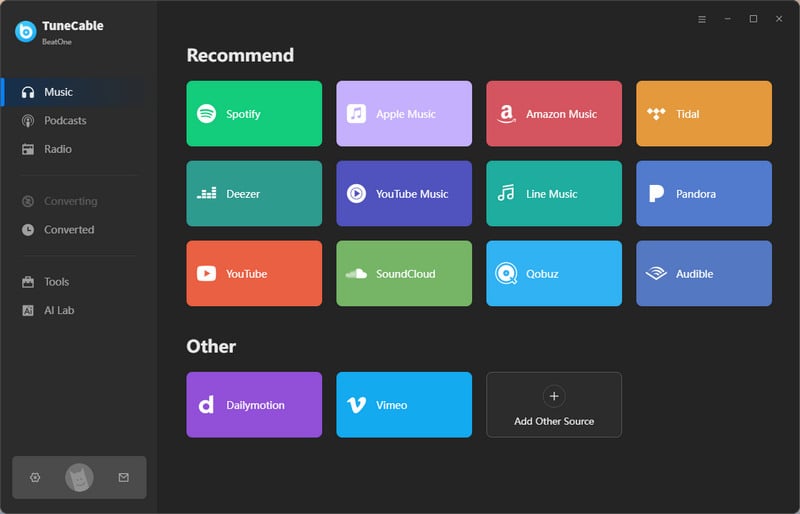
Step 1 Download and install TuneCable BeatOne on your Windows or Mac computer, then launch the program. From the main interface, you can access multiple supported streaming platforms. To start downloading from YouTube Music, click the "YouTube Music" module, and the built-in YouTube Music web player will open automatically. Log in with your YouTube account to access your personal library, playlists, and liked songs.
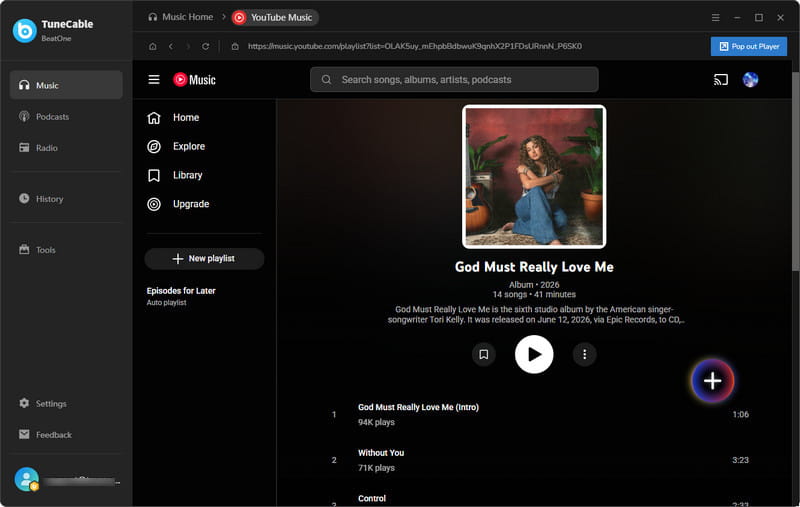
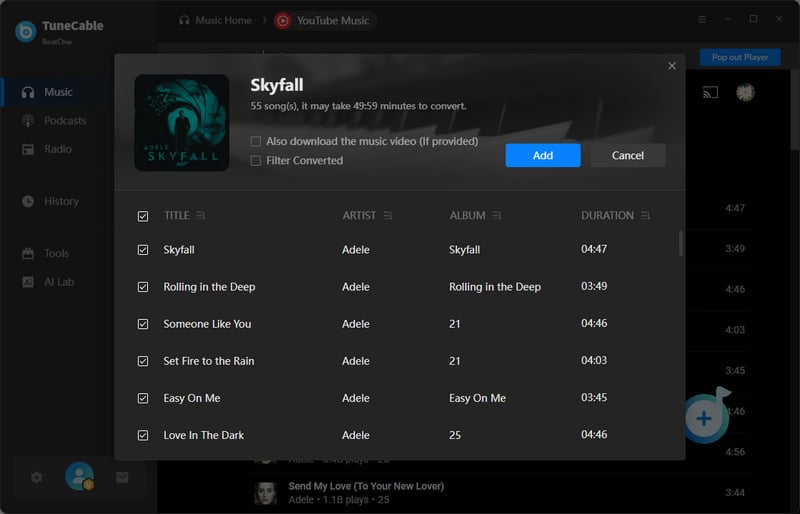
Step 2 Browse or open any track, album, or playlist in the YouTube Music web player. Then click the blue "Click to Add" button in the lower-right corner. The program will analyze and load all available songs for selection. You can enable "Filter Converted" to skip previously downloaded tracks, then select the songs you want and click "Add" to continue.
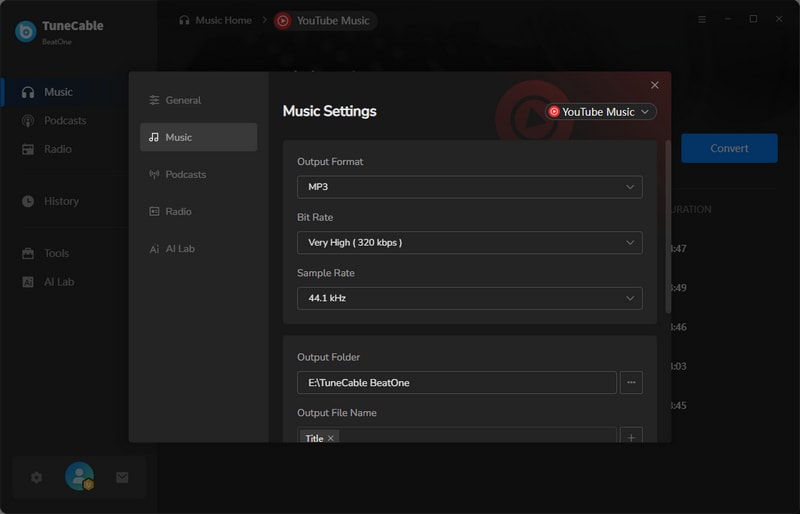
Step 3 Open "Settings" in the lower-left corner to customize output parameters such as format, bitrate, sample rate, output folder, file naming rules, and library organization. To achieve the best possible audio quality from YouTube Music, select FLAC or ALAC as the output format. You can also enable the "Save Lyrics" option to download synchronized lyric files for offline playback.
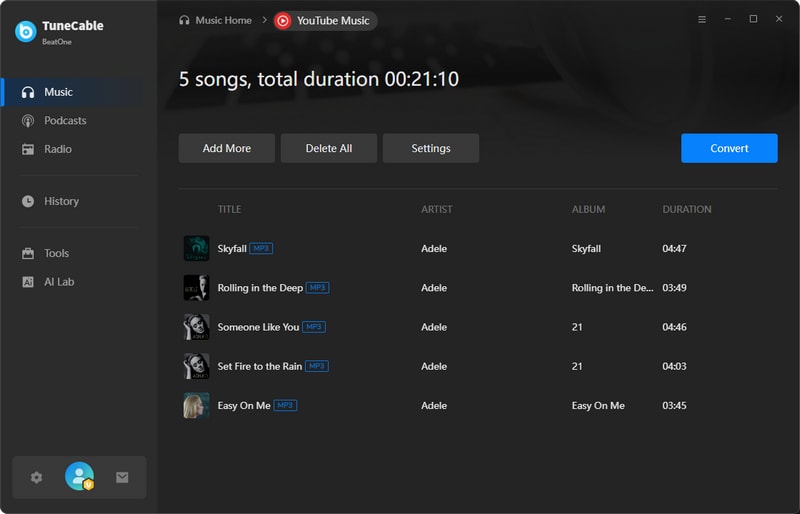
Step 4 Click the "Convert" button to start downloading YouTube Music tracks. The program will process and save your selected songs in the chosen format. Once completed, the output folder will open automatically, allowing you to enjoy your music offline in high-quality or lossless FLAC/ALAC format on any device.
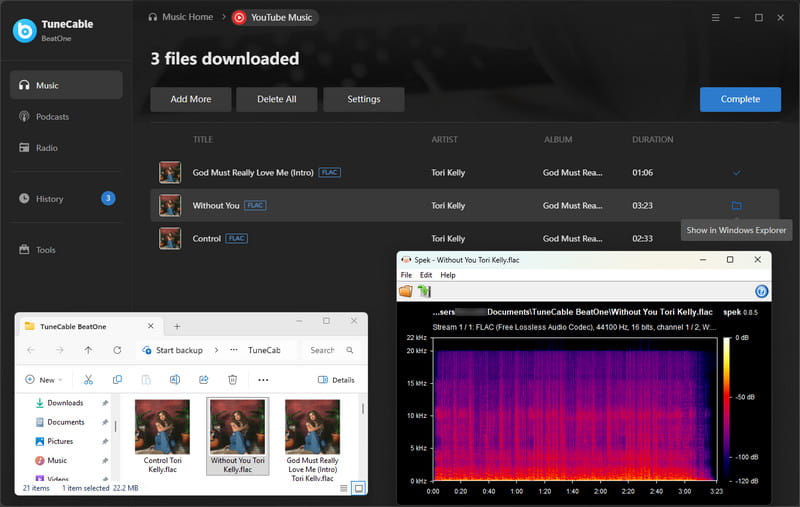
It is important to understand a key limitation: converting a lossy source (such as 256kbps AAC) into FLAC does not restore lost audio data or create true lossless quality. Instead, this process helps you:
In other words, converting YouTube Music tracks to FLAC helps preserve the existing audio quality, but it cannot restore details that were never present in the original stream. For listeners seeking real lossless or Hi-Res audio, services such as Spotify and TIDAL offer higher-quality source content. TuneCable BeatOne makes it easy to download Spotify lossless FLAC music and save TIDAL HiRes audio locally for offline listening on any device.
Q: Is YouTube Music lossless?
Q: Does YouTube Music support FLAC?
Q: What bitrate is YouTube Music Premium?
Q: Is AAC 256kbps enough for audiophiles?
Q: Does converting AAC to FLAC improve sound quality?
Overall, YouTube Music delivers solid audio quality for everyday listening, but it is still limited to compressed formats such as AAC 256kbps and does not offer true lossless or Hi-Res streaming. For most users, this level of quality is more than sufficient, especially when combined with good headphones and proper playback settings. However, if you are looking for a more advanced audio experience or want to build a personal music library in FLAC or ALAC format, you may want to explore alternative solutions that support higher-fidelity sources. With tools like TuneCable BeatOne, you can also save your favorite tracks for offline listening and better manage your music collection across devices, making it easier to balance convenience with higher-quality audio needs.
 What's next? Download TuneCable BeatOne now!

Ava Morrison | Senior Writer
TuneCable BeatOne

