
 >
How To >
Music Tips >
>
How To >
Music Tips >
High-quality audio matters to many music lovers, DJs, and content creators—and that’s why WAV files remain a popular choice. As an uncompressed, lossless audio format, WAV delivers better sound quality than MP3 or AAC, making it ideal for professional and personal use alike. As a result, more users are searching for free WAV download sites and ways to download WAV songs quickly and easily.
Free WAV download sites attract users mainly because they offer quick access to high-quality audio without upfront costs. For many people, especially those who only need a few songs occasionally, these sites seem like the easiest solution.
One major reason is that most free WAV download sites don’t require account registration or software installation, making the process fast and convenient. Users can simply visit a website, search for a song, and download the WAV file in minutes. This is particularly appealing to DJs, content creators, or casual users who want lossless audio for short-term use. Another factor is accessibility. Free sites are usually browser-based and work on different devices and operating systems. This makes them a popular choice for users who don’t want to install additional programs or pay for professional tools.
However, while free WAV download sites are convenient, their limitations and risks often become apparent with repeated use—something we’ll explore in the following sections.
| Pros | Cons |
|---|---|
| Free to use. Download WAV songs without paying or subscribing. | Users often encounter pop-ups, redirects, and misleading download buttons. |
| Allow users to get audio files quickly with minimal steps. | Some ads or fake download links may lead to malicious files. |
| No need to install software or create an account. | Free sites may experience broken links, slow speeds, or sudden shutdowns. |
| Convenient for occasional use. | Missing metadata (artist, album, cover art). |
| Not all files labeled as WAV are truly lossless. |
URL: https://pixabay.com/music/search/wav/
Rating: ⭐⭐⭐
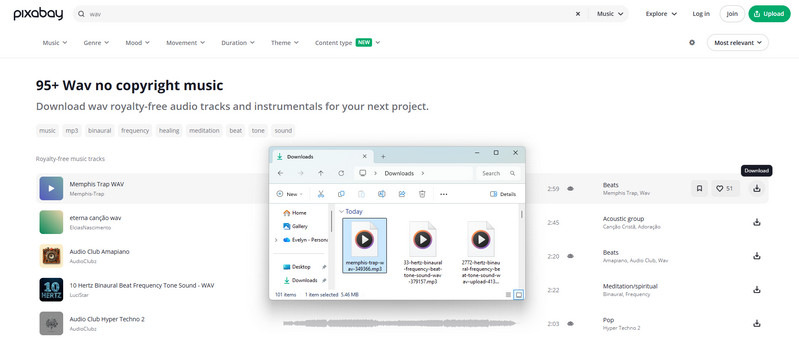
Pixabay is often mentioned as a source for free WAV music downloads, especially for creators looking for royalty-free background audio. The site allows users to search for music using a “WAV” filter and download tracks quickly without registration, which makes it appear to be a convenient WAV music source at first glance. However, based on real-world testing, the audio files downloaded from Pixabay are actually provided in MP3 format at around 256 kbps, even when labeled or filtered as WAV. In addition, most downloaded files retain very limited metadata, usually only the track title. While download speeds are fast and the platform is safe to use, Pixabay is better suited for quick project audio needs rather than true lossless WAV music downloads.
| 👍 Pros: | 👎 Cons: |
|---|---|
| Download music without payment or account registration. | Downloaded files are actually MP3 format at approximately 256 kbps. |
| Fast download speeds. | Users cannot choose output formats, bitrates, or sample rates. |
| Provide a clean user experience with minimal ads and no obvious malware risks. | Downloaded files contain only the title, with missing artist, album, artwork, and other tags. |
URL: https://ektoplazm.com/
Rating: ⭐⭐
Ektoplazm is a long-standing music portal known for offering free downloads of electronic music in multiple formats, including WAV, FLAC, and MP3. Established in the early 2000s, the site serves as a community-supported hub where artists and netlabels share full releases from genres like psytrance, techno, downtempo, ambient, and more.
Based on current testing, however, Ektoplazm appears to have not been actively updated since around 2019. Although WAV download options are still listed, most files are delivered as large RAR archives that cannot be successfully extracted. In addition, the download speed is extremely slow — for example, downloading a 500 MB file may take up to 40 minutes. These issues significantly limit its practicality as a modern WAV download site. As a result, Ektoplazm today functions more as a legacy archive than a reliable source for active WAV music downloads.

| 👍 Pros: | 👎 Cons: |
|---|---|
| Free access to niche electronic music. | Outdated and inactive platform. |
| Historically offered lossless formats. | Downloaded RAR files cannot be extracted. |
| No account registration required. | Extremely slow download speeds. |
URL: https://wav.ninja/
Rating: ⭐
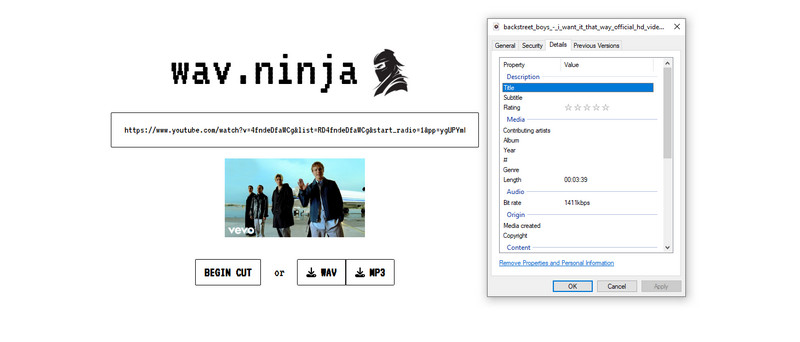
WAV.ninja is a straightforward online tool for converting and downloading audio from YouTube videos. It markets itself as a clean music downloader with no ads, allowing users to extract audio in WAV or MP3 format directly from YouTube links. The interface is minimal and easy to use, making it appealing for users who want a quick way to save music or soundtracks.
WAV.ninja delivers a clean download experience with no intrusive ads or pop-ups. However, its performance and features are limited: download speeds are relatively slow (about 6 minutes for a 31 MB file), only the title metadata is retained, and it supports YouTube sources exclusively. Despite these limitations, WAV.ninja can be a useful option for users who want a simple web-based WAV or MP3 downloader without clutter.
2026 Latest update: The WAV.Ninja site is shut down. It is recommended to use other tools, such as TuneCable BeatOne, to download lossless WAV songs.
| 👍 Pros: | 👎 Cons: |
|---|---|
| No ads or intrusive pop-ups. | Downloads are noticeably slower than many alternatives. |
| Supports both WAV and MP3 downloads. | Only supports downloading audio from YouTube videos |
| No account, registration, or software installation required. | Downloaded files only retain the title, other ID3 tags are missing. |
Rating: ⭐⭐⭐⭐⭐
While free WAV download sites may seem fast and convenient, they often come with intrusive ads, unstable download links, and potential security risks. If you’re looking for a safer, more reliable way to download high-quality WAV files, TuneCable BeatOne offers a powerful alternative designed specifically for streaming music lovers.
TuneCable BeatOne is an all-in-one streaming music downloader that lets you save songs, albums, playlists, podcasts, radio shows, and more from popular platform. Unlike many free download sites, BeatOne provides lossless audio downloads in WAV and while preserving metadata such as ID3 tags, cover art, and lyrics. Because it operates as dedicated software rather than a web-based free site, TuneCable BeatOne reduces exposure to ads and malware, offering a cleaner and more secure WAV downloading experience.

TuneCable BeatOne
Now, let's see how to download music using this best WAV music downloader.
Step 1 Choose a Music Streaming Platform
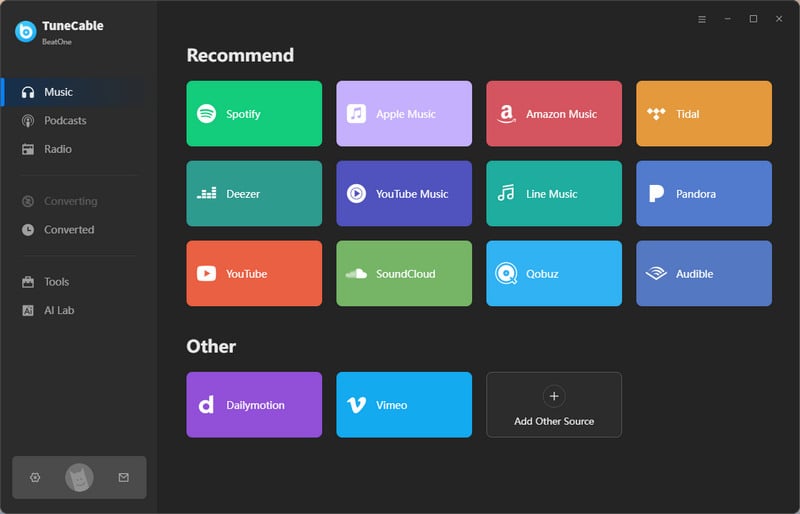
When you launch TuneCable BeatOne, you’ll see a list of supported music streaming services on the main interface. Simply select the platform you want to download from, such as Spotify, Apple Music, YouTube Music, or others. For example, we’ll use YouTube here. TuneCable BeatOne works with both free and premium accounts. After choosing a platform, log in to your streaming account to access the music library.
Step 2 Add Songs, Albums, or Playlists to the Download List
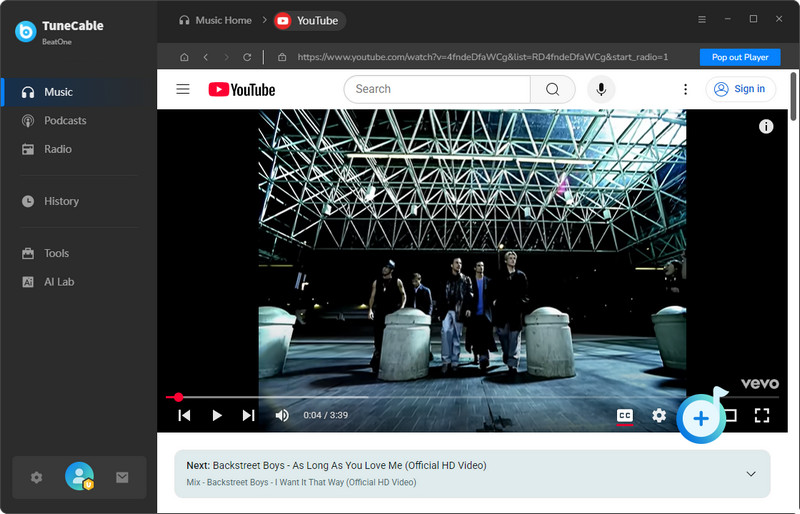
Open the song, album, or playlist you want to download. A “Click to Add” button will appear in the lower-right corner of the player. Click it to analyze the audio content. Once the analysis is complete, a pop-up window will display all available tracks. Select the songs you want and click “Add” to include them in the download queue.
Step 3 Set Output Format to WAV
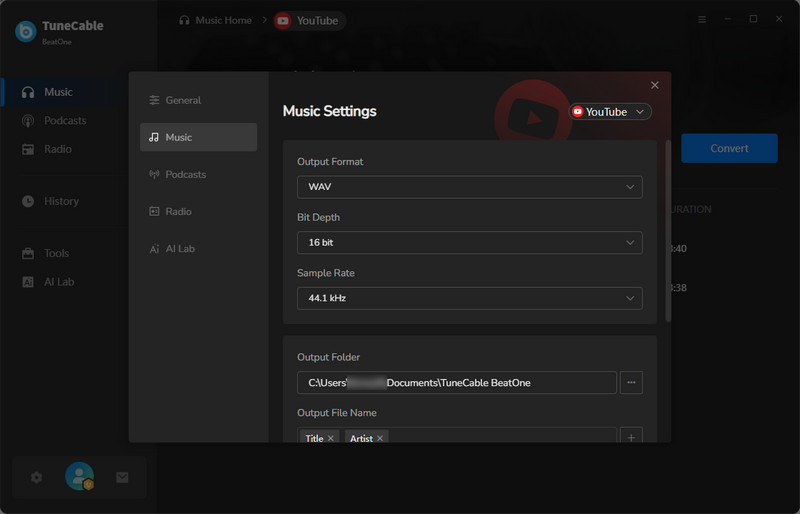
Click the gear icon in the lower-left corner to open the Settings panel. Here, set the output format to WAV for lossless audio quality. In addition, you can adjust the sample rate, output path, file naming rules, and other settings to your requirements.
Step 4 Download and Convert Music to WAV
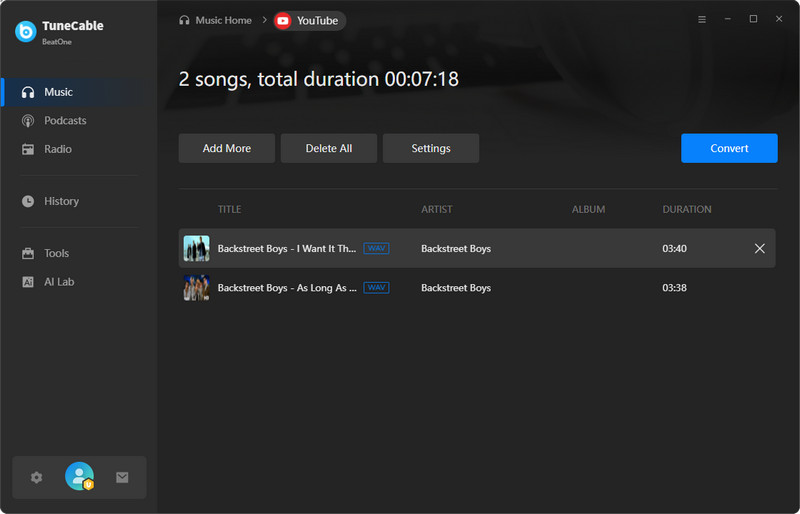
After confirming your settings, click the “Convert” button to start downloading and converting the selected tracks to WAV format. TuneCable BeatOne supports batch downloads, allowing multiple songs or entire playlists to be processed at once.
Step 5 Access and Use Your WAV Music Files Freely
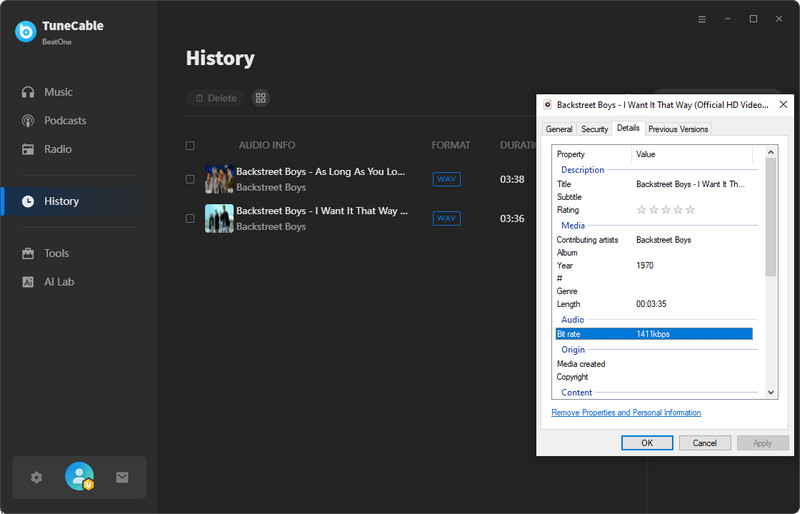
Once the download is complete, the output folder will open automatically, where you can find your downloaded WAV music files. You can also view all completed downloads in the History section. The downloaded WAV files can be played, edited, transferred, or backed up without restrictions. You’re free to move them to external drives, mobile devices, or use them in DJ software, audio editors, or any media player for offline listening.
| 👍 Pros: | 👎 Cons: |
|---|---|
| Safe and Secure. Clean interface and no intrusive pop-ups or unsafe links. | Only available on Windows or Mac. |
| Support lossless WAV downloads, preserving original audio quality. | Not a Free Tool. |
| Adjust the sound quality and output format flexibly. | You need to install the program on your computer. |
| Supports customizing output file name, making it easy to organize your private music library. | |
| Support downloading music from multiple music platforms or any website. | |
| Retain important information like artist name, album title, track number, cover art, and lyrics |
In addition to downloading songs from streaming platforms, TuneCable BeatOne also lets you convert music files already stored on your computer into WAV and other popular audio formats. This is ideal when you want to standardize your music library, prepare audio for editing, or create high-quality WAV files from MP3/M4A sources.
Step 1 Launch TuneCable BeatOne on your Windows or Mac computer. From the main interface, find and click on the “Tools” option in the left sidebar to open the built-in utility section.
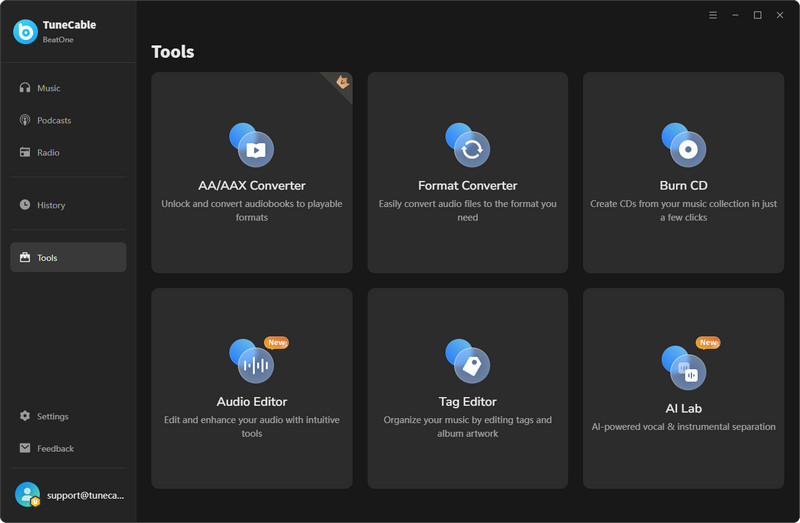
Step 2 Within the Tools section, select the Format Converter feature. This tool allows you to import local audio files and convert them into various formats, including WAV, MP3, FLAC, AIFF, and OGG.
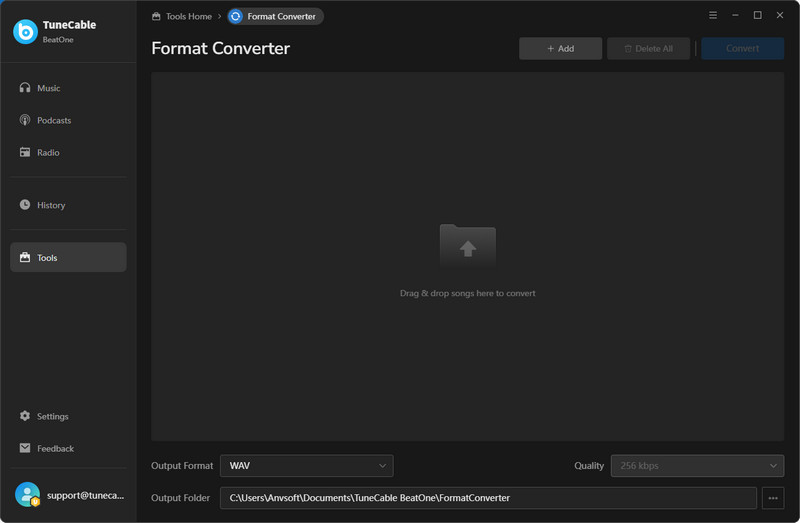
Step 3 Click the “+Add” button in the Format Converter interface to upload the music files you want to convert. You can also drag and drop audio files directly into the converter. Supported input formats include MP3, M4A, WAV, FLAC, OGG, AIFF, and more.
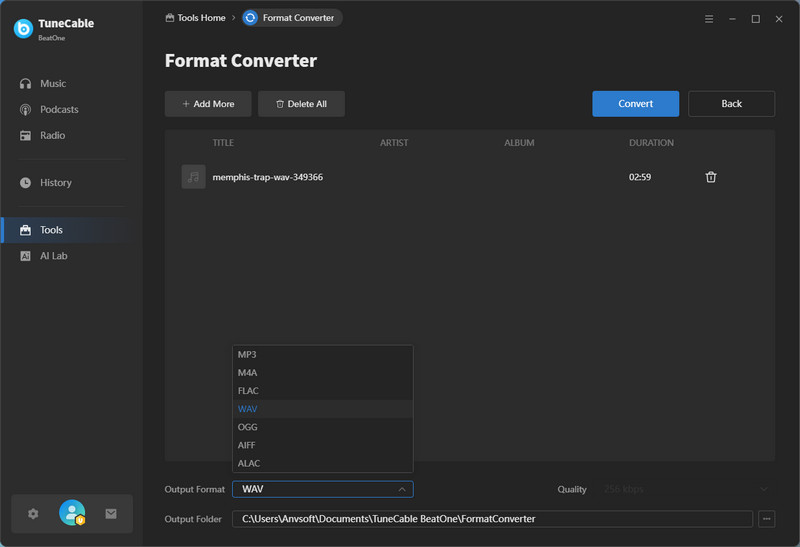
Step 4 After importing your files, choose WAV as the output format from the dropdown menu. Once you’ve set your output format and preferences, click the “Convert” button at the bottom of the window. TuneCable BeatOne will begin converting your local music files to WAV format. The conversion time depends on file size and your system speed, but it runs efficiently and reliably.
Step 5 When the conversion is complete, TuneCable will save the new WAV files in the output folder you selected. You can open the folder directly from the converter interface or navigate to it manually from your file system. Your converted WAV tracks are now ready for listening, editing, archiving, or use in any audio project.
Q: Are free WAV download sites really free to use?
Q: Are WAV files from free sites truly lossless?
Q: Can I download popular songs from Spotify or Apple Music as WAV for free?
Free WAV download sites can be appealing because they offer fast, no-cost access to audio files. For occasional use or simple projects, some of these sites may be sufficient. However, as we’ve seen, many free options come with clear trade-offs—slow download speeds, misleading “WAV” quality, missing metadata, limited sources, and potential reliability or safety concerns.
If you’re looking for true lossless WAV audio, consistent performance, and a cleaner experience, a dedicated tool is often the better choice. TuneCable BeatOne stands out as a safe and reliable WAV music downloader, supporting downloads from major streaming services while preserving audio quality and metadata without intrusive ads or security risks.
 What's next? Download TuneCable BeatOne now!

Ava Morrison | Senior Writer
TuneCable BeatOne - All-in-one Music Solution

