
 >
How To >
Spotify Music Tips >
>
How To >
Spotify Music Tips >
Looking for an honest Spotiload review? Spotiload is one of the most talked-about free Spotify downloaders online — a Chrome extension that claims to let you download Spotify songs as MP3 files directly to your local device. Is it safe? How does it work? Is it worth using in 2026? Or are there any better Spotiload alternatives? In this Spotiload review, we will tackle the most frequently asked questions and break them all down.
Spotiload (formerly called Spotify VK Downloader) is a free Chrome extension that aims to download Spotify tracks as MP3 files to local storage. Compared to dedicated software, installing an extension is far more lightweight and hassle-free. Its ease of access and free model quickly drew a large number of users and became one of the most popular online Spotify downloaders after it debuted. However, unfortunately, it was removed from the Chrome Web Store in 2021, and we can not access it now. That's why many people are looking for an alternative to Spotiload.
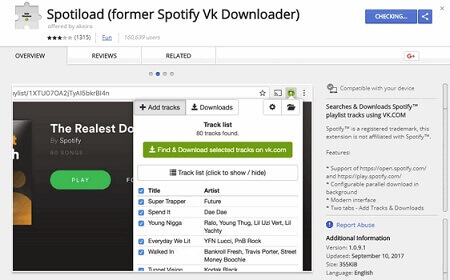
Instead of downloading tracks from the Spotify platform directly, Spotiload matches songs from your Spotify playlist with audio files hosted on VK. Once the track is matched and located on VK, Spotiload allows you to save the MP3 file locally.
Pros
 It is completely free.It is easy to use.No installation is required.Batch download is supported.
Cons
 It depends on VK database availability.Sometimes song matching fails.The audio quality is unstable, generally around 128 kbps (only one output format: MP3).There may be legal risks involved in using it.It has now been removed from the Chrome Web Store and can no longer be downloaded.Existing extension download resources are hard to find.
⚠️Spotiload not working? You may try a stable alternative, TuneCable Spotify Downloader. This professional tool is designed for downloading Spotify tracks to MP3, AAC, ALAC, FLAC, AIFF, or WAV format on Windows, Mac, or Android. For those who prioritize audio quality, TuneCable is a perfect choice that supports downloading Spotify Lossless FLAC. Click the button on the right to give it a try.
As we mentioned earlier, Spotiload has been removed from the Chrome Web Store. Regarding the question of whether Spotiload is legal and safe, the answer is obvious - not fully legal and safe. Typically, an extension gets down from the store for reasons ranging from technical obsolescence to policy violations involving malicious behavior, privacy issues, user deception, or copyright infringement, etc. Spotiload enabled users to download copyrighted music from Spotify, which directly violates both Spotify's terms of service and the Chrome Web Store's policies on unauthorized content. As a result, it was removed from the store.
As for why it is not working, there are several possible reasons:
Now that Spotiload is no longer available, you might need some practical Spotiload alternatives below:
TuneCable Spotify Downloader is born to download Spotify songs, playlists, podcasts, videos, and audiobooks for offline listening. Better than Spotiload, it supports converting Spotify music to MP3, AAC, WAV, FLAC, AIFF, and ALAC formats in batches at up to 40x speed. If you prefer to get Spotify Lossless quality, TuneCable allows you to get it breezily (Premium required). Want to easily manage your Spotify music collection? TuneCable can preserve the full ID3 tags and cover art, so you can organize the downloaded Spotify music files as needed. It is suitable for both desktop (Windows and Mac) and mobile (Android) devices, meeting the needs of users across different devices. More key features of this wonderful tool is as follows. Just click the button below to download and try it for free.
TuneCable Spotify Downloader
Ready to download? Here is how to use TuneCable Spotify Downloader to download music from Spotify on Windows or Mac:
Step 1 To begin, launch TuneCable Spotify Downloader and choose your download source, either the Spotify app or the Spotify web player. Then, make sure to log in to your Spotify account. If you need to download Spotify Lossless quality, please choose the Spotify app and log in to a Spotify Premium account.
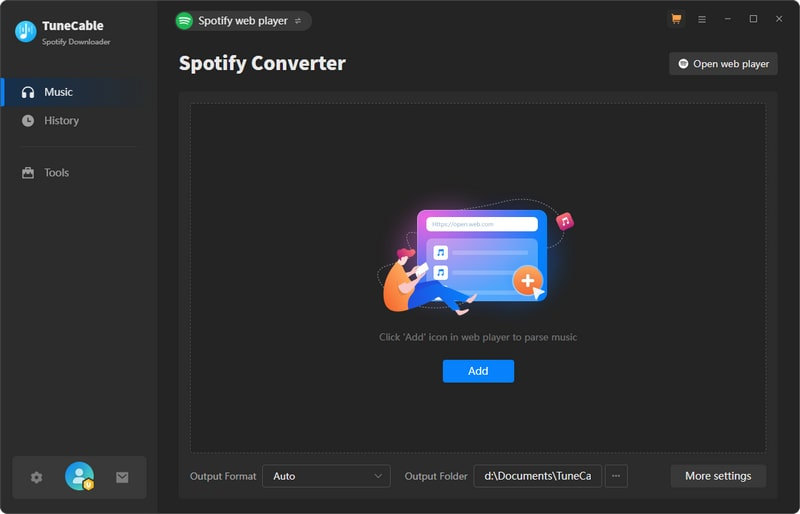
Step 2 Click the "Settings" icon in the lower left corner to modify important parameters such as output format, bit rate, and sample rate. Output formats include MP3, AAC, FLAC, WAV, AIFF, and ALAC, allowing you to flexibly use downloaded Spotify music files in different scenarios. For example, you can download and save them in a lossless format, and then import them into a DJ app for remixing.
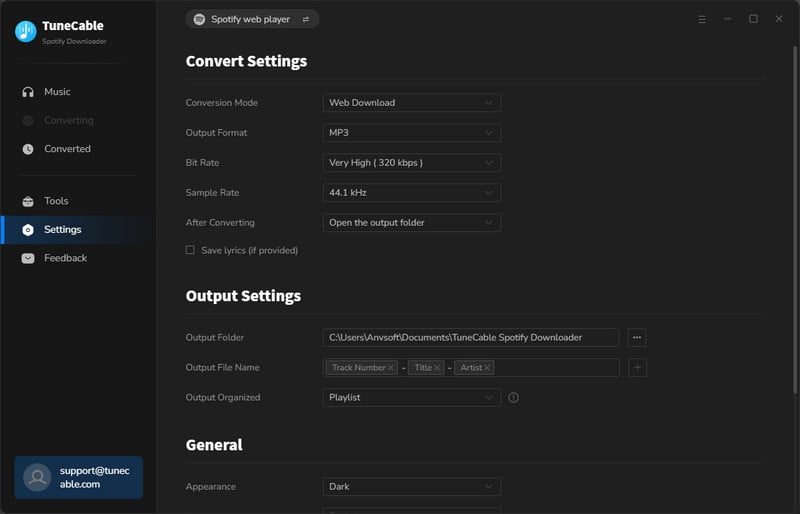
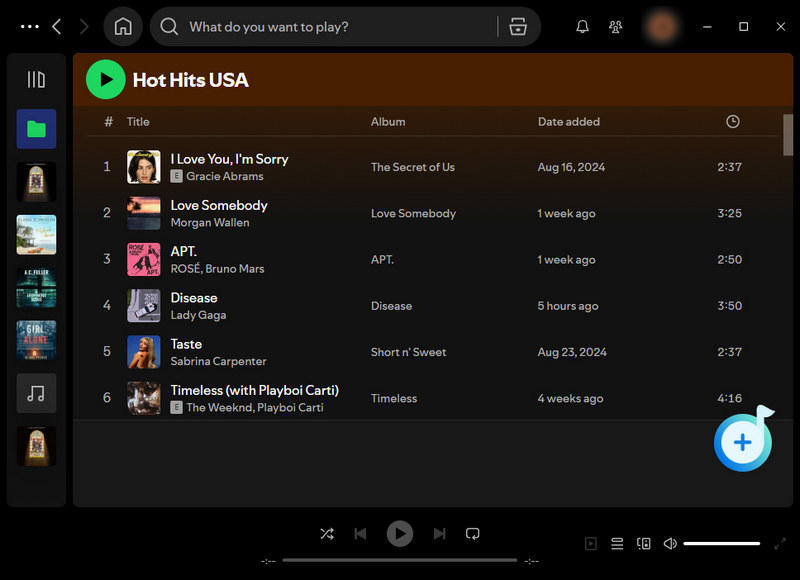
Step 3 Next, navigate to the Spotify app or the built-in Spotify web player interface and select the songs you want to download. Then, hit the "Click to add" button in the bottom-right corner to initiate the analysis.
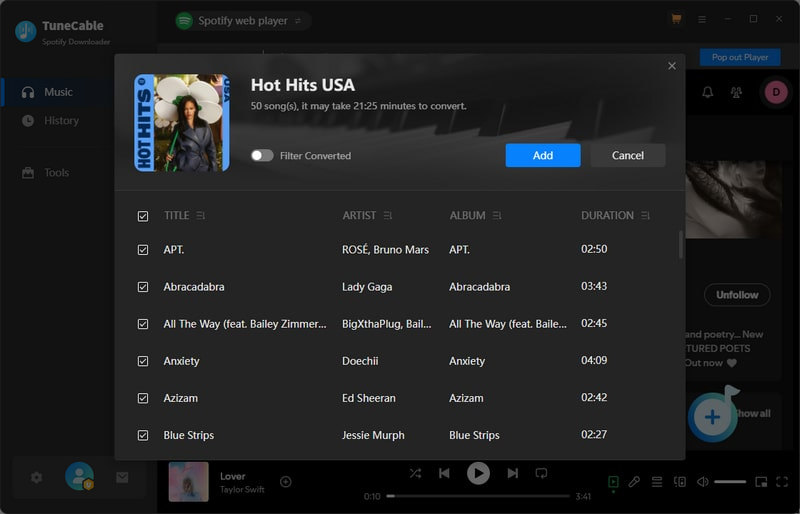
Step 4 The parsed music tracks will be arranged in a small pop-up window. Simply select the tracks you want to download and click "Add" to add them to the download task list. To add music from other playlists, click the "Add More" button and repeat the steps.
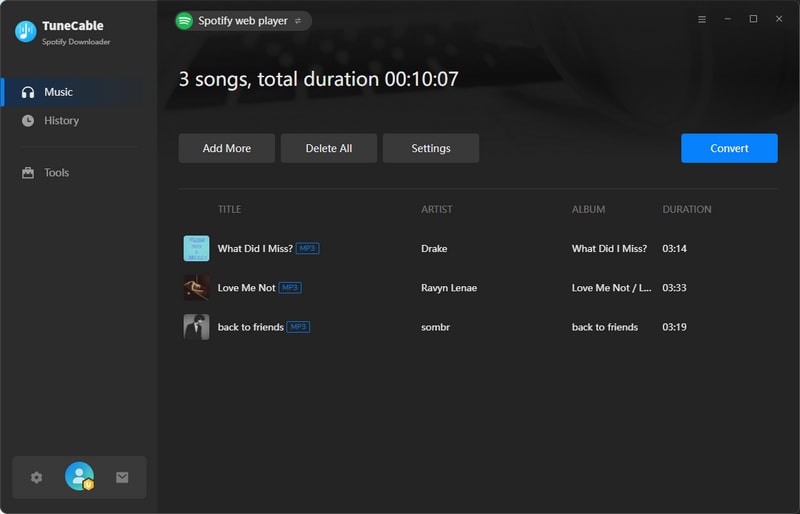
Step 5 Once you've selected the tracks to download, click the "Convert" button above the download queue to start the download process. Now, simply wait patiently.
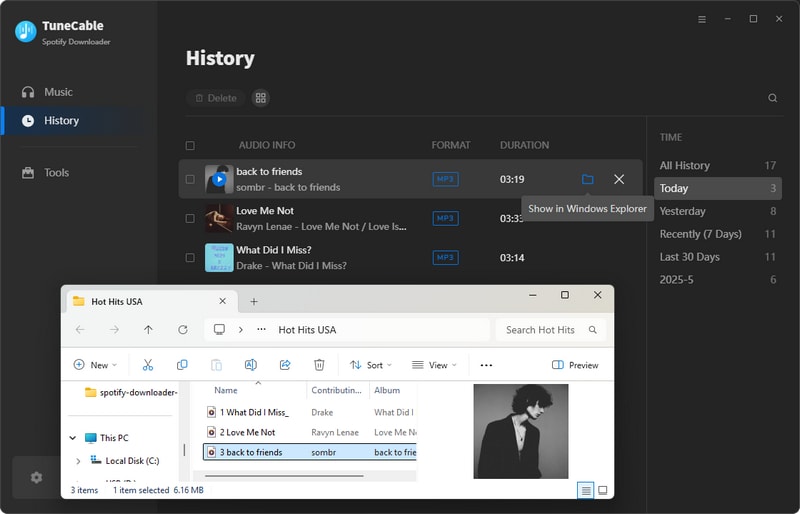
Step 6 After the download is complete, click "History" in the left-hand menu to view the download history. To locate a downloaded music file, hover your mouse over the right side of the track title to find the folder icon. Then, click it to go to the local location of the music file.
For Android users, TuneCable Spotify Downloader offers a mobile solution that enables users to download and convert Spotify content, including tracks, podcasts, and audiobooks, to universally compatible formats like MP3, AAC, WAV, and FLAC. Just click the button below to download the APK, open it, tap "Install", and follow the steps below to download your favorite Spotify tracks to the local storage!

TuneCable Spotify Downloader for Android
⭐ 100K+ Downloads 🚀 Easy & Fast
🔄 Regular Updates 🔒 100% Clean
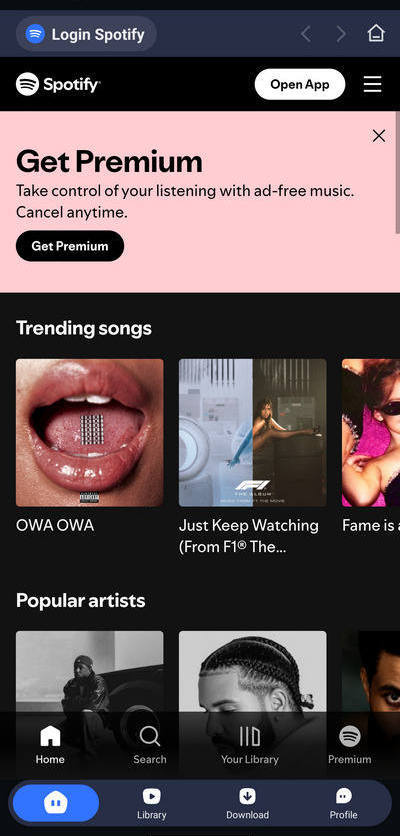
Step 1 Launch TuneCable Spotify Downloader on your Android device and click "Login Spotify" at the top to log in to your Spotify account.
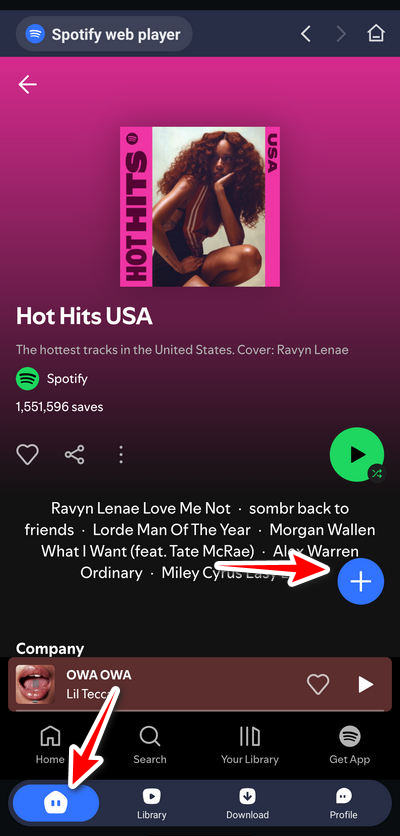
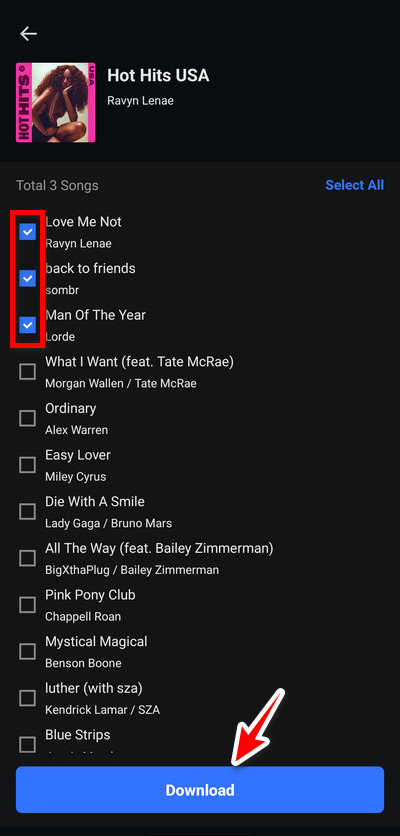
Step 2 Find the playlist or single you want to download in the Spotify web player interface. Click the "+" button in the lower right corner to start parsing music. Then, tick the items you want and click "Download".
Step 3 Then a settings interface will pop up, where you can choose the output format, output quality, output path, and file saving organization method. Select the settings as your requirements and then hit "Confirm" to start downloading.
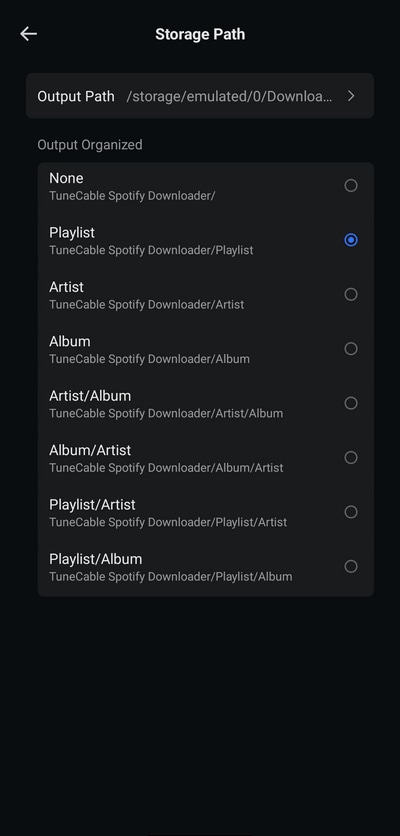
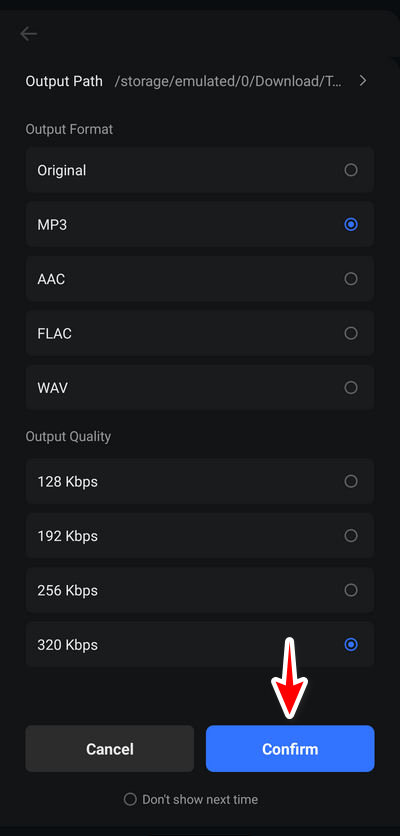
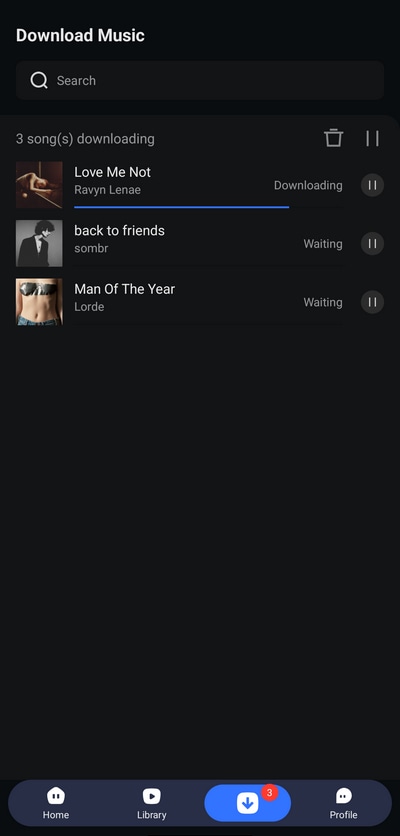
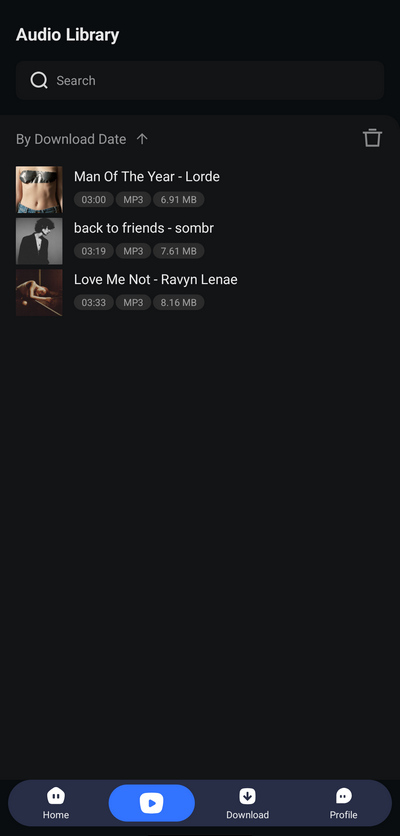
Step 4 Finally, you can find the downloaded music files in the "Library" module, and simply tap the song to play it offline.
SpotMate is an online Spotify downloader. No extensions or software installation is required. It obtains MP3 files of Spotify tracks by parsing playlists and song links. It supports outputting 320 kbps MP3s. However, it can only download one song at a time and does not support batch downloading entire playlists. Here are the simple steps:
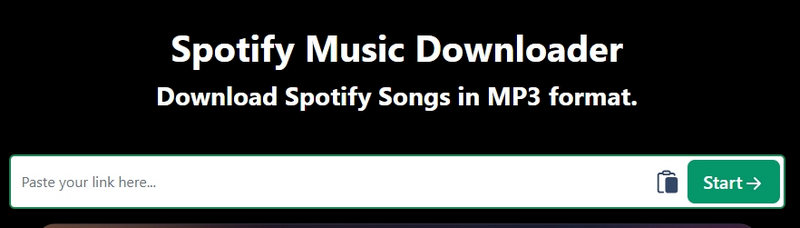
Step 1 Copy and paste the link to your Spotify playlist or song to the SpotMat website, and click "Start".
Step 2 Select the track you want to download and click "Convert" on the right, then click "Download".
Step 3 After the download is complete, you can find the MP3 file in the browser's download output folder.
YES. It is a free Chrome extension. Previously, it was available for download on the official Chrome Web Store. But in 2021, it was removed from the official Chrome Web Store. You can still find ZIP installers floating around on some websites, but make sure you're downloading a legitimate version. Most installation sources are free.
YES, Spotiload supports parsing Spotify playlist links and then downloading them in batches. However, since Spotiload works by searching for and matching tracks from your Spotify playlist on VK, it sometimes fails to find a match or encounters download errors. For bulk downloading of high-quality Spotify playlists, we recommend using TuneCable Spotify Downloader, which supports downloading multiple playlists at once. To keep your files tidy, select "Playlist" under "Output Organized." This will group all songs from the same playlist into one folder.
Unfortunately, the audio quality is inconsistent. Spotiload only downloads music in MP3 format. While the MP3 format can technically support up to 320kbps, in practice, the downloaded MP3 files you get from Spotiload are often only 128kbps or lower, resulting in poor sound quality. If you require higher output quality, such as Spotify Lossless, you'll need a more advanced desktop Spotify Downloader, such as TuneCable Spotify Downloader.
The Spotiload extension is no longer available in the official Chrome Web Store. You will need to download the ZIP installation package from a reliable online website to your computer and extract it. Next, launch the Chrome browser. Go to the "Manage extensions" module and enable developer mode. Click the "Load unpacked" tab and choose the Spotiload installation package to install it.
This article provides a detailed review of Spotiload, including its working principle, key features, pros and cons, and some FAQs. As a free extension, it does offer users considerable convenience. Unfortunately, it has been removed from the Chrome Web Store, forcing users to search for Spotiload alternatives. To meet this need, we also introduce 3 viable solutions: one for Windows or Mac, one for Android, and one for iOS or any other device. Overall, TuneCable Spotify Downloader is a great option, available for Windows and Mac as well as Android devices. If you need to download Spotify tracks in high quality in bulk, just give ita try!
 What's next? Download TuneCable Spotify Downloader now!

Ava Morrison | Senior Writer
TuneCable Spotify Downloader


