
 >
How To >
Spotify Music Tips >
>
How To >
Spotify Music Tips >
Spotify's success is inseparable from its robust user base. While offering free users basic services, Spotify gently nudges them toward Premium by running ads, limiting skips, and restricting offline listening on the free tier. However, not all free users are willing to open their wallets — and that's precisely why the Spotify Premium (Mod) APK exists. But what exactly is it? Is it safe? In this article, we'll break down what the Spotify Premium APK actually is, the dangers of using it, and — most importantly — the safe alternatives you can turn to in 2026.
APK is the abbreviation of Android Package Kit. It is an application installation package format compatible with the Android system. In simple terms, Spotify Premium APK (also called Spotify Premium Mod APK) refers to a modified (cracked), unofficial version of the Spotify app, which comes with Spotify Premium features. It allows users to enjoy Premium features without paying for the Spotify Premium plan, including unlimited song skipping, ad-free listening, and more on an Android device.

Looking for a safe alternative to Spotify Premium APKs for ad-free music? Want unlimited track skipping? Try this Spotify music converter—featuring download speeds up to 40x faster—to download Spotify songs for unlimited offline listening. It works on Windows, Mac, and Android. Click the button on the right to give it a try!
However, there's no such thing as a free lunch. Free doesn't mean risk-free. In the digital world, that "free" price tag almost always masks hidden costs to your privacy and cybersecurity. Using a cracked version not only violates Spotify's Terms of Service but also carries serious security risks. The following are potential issues that may arise when using the Spotify Premium Mod APK:
1. Account Ban: Spotify employs strict mechanisms to detect cracked versions. Your account can be temporarily suspended, or even permanently banned if you use Spotify Premium Mod APKs frequently. This means you would lose all the playlists and data you have created and saved.
2. Malware & Security Threats: Third-party APKs are typically modified, unofficial apps. Some Spotify Premium Mod APKs may contain Trojans, viruses, adware, or malicious code that could compromise your personal accounts and device privacy.
3. Unstable Performance: The Spotify cracked apps cannot receive official updates and may malfunction at any time. Many users frequently encounter issues such as failure to load playlists, crashes, or malfunctions. Furthermore, as of 2026, an increasing number of Spotify Premium Mod APKs are no longer being updated. This means that whenever Spotify releases an official update, existing Mod APKs may immediately stop working.
With these hidden dangers in mind, it's clear that we must look beyond 'free' options, and the smart move is to switch to more secure options. Accordingly, we recommend two more secure alternatives, which we will detail below.
Since the Spotify Premium Mod APK is only available on Android, we'll first cover a solution that best fits the needs of Android users. TuneCable Spotify Downloader works for Android, Windows, and Mac. Its Android version supports downloading ad-free Spotify songs, playlists, albums, etc., in MP3, AAC, WAV, and FLAC formats to local storage. It offers download speeds up to 10x faster, allowing you to instantly download music to your Android device for offline listening—anytime, anywhere.

TuneCable Spotify Downloader for Android
Step 1 Download the app by clicking the "Try It Free" button above. Install and launch TuneCable Spotify Downloader on your Android device.
Step 2 Tap on the "Login Spotify" button and log in to your Spotify account so as to access your music collections.
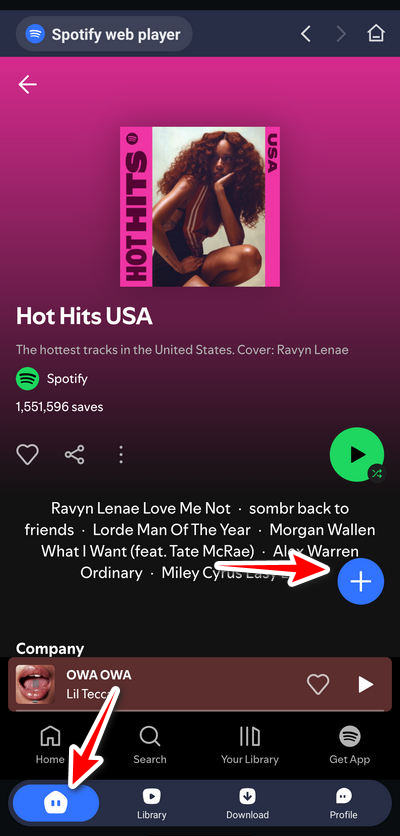
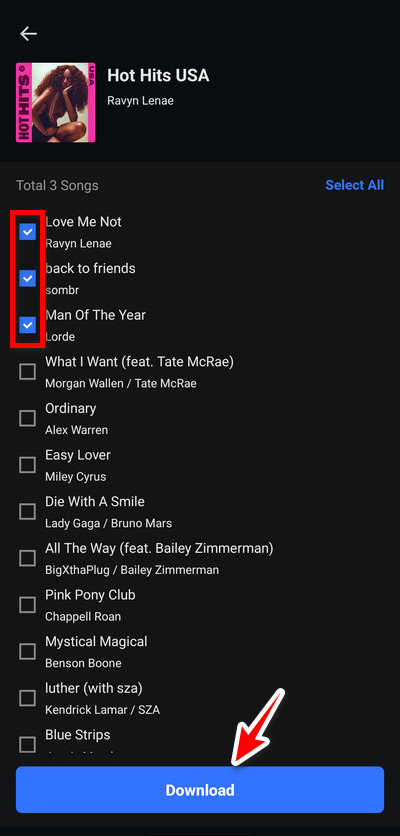
Step 3 Open any playlist or album. Then click the blue "+" button. TuneCable will parse the songs, and you just select the tracks to download. After checking the songs, click "Download".
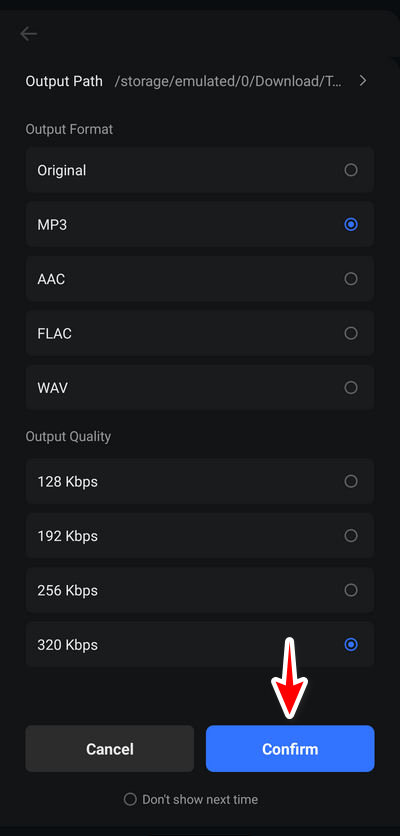
Step 4 Choose the output format and quality, then tap on "←" to start downloading. Once the download is complete, go to "Library" to view and play your downloaded Spotify music offline.
For those who need to download multiple playlists at once or listen offline in high-resolution audio like Spotify Lossless, TuneCable Spotify Downloader for Windows or Mac is your top choice. It is specially designed for downloading Spotify content like songs, albums, playlists, audiobooks, and podcasts at up to 40x conversion speed. Whether you currently have a Free account or a Premium account, you can use TuneCable to batch download your favorite Spotify content to the local PC. The selectable audio output formats include MP3, AAC, FLAC, ALAC, AIFF, and WAV. After downloading Spotify tracks locally, you can play them offline on any device without restrictions. This powerful tool has the following features:

TuneCable Spotify Downloader
Now, let's see how to use this excellent Spotify Premium Mod APK alternative.
Step 1 Launch the App on Your Computer
Click the download button above to download TuneCable Spotify Downloader on your Windows or Mac computer. On the initial interface, you can switch the download source through the "Spotify App" or "Spotify web player" button located in the top navigation bar. When the Spotify web player or app pops up, you need to log in to your Spotify Free/Premium account.
Note: To download Spotify audio in lossless or 320kbps quality, you need to log in to a Spotify Premium account. Don't have Spotify Premium? You can get a Spotify Premium free trial by following this guide.
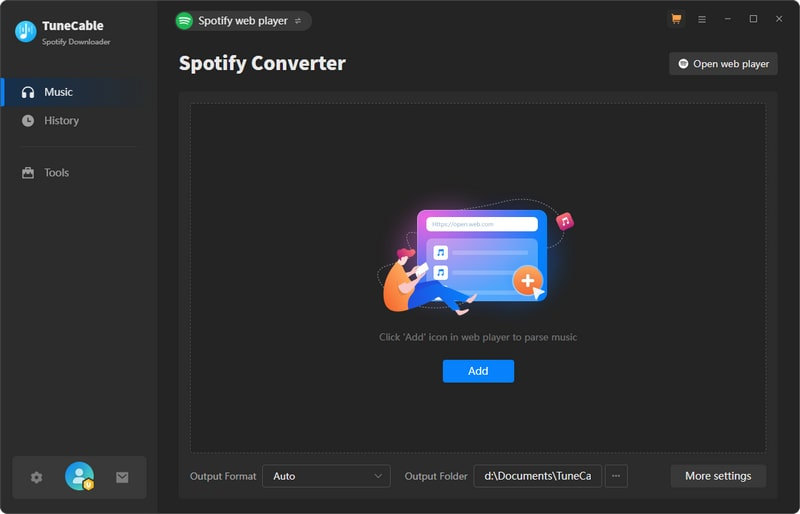
Step 2 Make Changes to Output Settings
Go to the Settings module in the lower left. Before downloading music, you need to complete the output parameter settings, including output format, bit rate, sample rate, etc. If you have a Premium account, you get 320 kbps audio quality after conversion by choosing MP3 as the output format and 320kbps as the bit rate. It doesn't matter if you only have a Free account. TuneCable also supports downloading ad-free Spotify music to your local computer with a free account.
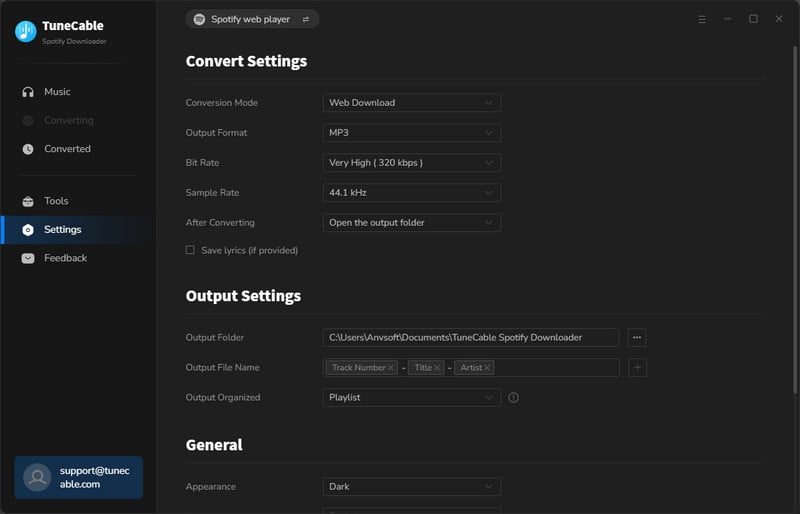
Step 3 Browse for Desired Spotify Items
Go back to the Spotify app or the embedded web player. Locate your favorite Spotify track and hit the "+" button to parse the tracks on the current page.
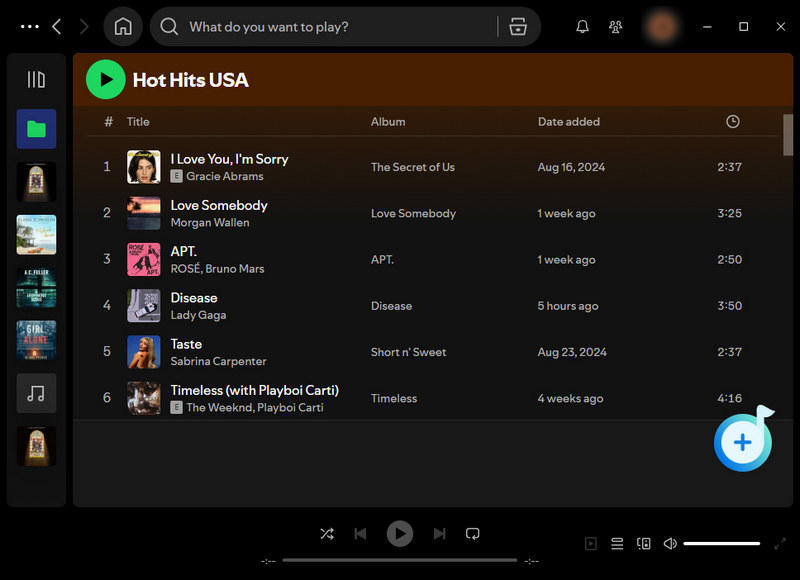
Step 4 Add Spotify Songs/Albums/Playlists to Task List
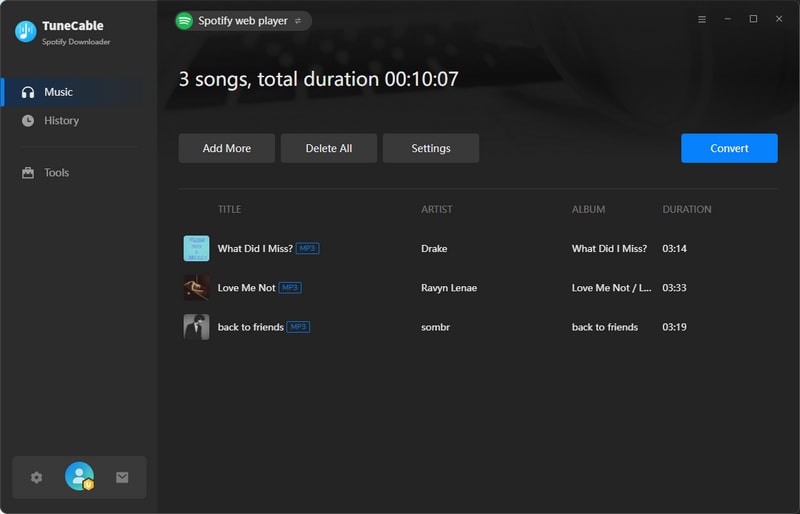
After the songs on the page are analyzed, there will be a pop-up window listing the items that can be downloaded. Simply select the ones you need and click "Add" to add them to the download task list.
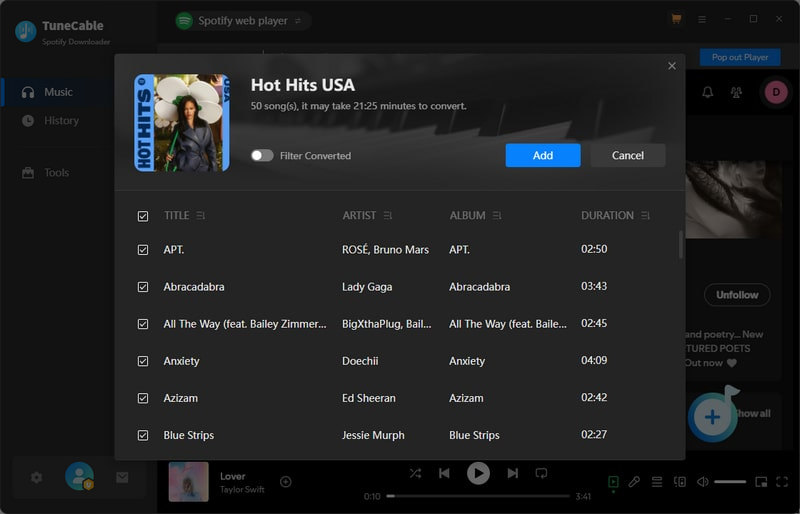
Step 5 Start Downloading Spotify Songs as Local Files
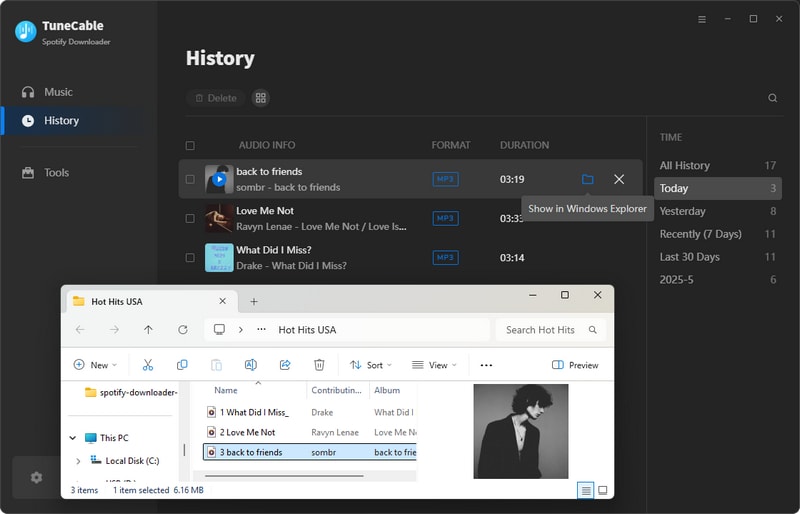
Just tap the "Convert" icon to start the download process. Just be patient and wait until it is finished. Normally, after the conversion is completed, the output folder will pop up. Also, you can also go to the "History" module to view the download history. At this point, you can save the downloaded Spotify tracks permanently and play them offline on any device.
Q: Is Spotify Premium Mod APK legal? Is it safe?
Q: Can I download Spotify tracks using Spotify Premium Mod APK?
Q: Why Does Spotify Premium Mod APK Stop Working?
The Spotify Premium Mod APK may seem like an attractive shortcut to free premium service, but the hidden costs are simply too high. To avoid potential risks like account bans, data compromise, or malware infections, we recommend switching to safer alternatives. In general, TuneCable Spotify Downloader (both desktop app and Android app) is more stable and secure and has professional and timely technical support. TuneCable can download Spotify music as local files, making it possible to listen to music offline on any device or any player, which is something that even Spotify Premium users cannot do. If you haven't downloaded TuneCable Spotify Downloader yet, click the button below to start a free trial.

Ava Morrison | Senior Writer
TuneCable Spotify Downloader


 What's next? Download TuneCable Spotify Downloader now!