
TuneCable iTadal Music Converter
 >
How To >
>
How To >
Tidal boasts a music library of over 110 million tracks with audio quality up to HiRes FLAC (Up to 24-bit, 192 kHz), attracting many music lovers who are seeking the ultimate listening experience. However, a notable limitation is that offline music downloads and playback are only available within the app. This is why some Tidal Music Converters are developed to convert Tidal tracks into files in common formats for unlimited offline listening or other uses. Tidabie Tidal Music Converter is a popular option, but is it really worth using in 2026? Here, we will provide a detailed review of Tidabie Tidal Music Converter based on our test results and user feedback, covering its features, price, real-world user experience, pros and cons, and step-by-step user guide.
 Part 1. Quick Verdict & Rating Part 2. What Is Tidabie Tidal Music Converter? Part 3. How to Use Tidabie Tidal Music Converter? Part 4. Tidabie Tidal Music Converter Full Review [Based on Real User Experience] Part 5. Real User Reviews: What People Actually Say Part 6. FAQs about Tidabie Tidal Music Converter
 Part 1. Quick Verdict & Rating
Overall, Tidabie Tidal Music Converter is a relatively professional Tidal music downloader with good and stable performance, suitable for long-term use.
Part 2. What Is Tidabie Tidal Music Converter?Tidabie Tidal Music Converter is a comprehensive tool for downloading songs, albums, and playlists from Tidal to MP3, AAC, FLAC, ALAC, WAV, or AIFF format. It is available on Windows and Mac computers.
 Part 3. How to Use Tidabie Tidal Music Converter?
To use Tidabie Tidal Music Converter to download Tidal tracks, just follow the simple steps below:
Step 1 Open Tidabie Tidal Music Converter. Then, pick where to download music from — the Tidal app or the web player. Log in to a Tidal account.
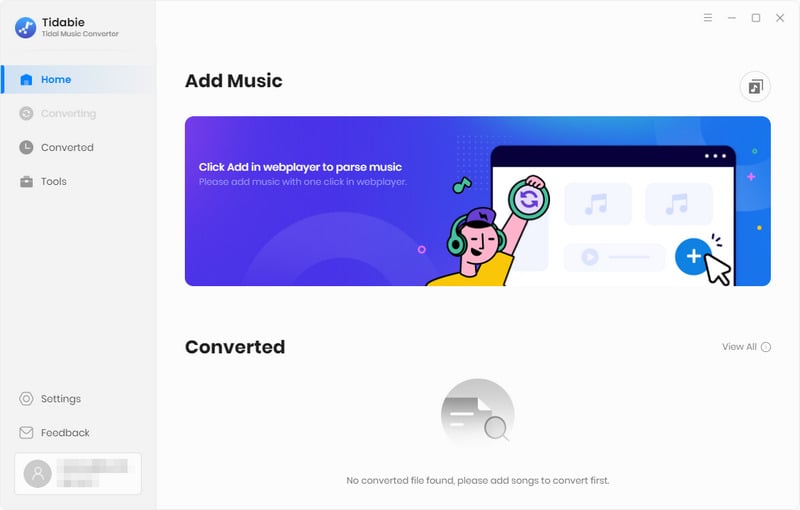
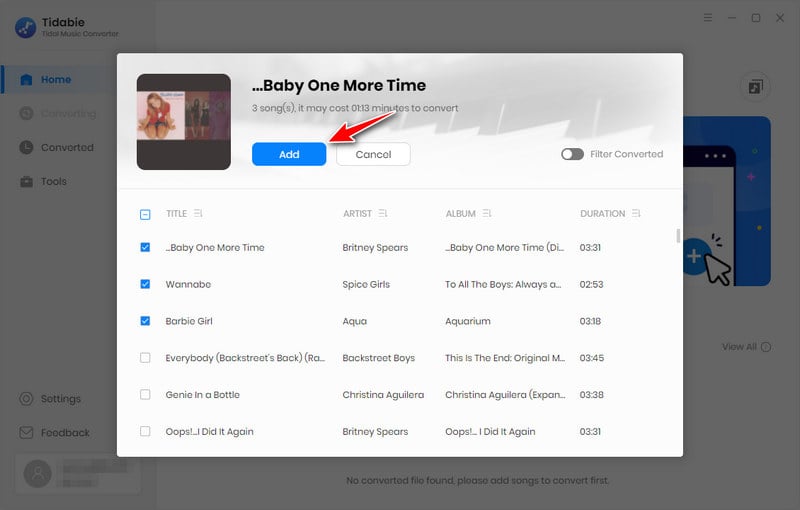
Step 2 Locate the target track, playlist, album, or artist. Hit the "+" button. Tick the needed tracks and click "Add".
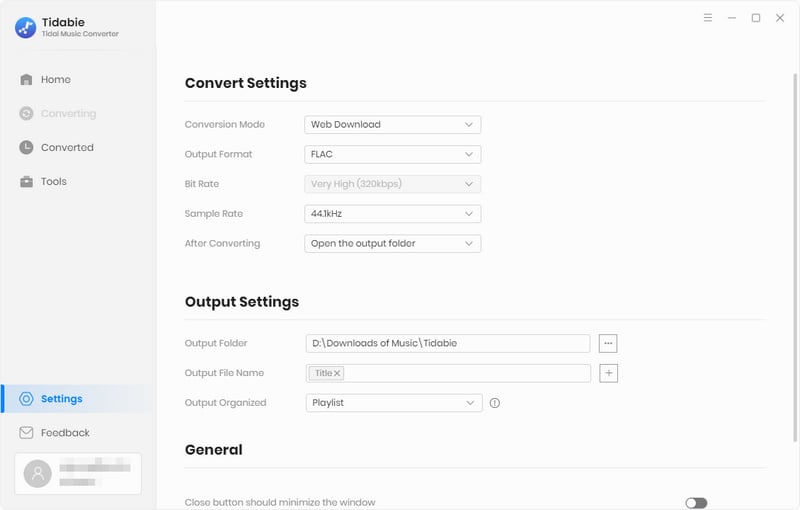
Step 3 Click "Settings" to customize output format, bit rate/bit depth, sample rate, output path, and more settings options.
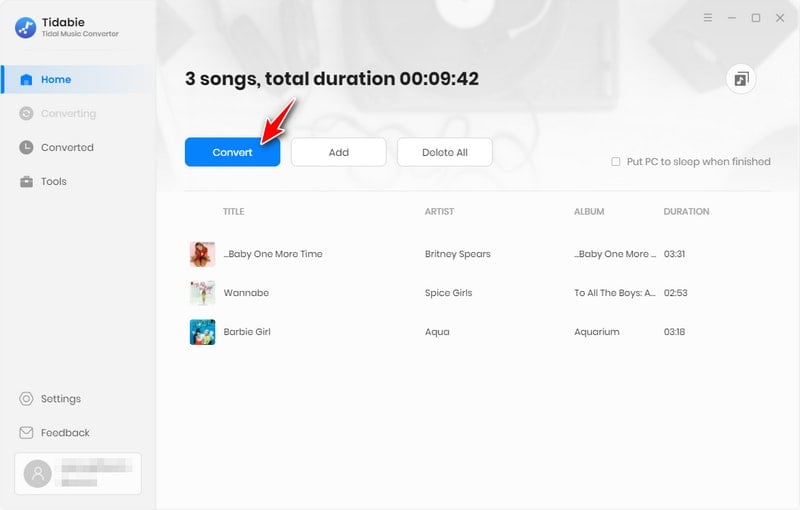
Step 4 Hit "Convert" to start downloading Tidal tracks to local storage.
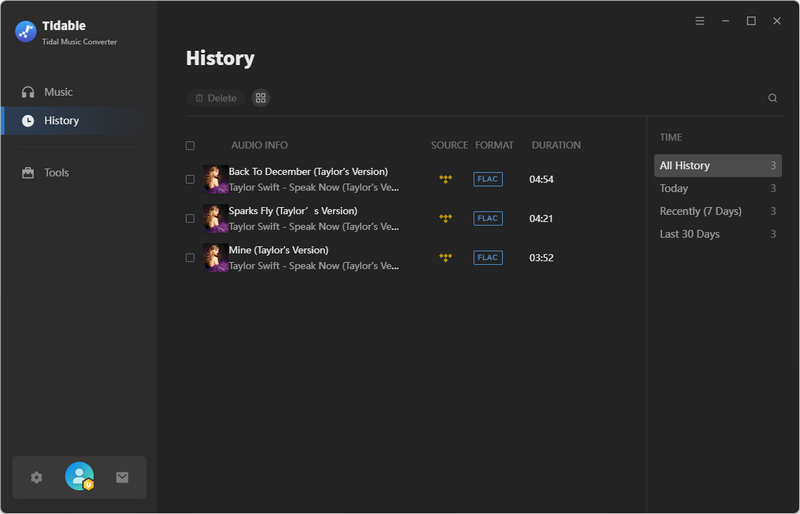
Step 5 Once finished, view downloaded Tidal music files in the "History" module.
 Part 4. Tidabie Tidal Music Converter Full Review [Based on Real User Experience]
We put Tidabie Tidal Music Converter to the test. Here's how it scores across each important aspect.
The installation process is straightforward. Simply download the appropriate installation package (for Windows or for Mac) from the Tidabie official website. After the installation package is downloaded, the setup instructions will pop up, which is convenient for new users to follow the prompts to proceed with the installation. The on-screen instructions are intuitive enough for new users to set up. And there is no bundled adware during installation. The UI of Tidabie Tidal Music Converter is uncluttered, and the app runs smoothly, which contributes to a positive initial impression.
When logging into a Tidal account to download music, users can log in directly through the Tidal web player embedded in Tidabie and the pop-up Tidal app without being redirected to a webpage or other interface. The login entry is laid out in line with conventional operating habits and features clear visual cues.
Tidabie Tidal Music Converter has a simple and clear interface, with each function clearly defined on its UI. Following standard operating procedures, new users can download Tidal music with Tidabie Tidal Music Converter with ease. Some settings options might require a more detailed guide to fully understand. However, Tidabie Tidal Music Converter includes a comprehensive user guide to help new users unlock the program's full potential. Overall, the software remains relatively easy for beginners to get started with.
Tidabie Tidal Music Converter supports downloading tracks in HiRes quality. HiRes quality is accessible with a paid Tidal account and can only be downloaded via the Tidal app using Tidabie. Additionally, Tidabie's supported output formats include MP3, AAC, FLAC, ALAC, WAV, and AIFF. To get the highest audio quality officially provided by Tidal, users can go to the settings window of Tidabie, select the "Recommended" format, and "Max" quality.
During our test, we chose a 22-song album as a download example. The output results show that the bitrate of all 22 songs exceeds 1700kbps, which meets the HiRes audio quality standard, and the files are saved in FLAC format. Also, based on feedback from other users on Trustpilot, DJs are generally satisfied with the HiRes FLAC files output by Tidabie Tidal Music Converter. From the perspective of actual user experience and technical parameters, no exaggerated or false claims have been found in the product's advertising descriptions, which remain generally objective overall.
Tidabie Tidal Music Converter offers flexible download selection methods, allowing users to select all tracks within the playlist at once, tick specific tracks from the playlist, or add multiple playlists for batch downloading. It also allows users to download music from Tidal album pages or artist pages. Tidabie Tidal Music Converter supports downloading Tidal music at up to 10x conversion speed. The combination of batch downloading and high download speeds results in considerable time savings for users.
We took an album with 22 songs (total duration 1 hour 44 minutes 42 seconds) as an example. It took approximately 27 minutes and 52 seconds to finish the download. Although the test results showed that the download speed was not as fast as 10x, the actual download speed was still quite good and resulted in notable time savings.
⚠️ Note: Download speed is affected by many factors, with network speed being a major factor. An unstable network can also lead to longer download times. In general, the specific download speed depends on the specific circumstances.
Tidabie Tidal Music Converter supports preserving tags such as Title, Album, Artist, Artwork, Track Number, and Year, making it convenient for users to manage their music library on their computers, especially for DJs who would like to import the downloaded Tidal music for offline remixing. It also offers flexible naming and organization options for output download files. Details are as follows:
Unlocking the full features of Tidabie Tidal Music Converter requires a subscription or a one-time purchase. The free trial version only allows users to download the first minute of each track. For new users, a one-minute download sample may indeed be insufficient to fully evaluate the software's performance and output quality. However, Tidabie offers a 5-day money-back guarantee. If users are not satisfied with the product, they can request a refund.
Tidabie Tidal Music Converter currently provides three purchasing options: quarterly subscriptions, annual subscriptions, and one-time purchases. Tidabie Tidal Music Converter's shortest available subscription term is three months, making it less appealing for trial users who prefer shorter subscription terms like one month. The quarterly subscription option is comparatively less popular. However, when calculated as an average monthly cost, Tidabie's quarterly subscription comes to roughly $9.99 per month, lower than most competing products ($19.95) on the market.
In addition to its main function of downloading music, Tidabie Tidal Music Converter also offers many free tools, such as Format Converter, Tag Editor, AA/AAX Converter, and Audio Editor. Overall, it offers great value for the price.
| 3-Month Plan | 1-Year Plan | Lifetime Plan |
| $29.95 ($9.99 per month) | $44.95 ($3.75 per month) | $89.90 |
Part 5. Real User Reviews: What People Actually SayWe collected some reviews from real users on Trustpilot, as follows:
Part 6. FAQs about Tidabie Tidal Music ConverterThat's not enough. Tidabie Tidal Music Converter's trial version only supports downloading the first minute of each song. If you need to download the full song or download multiple songs in bulk, it's recommended to purchase a subscription.
Yes, it does. It supports outputting lossless audio formats, including ALAC, WAV, and AIFF.
Yes, it can. With a single click of the "+" button, users can parse all tracks from playlists and albums and add them to the download list for batch downloading.
The Final ThoughtsIn general, Tidabie Tidal Music Converter is a professional Tidal music downloader that supports downloading Tidal HiRes FLAC music and offers flexible parameter settings options as well as batch download functionality. While a subscription is required to unlock full-track downloads, it provides excellent value for money for heavy users. This powerful tool enables users to take full control of their music experience. With the downloaded local Tidal music files, users can transfer them to any device, play them offline, edit them using third-party tools, and never worry about losing access to their favorite tracks. If interested, you may click the button below to try it out.
 What's next? Download Tidabie Tidal Music Converter now!

Ava Morrison | Senior Writer

