
 >
How To >
Spotify Music Tips >
>
How To >
Spotify Music Tips >
Spotify has become one of the most popular music streaming platforms in the world, but it doesn’t allow users to freely download songs as standard audio files for offline use outside its app. Because of this limitation, many users turn to third-party tools like spotDL to download Spotify tracks, albums, or playlists to their local devices.
spotDL is often described as a free, open-source Spotify downloader, and it has gained attention among tech-savvy users for its flexibility and metadata accuracy. However, it also comes with important limitations, technical challenges, and potential risks that are not always clearly explained. New users often struggle with setup issues, download errors, or inconsistent audio quality, while others question whether spotDL is safe or reliable for long-term use.
In this article, we take an in-depth and objective look at what spotDL is, how it works, and how to use it, followed by a balanced analysis of its pros, cons, risks, real user feedback, and common troubleshooting issues. Finally, for users who want a more stable, user-friendly, and safer way to download Spotify music, we’ll introduce a reliable alternative solution.
spotDL is a free, open-source Spotify downloader that lets users download songs, albums, and playlists using Spotify links and save them as local audio files such as MP3 or FLAC. Instead of downloading music directly from Spotify, spotDL works by reading song metadata from Spotify (title, artist, album, artwork) and then finding matching audio from external sources, usually YouTube or YouTube Music. The downloaded audio is then tagged with accurate Spotify metadata.
Pros
 Completely free to use and released under an open-source license.
Works on Windows, macOS, and Linux.
Supports common audio formats (e.g., MP3, FLAC).
Download entire playlists and albums rather than single tracks.
Completely free to use and released under an open-source license.
Works on Windows, macOS, and Linux.
Supports common audio formats (e.g., MP3, FLAC).
Download entire playlists and albums rather than single tracks.
Cons
 Download music from YouTube instead of Spotify.
Installation requires Python and command-line knowledge.
Some songs fail to download or are mismatched due to unreliable external audio sources.
Downloading large playlists may trigger rate limits, crashes, or incomplete downloads.
spotDL relies on community support, with no guaranteed fixes or response times.
Download music from YouTube instead of Spotify.
Installation requires Python and command-line knowledge.
Some songs fail to download or are mismatched due to unreliable external audio sources.
Downloading large playlists may trigger rate limits, crashes, or incomplete downloads.
spotDL relies on community support, with no guaranteed fixes or response times.
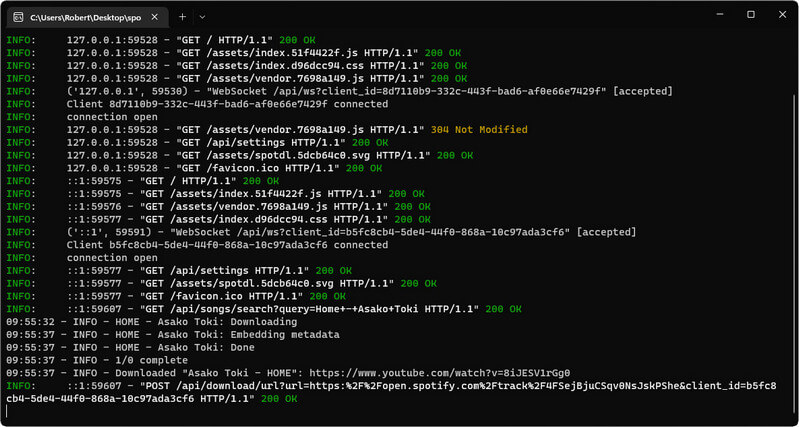
spotDL allows you to download Spotify songs, albums, and playlists by using Spotify links and matching them with audio from external sources. Below is a simple step-by-step guide for beginners.
Step 1 Before download spotDL, make sure Python is installed on your system. Then Install spotDL using the official installation method (such as pip) or download a prebuilt release
Step 2 Open Spotify and copy the link of the content you want to download. Open your command line or terminal and enter the spotDL command, then paste the Spotify link.
Step 3 Once started, spotDL will read the Spotify metadata, search for matching audio from supported sources (usually YouTube or YouTube Music), and finally download the audio.

Found spotDL too hard to use? Switch to TuneCable Spotify Downloader! Download any Spotify song, playlist, or podcast instantly in MP3, FLAC, or WAV, with lossless audio quality. Tracks auto-sort by artist/album, and downloads are up to 40x faster with full metadata, album art, and lyrics preserved. Download your favorite songs with only one-click!
When evaluating whether spotDL is safe, it’s important to look at both technical safety and practical user experience. spotDL is a community-developed, open-source tool with its source code available publicly. Open-source software allows anyone to inspect the code, contribute fixes, or identify potential issues, which generally improves trust and reduces the risk of hidden malware. Some online scanners (e.g., VirusTotal or sandbox analyses reported by third parties) have flagged compiled spotDL executables as potentially suspicious or even labeled them malware.
Community reports (especially on GitHub and Reddit) highlight common reliability problems that affect the user experience and indirectly raise safety concerns, such as:
These issues don’t indicate malware, but they do suggest that spotDL isn’t always reliable or predictable, especially for large playlists or users without technical backgrounds.
Encountering issues with SpotifyDown.com can be frustrating, especially when you're trying to download Spotify music to MP3 to your device for offline enjoyment. As a free online Spotify music downloader, SpotifyDown.com is prone to instability. Below are some practical troubleshooting methods to resolve common problems.
spotDL processes playlist or artist queries but never downloads the music, hangs, or crashes with errors after “Processing query.”
Possible Fixes:
Certain tracks in a playlist download fine, while others show errors like: AudioProviderError: YT-DLP download error. This is usually caused when spotDL’s audio source (often YouTube or YouTube Music) fails to provide a suitable result.
Possible Fixes:
spotDL appears to download a playlist, but the process gets stuck for hours on one song or never finishes.
Possible Fixes:
spotDL repeatedly retries requests with warnings like: Your application has reached a rate/request limit. Retry will occur after: X, or fails to fetch metadata repeatedly.
Possible Fixes:
Some songs may download with incorrect tags, missing album art, or no track info at all. This may not always be logged as an error but leads to imperfect output files.
Possible Fixes:
spotDL can work well for advanced users who are comfortable with command-line tools and manual troubleshooting. However, its complex setup, unstable downloads, and reliance on external audio sources make it less suitable for many users. If you want a simpler and more reliable way to download Spotify music, a dedicated desktop tool is often a better option. Among available alternatives, TuneCable Spotify Downloader stands out for its ease of use, stable performance, and safer overall experience when downloading Spotify songs, albums, and playlists.
TuneCable Spotify Downloader is a professional desktop tool designed to download Spotify music safely and reliably. Unlike spotDL, it works directly with the Spotify app and does not rely on third-party audio sources. This results in more stable downloads and consistent audio quality.

TuneCable Spotify Downloader
Step 1 Open TuneCable on your computer. Click the “Spotify Web Player/App ⇌” button on the main screen. Choose the Spotify app for lossless audio quality or the Spotify web player for up to 40× faster conversion. Log in to your Spotify account when prompted.
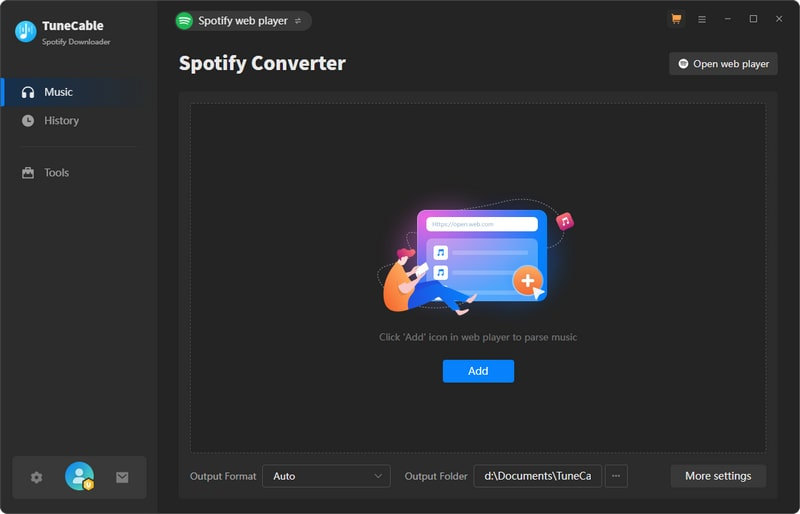
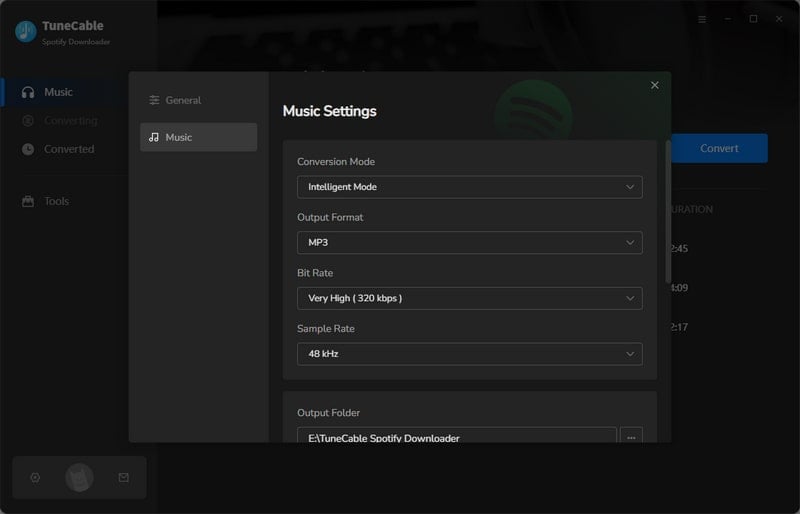
Step 2 Click the Settings icon in the bottom-left corner. Select your preferred output format, bitrate, sample rate, and output folder.
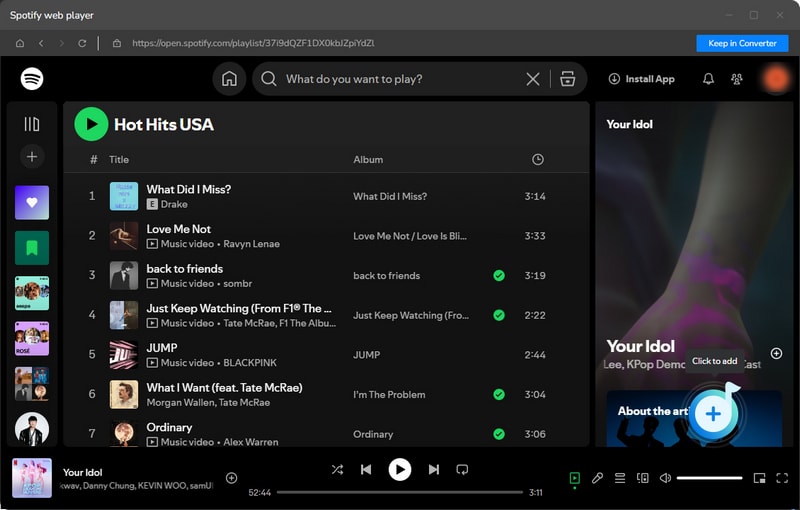
Step 3 Browse your Spotify library directly in TuneCable, or paste shareable links to songs, albums, or playlists. Click the “+” button to load the content. Select the tracks you want to download.
Step 4 Click the Convert button to begin the download. TuneCable will process your selections quickly and steadily.
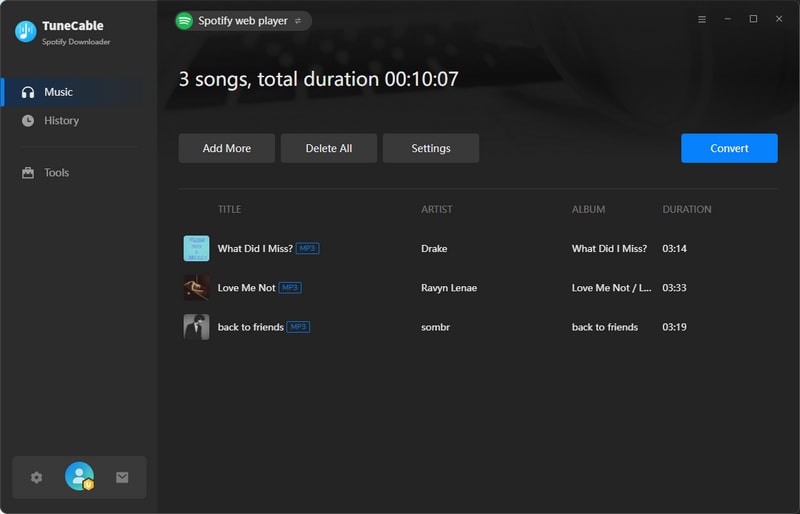
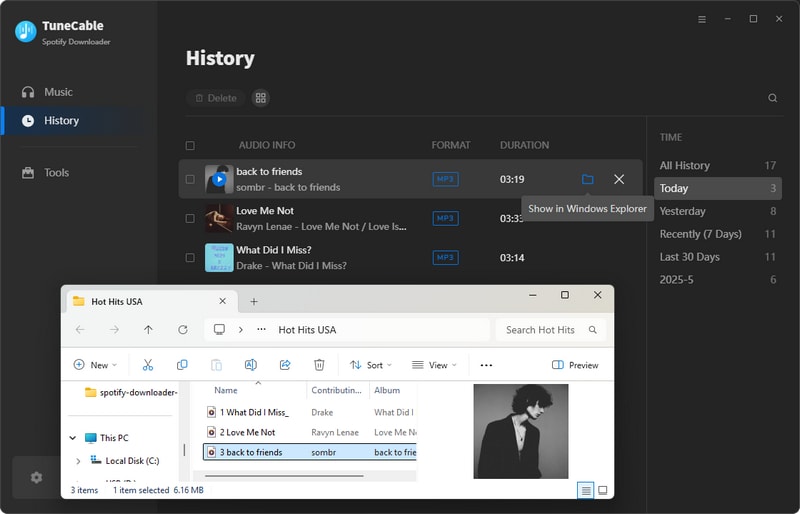
Step 5 After conversion is complete, find your Spotify MP3 files in the output folder. You can also view all downloaded content in the History section.
Pros
No command-line or technical setup required. Great for beginners.
Downloads Spotify music reliably without common errors seen in spotDL.
Works with the Spotify app or web player, improving compatibility and quality.
Supports MP3, AAC, WAV, FLAC, and more, giving users flexibility.
Preserve ID3 metadata (title, artist, album, track number, year, cover art) and lyrics.
Easy access to previously downloaded songs and organized saved files.
Cons
Requires a license for full features, unlike free open-source spotDL.
Users cannot inspect or modify the source code.
Only available for Windows and macOS, with no official Linux version.
Choose spotDL if you prefer a free, open-source tool and are comfortable with command-line setup and troubleshooting. It suits advanced users who want flexibility and don’t mind unstable downloads or inconsistent audio quality from external sources.
Choose TuneCable Spotify Downloader if you want an easy, reliable solution. It offers a clean interface, stable downloads, consistent audio quality, and built-in file management. It’s ideal for users who value simplicity and dependable results.
In summary, spotDL is a powerful, free tool for advanced users who don’t mind a technical setup and occasional download errors. For most users, however, TuneCable Spotify Downloader offers a safer, more reliable, and user-friendly experience. With stable downloads, high-quality audio, and simple management features, it provides a practical solution for enjoying Spotify music offline. Choose the tool that best fits your needs.
 What's next? Download TuneCable Spotify Downloader now!

Ava Morrison | Senior Writer
TuneCable Spotify Downloader


